2.1.15 Frontend SillyTavern
Handle:
sillytavern
URL: http://localhost:34791
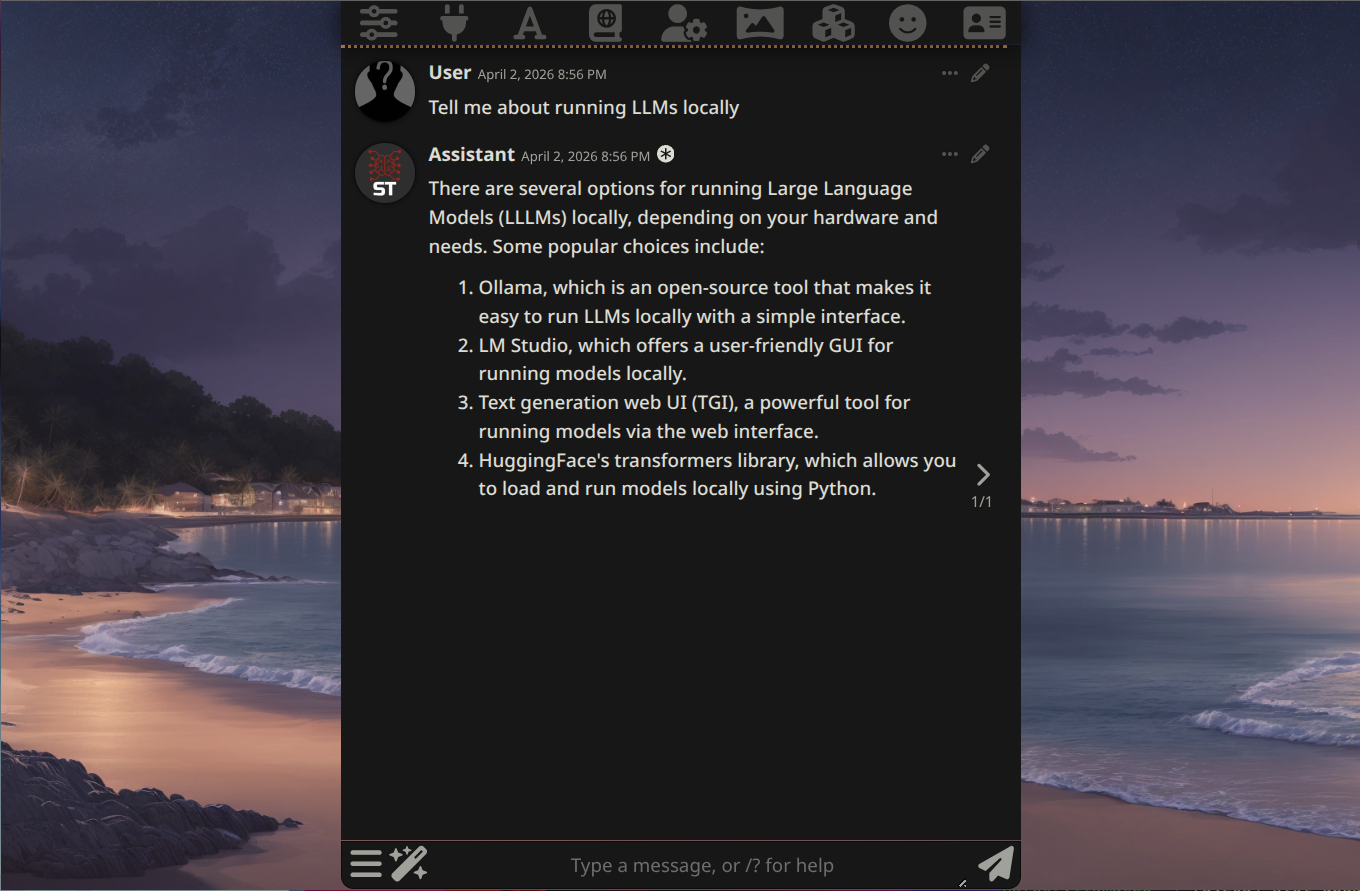
SillyTavern is a feature-rich, locally-installed web UI for interacting with LLMs. It supports multiple AI backends (Ollama, llama.cpp, OpenAI-compatible APIs, and more), advanced prompt engineering, personas, lorebooks, extensions, and a wide range of customization options. Originally a fork of TavernAI, it has grown into a full-featured power-user frontend for local AI.
Key Features:
- Multi-backend support: Ollama, llama.cpp, OpenAI-compatible APIs, Claude, Gemini, and many more
- Personas & Characters: Create and manage character cards with detailed personality profiles
- Advanced prompting: Lorebooks, author's notes, custom system prompts, and injection controls
- Extensions: Rich plugin ecosystem with STScript, Regex scripting, and third-party modules
- UI customization: Themes, movable panels, and extensive visual configuration options
harbor pull sillytavern
harbor up sillytavern --open
No default credentials are required. Access is controlled by an IP whitelist, which Harbor preconfigures to accept all connections (0.0.0.0/0). If you expose this service publicly, enable basic auth with harbor env sillytavern SILLYTAVERN_BASICAUTHMODE true, or enable multi-user mode.
Following options can be set via harbor config:
# Host port for the SillyTavern web UI
HARBOR_SILLYTAVERN_HOST_PORT       34791

# Docker image and version
HARBOR_SILLYTAVERN_IMAGE           ghcr.io/sillytavern/sillytavern
HARBOR_SILLYTAVERN_VERSION         latest

# Workspace directory for persistent data
HARBOR_SILLYTAVERN_WORKSPACE       ./services/sillytavern
Additional SillyTavern-specific env vars can be set with harbor env sillytavern <KEY> <VALUE> or by editing services/sillytavern/override.env directly. The environment variable naming convention for SillyTavern config overrides is SILLYTAVERN_<CONFIG_KEY> (uppercase, dots replaced with underscores). For example:
# Enable HTTP basic auth
SILLYTAVERN_BASICAUTHMODE=true
SILLYTAVERN_BASICAUTHUSER_USERNAME=myuser
SILLYTAVERN_BASICAUTHUSER_PASSWORD=mysecretpassword

# Enable multi-user mode
SILLYTAVERN_ENABLEUSERACCOUNTS=trueSillyTavern persists all user data, characters, chats, and settings to the workspace directory:
| Container Path | Host Path | Purpose |
|---|---|---|
/home/node/app/config |
./services/sillytavern/config |
Server configuration (config.yaml) |
/home/node/app/data |
./services/sillytavern/data |
User data: chats, characters, settings |
/home/node/app/plugins |
./services/sillytavern/plugins |
Server-side plugins |
/home/node/app/public/scripts/extensions/third-party |
./services/sillytavern/extensions |
UI extensions |
Note: The config/, data/, plugins/, and extensions/ subdirectories are excluded from Git (.gitignore) to prevent committing personal AI chat history and configuration.
SillyTavern connects to AI backends through its API Connections UI panel. When you start it together with ollama or llamacpp, Harbor pre-fills the matching backend URL and selects the corresponding backend type automatically, so the panel is ready to connect without manual URL entry.
- Start SillyTavern with Ollama:
harbor up sillytavern ollama - In the SillyTavern UI, open API Connections
- Confirm Ollama is already selected and the internal server URL is pre-filled
- Click Connect
- Select a model if needed and start chatting
When started together, SillyTavern and Ollama are placed on the same Docker network (harbor-network), so the internal URL is accessible without port forwarding.
- Start SillyTavern with llama.cpp:
harbor up sillytavern llamacpp - In the SillyTavern UI, open API Connections
- Confirm llama.cpp is already selected and the internal server URL is pre-filled
- Click Connect
SillyTavern supports any OpenAI-compatible endpoint. Use the Custom (OpenAI-compatible) API type and set the base URL accordingly.
harbor logs sillytavernService is unreachable: Ensure SILLYTAVERN_LISTEN=true is set (it is by default in harbor). Without this, SillyTavern only binds to 127.0.0.1 inside the container.
Connection refused from browser: Check that SILLYTAVERN_WHITELIST includes your IP or is set to ["0.0.0.0/0"] (Harbor default). On Linux Docker CE, whitelistDockerHosts does not work — Harbor's compose sets the open whitelist explicitly.
Cannot connect to Ollama from SillyTavern UI: Make sure both services are running with harbor up sillytavern ollama. Harbor pre-fills the internal URL automatically, but you can verify it should resolve to http://ollama:11434 from inside the Docker network.