Python – An Introduction
Mahalakshmi Arulalan
Assistant Professor ­I
Galgotias University
Python is a Programming Language
so many 
Programming Languages.
Why Python?
Python is simple and beautiful
Python is Easy to Learn
Python is Free Open Source Software
What Can we Do?
● Text Handling
● System Administration
● GUI programming
● Web Applications
● Database Apps
● Scientific Applications
● Games
● NLP
● ...
Text Handling
Natural Language Process
Robotics with python
Mayavi: 3D Visualization of
Scientific Data
3D Games
           Database Intergration
Reference
➢https://www.itschool.gov.in/pdf/Std_X/ICT/xEnglish.pd
➢https://timesofindia.indiatimes.com/city/chennai/p
ython-replaces-c-java-in-new-cbse-
curriculum/articleshow/63421271.cms
Python – Hello World
Mahalakshmi Arulalan
Assistant Professor ­I
Galgotias University
  H i s t o r y
Guido van Rossum 
  Father of Python 
           1991
                 Perl  Java  Python   Ruby    PHP
            1987       1991           1993      1995
What is
Python?
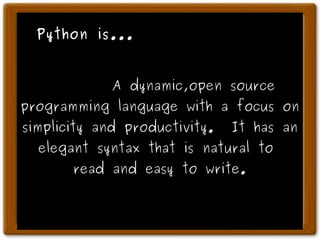
Python is...
A dynamic,open source
programming language with a focus on
simplicity and productivity. It has an
elegant syntax that is natural to
read and easy to write.
Quick and Easy
Intrepreted Scripting Language
Variable declarations are unnecessary
Syntax is simple 
Memory management is automatic
    Examples!
print    “Hello World”
         No Semicolons !
Python – variable
Mahalakshmi Arulalan
Assistant Professor ­I
Galgotias University
          Variables
  colored_index_cards
No Need to Declare Variable Types !
      Python Knows Everything !
value = 10
print value
value = 100.50
print value
value = “This is String”
print      value * 3
Input
name = raw_input(“What is Your name?”)
print "Hello" , name , "Welcome"
         Indentation
You have to follow 
the Indentation 
Correctly.
Otherwise,
Python will beat 
you !
 Discipline 
   Makes  
    Good 
Flow
if score >= 5000 :
print “You win!”
elif score <= 0 :
print “Game over.”
else:
print “Current score:”,score
print “Donen”
https://www.python.org/
Python – for loop
Mahalakshmi Arulalan
Assistant Professor ­I
Galgotias University
Python – Help usage
Mahalakshmi Arulalan
Assistant Professor ­I
SEECE
Galgotias University
Conversion
● Type int(x) to convert x to a plain integer.
● Type long(x) to convert x to a long integer.
● Type float(x) to convert x to a floating-point
number.
● Type complex(x) to convert x to a complex
number with real part x and imaginary part zero.
● Type complex(x, y) to convert x and y to a
complex number with real part x and imaginary
part y. x and y are numeric expressions
Python – Strings
Mahalakshmi Arulalan
Assistant Professor ­I
SEECE
Galgotias University
● + Concatenation - a + b will give HelloPython
● * Repetition -HelloHello
● [] Slice - a[1] will give e
● [ : ] Range Slice - Gives the characters from
the given range a[1:4] will give ell
Operators in stringsOperators in strings
Array
                List = Array
numbers = [ "zero", "one", "two", "three", 
"FOUR" ]  
                List = Array
numbers = [ "zero", "one", "two", "three", 
"FOUR" ]
numbers[0]
>>> zero 
numbers[4]                                 numbers[­1]
>>> FOUR                                  >>> FOUR
                         numbers[­2]
          >>> three
  Multi Dimension List
numbers = [ ["zero", "one"],["two", "three", 
"FOUR" ]]
numbers[0]
>>> ["zero", "one"] 
numbers[0][0]                       numbers[­1][­1]
>>> zero                                  >>> FOUR
                         len(numbers)
          >>> 2
                Sort List
primes = [ 11, 5, 7, 2, 13, 3 ]
                Sort List
primes = [ 11, 5, 7, 2, 13, 3 ]
primes.sort()
                Sort List
primes = [ 11, 5, 7, 2, 13, 3 ]
primes.sort()
>>> [2, 3, 5, 7, 11, 13]
                Sort List
names = [ "Shrini", "Bala", "Suresh",
"Arul"]
names.sort()
>>> ["Arul", "Bala","Shrini","Suresh"]
names.reverse()
>>> ["Suresh","Shrini","Bala","Arul"]
                Mixed List
names = [ "Shrini", 10, "Arul", 75.54]
names[1]+10
>>> 20
names[2].upper()
>>> ARUL
                Mixed List
names = [ "Shrini", 10, "Arul", 75.54]
names[1]+10
>>> 20
names[2].upper()
>>> ARUL
         Append on List
numbers = [ 1,3,5,7]
numbers.append(9)
>>> [1,3,5,7,9]
menu = {
“idly” : 2.50,
“dosai” : 10.00,
“coffee” : 5.00,
“ice_cream” : 5.00,
100 : “Hundred”
}
menu[“idly”]
2.50
menu[100]
Hundred
    Tuples
                                                             immutable
Sets 
                                 unique
Example Programms
1.Square root program
names = ('Arul','Dhastha','Raj')
name.append('Selva')
Error : Can not modify the tuple
Tuple is immutable type
      Function
def sayHello():
        print 'Hello World!' # block belonging of fn
# End of function
sayHello() # call the function
def printMax(a, b):
        if a > b:
                print a, 'is maximum'
        else:
                print b, 'is maximum'
printMax(3, 4) 
Using in built Modules
#!/usr/bin/python
# Filename: using_sys.py
import time
print 'The sleep started'
time.sleep(3)
print 'The sleep finished'
#!/usr/bin/python
import os
os.listdir('/home/arulalan')
os.walk('/home/arulalan')
Making Our Own Modules
#!/usr/bin/python
# Filename: mymodule.py
def sayhi():
        print “Hi, this is mymodule speaking.”
version = '0.1'
# End of mymodule.py
#!/usr/bin/python
# Filename: mymodule_demo.py
import mymodule
mymodule.sayhi()
print 'Version', mymodule.version
#!/usr/bin/python
# Filename: mymodule_demo2.py
from mymodule import sayhi, version
# Alternative:                 
# from mymodule import *
sayhi()
print 'Version', version
Class
class Person:
        pass # An empty block
p = Person()
print p
Classes
class Person:
        def sayHi(self):
                print 'Hello, how are you?'
p = Person()
p.sayHi()
Classes
class Person:
        def __init__(self, name):
#like contstructor                
                self.name = name
        def sayHi(self):
                print 'Hello, my name is', self.name
p = Person('Arulalan.T')
p.sayHi()
Classes
                            
Inheritance
Classes
class A:
        def  hello(self):
print  ' I am super class '
class B(A):
 def  bye(self):
print  ' I am sub class '
p = B()
p.hello()
p.bye()
Classes
class A:
Var = 10
        def  __init__(self):
self.public = 100
self._protected_ = 'protected'
self.__private__ = 'private'
Class B(A):
pass
p = B()
p.__protected__
Classes
File Handling
File Writing
poem = ''' Programming is fun
When the work is done
if you wanna make your work also fun:
        use Python!
'''
f = file('poem.txt', 'w') # open for 'w'riting
f.write(poem) # write text to file
f.close() 
File Reading
f= file('poem.txt','r') 
for line in f.readlines():
print line
f.close() 
           Database Intergration
import psycopg2
   
conn = psycopg2.connect(" dbname='pg_database' 
user='dbuser' host='localhost' password='dbpass' ")
cur = conn.cursor()
cur.execute("""SELECT * from pg_table""")
rows = cur.fetchall()
print rows
cur.close()
conn.close()
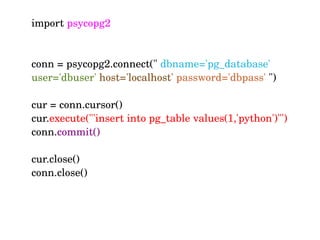
import psycopg2
   
conn = psycopg2.connect(" dbname='pg_database' 
user='dbuser' host='localhost' password='dbpass' ")
cur = conn.cursor()
cur.execute("'insert into pg_table values(1,'python')"')
conn.commit()
cur.close()
conn.close()
THE END
                                                    of code :­)
How to learn ?
                                     
               
Python – Shell
                                     
               
● Interactive Python
● Instance Responce
● Learn as you type
bpython
ipython
                                     
               
} 
teach you very easily
Python can communicate 
                 With
                Other
            Languages
           C
           +
       Python
        Java
           +
       Python
     GUI
        With 
   Python