INPUT DEVICES

Enter all your data: sounds, pictures, letters, numbers and
symbols.
INPUT DEVICE
   Any hardware component that allows a user
    to enter data and instructions into a computer
    for processing.

   Input: any data or instructions that are
    entered into the computer.
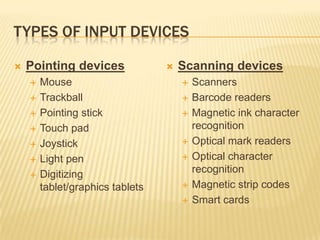
TYPES OF INPUT DEVICES

   Pointing devices                 Scanning devices
       Mouse                            Scanners
       Trackball                        Barcode readers
       Pointing stick                   Magnetic ink character
       Touch pad                         recognition
       Joystick                         Optical mark readers
       Light pen                        Optical character
       Digitizing                        recognition
        tablet/graphics tablets          Magnetic strip codes
                                         Smart cards
TYPES OF INPUT DEVICES

   Audio and Video               Other Input Devices
    Input Devices                     Biometric systems
       Digital Video Camera          Remote Control
       Voice recognition             Sensors


     Keyboard – the most popular input
     device!!
KEYBOARD
   The set of typewriter-like
    keys that enables you to
    enter data into a computer.
•   The keys on computer
    keyboards are often
    classified as follows:
    –   Alphanumeric keys --
        letters and numbers
    –   Punctuation keys --
        comma, period, semicolon,
        and so on.
    –   Special keys -- function
        keys, control keys, arrow
        keys, Caps Lock key, and so
        on.
MOUSE

   A device that controls
    the movement of the
    cursor or pointer on a
    display screen.
   There are TWO types
                             Can you spot the difference?
    of mice MECHANICAL
    and OPTICAL
TRACKBALL

   Essentially, a trackball      Compare with a mouse
    is a mouse lying on its
    back.


                                  What is the difference?
POINTING STICK

   Primarily found on
    notebook computers
   It looks like a miniature
    joystick, usually with a
    rubber eraser-head tip.
   Found between the G,
    H and B keys on the
    keyboard
TOUCH PAD

   Is a mouse
    replacement used in
    portable computers
    such as laptops
JOYSTICK
                              I’m sure you have used one of
   A device with a stick     these to play you favourite
    perpendicular to its      computer or PS3 game.
                              Tell us some
    base, as well as
    buttons on the stick
    and or on the base.
   Joysticks are used
    mostly for computer
    games, but they are
    also used occasionally
    for other applications.
LIGHT PEN

   An input device that            See how it writes
    utilizes a light-sensitive       directly on the screen!!
    detector to select
    objects on a display
    screen.
DIGITIZING TABLET

   An input device that         Tablets are quite common
    enables you to enter          nowadays
    drawings and sketches        Think Ipad, Kindle,
                                  Samsung Galaxy...Kool!!
    into a computer.
   A digitizing tablet
    consists of an
    electronic tablet and a
    cursor or pen.
SCANNER

   Translates drawings,
    photos and text into
    digital form
BARCODE READER

   A device that scans a set
    of bars and spaces
    found on a variety of
    sale items.

   The barcode brings up
    product information such
    as, product name, size,
    brand, manufacturer,
    country of origin and
    price from the computer.
BARCODE READER

   Check the items your       Observe the clerk at the
    mummy or daddy              check out counter
    place in the shopping      Does this scene look
                                familiar?
    cart next time you
    accompany them to          Can you share with the
                                class what happens?
    the supermarket
MAGNETIC INK CHARACTER RECOGNITION
(MICR)
   MICR is used to read
    and sort bank cheques
    and deposit slips.
   The numbers at the
    bottom of the cheque
    are printed in magnetic
    ink.
   The MICR is able to
    read those numbers very
    quickly and have the
    information sent to a
    computer for processing.
OPTICAL MARK READER (OMR)

   A device that reads
    hand drawn marks
    such as circles or
    rectangles.

   A person places these
    marks on a form such
    as a test, survey or
    questionnaire
OPTICAL MARK READER (OMR)

   Remember this??
OPTICAL CHARACTER RECOGNITION (OCR)

   This involves the
    reading of text from
    paper and translating it
    into electronic format
    for manipulation by a
    computer
MAGNETIC STRIPE READER
   Magnetic stripes are
    usually found at the back
    of credit cards, loyalty
    and membership cards
   They hold personal
    details about the card
    holder such as name,
    account number and
    loyalty points
   The card is swiped in the
    reader and the
    information fed to a
    computer
SMART CARD

   A magnetic strip is
    placed on a plastic
    card containing
    encoded data about
    the owner of the card.
   The data is processed
    by the computer when
    the card is swiped.
DIGITAL CAMERA

   Allows users to take
    pictures and store the
    photographed images
    digitally.


                                Have you ever used
                                 one of these?
WEB CAMERA (WEBCAM)

   A device that captures
    video images
MICROPHONE

   A device that allows a
    user to enter data in
                             Speak into
    audio form.
                               me!!
   For example speech
BIOMETRIC READER

   A device that identifies         Examples of biometric
    an individual through             systems
    their body
    characteristics such as
    face geometry and
    hand geometry.
   For example,
    fingerprint, iris or retina
    scan, vein and voice
    patterns.
BIOMETRIC READER

 Can you say what the word BIOMETRIC
  means?
 Here’s a clue
     BIO:      ___________________
     METRIC:   ___________________
REMOTE CONTROL
   These emit a beam of
    infra-red light which
    carries digital data
    signals.
   They are often used to
    control TV's and
    VCR's.
   More advanced
    models can be
    programmed to
    transmit a series of
    commands with one
    button press.
SENSOR

 These detect changes in the physical or
  chemical environment and convert them into
  electrical signals. These signals can then be
  digitised and used by the computer.
 They measure quantities such as light,
  temperature and pressure
INPUT DEVICES – ASSESSMENT

   Can you now give an example of where each
    device is used?
       Device                               Use
       Keyboard
       Mouse
       Trackball
       Pointing stick
       Touch pad
       Joystick
       Light pen
       Digitizing tablet/graphics tablets
INPUT DEVICES – ASSESSMENT
Device              Use
Digital Camera
Microphone
Webcam
Voice recognition
Biometric systems
Remote Control
Sensors