INTRODUCTION OF HTML:-
Hyper Text Markup Language is
developed by “Tim Bemusler” (around
1980). It is not a programming language
It is a markup language. It is used to
create a Web Pages , Along with CSS and
JAVA Script.
STRUCTURE OF HTML:-
STRUCTURE OF HTML:-
HTML TAGS:-
1. Heading Tag.
2. Paragraph Tag.
3. Bold Tag.
4. Italics Tag.
5. Underline Tag.
6. Center Tag.
7. tt Tag.
8. Pre Tag.
9. Superscript Tag.
10. Unpair Tag.
11. Graphics Tag.
12. Marquee Tag.
13. Anchor Tag.
.HEADING TAG:-
Any document starts with a
heading. We can use different
sizes of heading tags. HTML
also has six levels of
headings, which use the
elements <h1>,<h2>, <h3>
,<h4>,<h5>, <h6>.
<html>
<head>
<title>heading </title>
</head>
<body>
<h1>RCEW</h1>
<h2>RCEW</h2>
<h3>RCEW</h3>
<h4>RCEW</h4>
</body>
</html>
output:-
RCEW
RCEW
RCEW
RCEW
. EXAMPLE OF HEADING TAG:-
. PARAGRAPH TAG:-
<p> tags offers a way to structure we
text into different paragraphs.
Each paragraph of text should go in
between on opening<p> and closing
</p> tag.
<html>
<head>
<title>paragraph</title>
</head>
<body>
<p>first paragraph</p>
<p>second
paragraph</p>
<p>third paragraph</p>
</body>
</html>
OUTPUT:-
first paragraph
second paragraph
third paragraph
EXAMPLES OF PARAGRAPH TAG:-
. BOLD TAG:-
The <b> tag specifies bold text .
<html>
<body>
<p>This is
normal
Text-<b>and This
is
bold
text</b>.</p>
</body>
</html>
OUTPUT:-
This is normal
text-
and This is
bold text
EXAMPLE OF BOLD TAG:-
. ITALICTAG:-
The <i> tag defines a part of text in an alternate
voice or mood. The content of the <i> tag is
usually displayed in italic. The <i> tag can be
used to in italic.
The <i> tag can be used to indicate a technical
term, a phrase from another language.
<html>
<body>
<p>He named
his car<i>The
lighting</i>,beca
use it was very
fast.</p>
</body>
</html>
OUTPUT:-
He named his car The
lightning, because it
was very fast.
EXAMPLE OF ITALICS TAG:-
.UNDERLINE TAG:-
The<u> tag represents some text that should be
stylistically different from normal text.
Syntax:-
<html>
<body>
<p>This is a <u>paragraph</u>.</p>
</body>
</html>
. CENTER TAG:-
The <center> tag is used to align text.
<html>
<body>
<p>This is cat.</p>
<center> how r u
</center>
<p>This is cat</p>
</body>
</html>
Output:-
This is
cat
How r u
This is
cat
EXAMPLE OF CENTER TAG:-
. TT –TAG:-
If <tt> was used for making up keyboard, consider the
<kbd>element; for variable, consider the <var> element;
for computer code, consider the<code>, and for Computer
output, consider the <samp> ,or use CSS.The<tt> tag
defines teletype text. It is used in text decorate.
<html>
<body>
<p>This is normal</p>
<p><tt>This is teletype
text</tt></p>
</body>
</html>
Output:-
This is normal
This teletype text
EXAMPLE OF TT TAG:-
. PRE TAG:-
The <pre> tag defines performatted text.
Text in a <pre> element in displayed in a fixed width
font, and it preserves both space and lone breaks.
<html>
<body>
<pre>
aa aa aa
aa
aa
</pre>
</body>
</html>
OUTPUT:-
aa aa aa
aa
aa
EXAMPLE OF PRE TAG:-
. SUPERSCRIPT TAG:-
The <sup> tag defines Subscript text.
Subscript text appears half a character above the
normal lines and is sometimes rendered in a
small font.
<html>
<body>
<p> this is<sub>
<sub>text</p>
<p>this is<sup>
<sup>text</p>
</body>
</html>
Output::-
this is text
sub
sup
this is text
EXAMPLE OF SUPERSCRIPT TAG:-
. ANCHOR TAG
The <a> tag defines a hyper link; which is used to
link from one page to another page.
The most important attribute of the <a> element is
the href attribute, which indicates the link’s
destination. It is used to redirect one page to
Another page is called anchor tag.
Syntax:-<ahref=“edgenamewith extension”>click
name>/a>
<html>
<body>
<a href=
“http://www.n.co
m”>visit
n.com</a>
</body>
</html>
Output::-
Visit n.com
EXAMPLE OF ANCHOR TAG:-
. BREAK TAG:-
The <br> tag inserts a single line break.
The <br> tag is an empty tag which means that it has
no end tag.
<html>
<body>
<p> this line<br>
in
A text<br> use the
br element.
</p>
</body>
</html>
this lines
in a text
use the br element.
EXAMPLE OF BREAK TAG:-
. HORIZONTAL TAG:-
The <hr> tag define a thematic break in html
page.
The <hr> element is used to separate content (or
define a change) in html page.
. MARQUEE TAG:-
The HTML <marquee> tag is used for scrolling piece
of text or image displayed either horizontally
across or vertically down your web site page
depending on the settings.
Syntax:-<marquee behavior=“alternate”
Scrollamount=“4”direction=“left”onmouse=“stop()”
Onmouseout=“start”/marquee>
LIST:-
Group of item is called list.
List has two type->
1.Ordered list(ol)
2.Unordered list(ul)
<html>
<body>
<h2>Ordered
List</h2>
<ol>type=‘’1’’>
<li>Coffee</li>
<li>Tea</li>
<li>Milk</li>
</ol>
</body>
</html
Output:-
Ordered List
1. Coffee
2. Tea
3. Milk
EXAMPLE OF ORDERED LIST:-
UNORDERED LIST:-
Style Description
list-style-type:disc The list items will be marked
with bullets (default)
list-style-type:circle The list items will be marked
with circles
list-style-type:square The list items will be marked
with squares
list-style-type:none The list items will not be marked
<html>
<body>
<h2>Unordered
List</h2>
<ul>type=‘’disc’’>
<li>Coffee</li>
<li>Tea</li>
<li>Milk</li>
</ul>
</body>
</html>
OUTPUT:-
Unordered List
.Coffee
.Tea
.Milk
ONE EXAMPLE OF UNORDERED LIST:-(DISC)
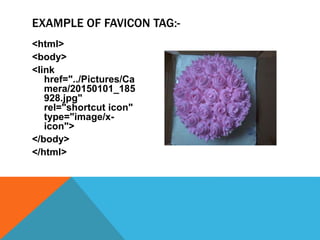
. FAVICON TAG:-
Favicon tag is used in head section and it is
unpair.
The sizes attribute specifies the sizes of icons
for visual media.
This attribute is only used if rel="icon".
<html>
<body>
<link
href="../Pictures/Ca
mera/20150101_185
928.jpg"
rel="shortcut icon"
type="image/x-
icon">
</body>
</html>
EXAMPLE OF FAVICON TAG:-
. REFRESH:-
It is also used in head section. It use for
property of meta. It is unpair.
Syntax:-
<meta http-equiv=“refresh” content=“5”/>
.REDIRECT:-
Syntax of redirect->
<meta http-equiv=“refresh” content=“online
link”/>
.TABLE:-
It is used to stored the data in rows and coloumns.
Property of table:-
1.table.
2.width.
3.height.
4.Border
5.align.
Horizontal is represented by tr and vertical is
represented by td.
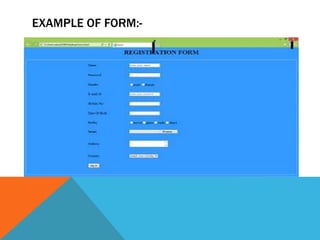
.FORM:-
Form is used to submit or basic information on a server or data
base.
1.Text(name/email/mobile)->it is unpair.
2.Password -> it is unpair.
3.Radio (male/female)-> it is unpair.
4.Checkbox->it is unpair.
5.File (upload browse file)-> it is pair.
6.textarea(address)->it is pair.
7.Button(submit/sign in/log in/cancel)-> it is unpair.
EXAMPLE OF FORM:-
THANK
YOU