Frontend Architecture and Jest
Goals
❏ Help the team:
❏ To take better decisions in frontend architecture
❏ To think about frontend design code
❏ Setup tests
❏ To make better unit tests
Frontend
Architecture
Coincidence Programming
Architecture
Layers Architecture
Abstraction
logic not
related to UI
State
Management
Async
Services Service Layer
Presentation
Module A
Presentation
Module B
Presentation/
View Layer
Layers Architecture
❏ Isolated UI logic from others logic
❏ Easier to test
❏ Easier to maintain
❏ SOC
❏ Control the application state in a simple way - No NgRx
(Angular Redux)
Components
Presentation
Module
Containers or
Smart
Components
1 … N
Dumb
components
Dumb
components
Dumb
components
Smart components
❏ Services Injected
❏ Know how to get the data
❏ Pass data to the dumb components
❏ react to the events from dumb components
❏ Are top-level routable components (but not always!).
Dumb/Presentational
Components
❏ should not be dependant on external services
❏ Should be predictable - not produce any side effects
❏ Should not mutate its’ inputs — because if it does, it actually
produces a side effect - a child should never directly edit
parent’s data.
Binding
Module
❏ An application is made up of several blocks, which are
ngModules or modules.
❏ Give context for our components to run
❏ Correct use of modules has a positive impact on application
performance through the use of Lazy Loading.
❏ Angular Modules: BrowserModule, CommonModule,
HttpClientModule, RouterModule, FormsModule and
ReactiveFormsModule
Module Options
❏ Declarations - where we put our components, directives, pipes
and masks - the things related with the module itself
❏ Imports - to import another modules with services, pipe,
components and others resources. The dependencies
necessary on the module
❏ Exports - public components, submodules, directives, etc to be
used in others module
❏ entryComponents - components not linked with routes or
bootstrap in app module - example: modals
Architecture Modules
❏ Coreservices Module - All services that are singleton and global
(interceptor, guards, ). - optional
❏ SharedModule - Shared components, directives, pipes, masks
between the various application modules.
❏ Layout Module - Components that are the basis for the entire
application (eg header, menu-aside, footer)
❏ FeatureModule - Module by Feature
❏ AppRoutingModule - Main Routing Module
❏ FeatureRoutingModule - sub-module of a feature
❏ CoreModule and LayoutModule can only be imported once
Services - Singleton
Component
When I get an US...
❏ Check the requirements and what is necessary to do
❏ See if the US is possible to be developed
❏ Create your own checklist
❏ Which module?
❏ Do I need to create components?
❏ Presentational component or smart component? Or both?
❏ What is UI logic and what is not?
❏ What kind of services do I need?
Jest
What is
Jest is a delightful
JavaScript Testing
Framework with a focus on
simplicity.
It works with projects
using: Babel, TypeScript,
Node, React, Angular, Vue
and more!
Made on top of Jasmine
Why to Use?
❏ Easy to config and setup tests in most projects
❏ Focuses on Developer Experience (speed and ease of use is the
first priority.)
❏ Isolated and high performance to execute
❏ Tests run in parallel
❏ It has a really good documentation
❏ The API is richer than Jasmine
❏ rerun instantly only tests related to latest code changes
❏ Abstracting the DOM with jsdom library - don't use a headless
browser
Watch Mode
Tests Doubles
Mock x Stub x Spy
❏ It is very rare that the units we are testing do not have
dependencies
❏ "Test Double is a generic term for any case where you
replace a production object for testing purposes". Martin
Fowler
Mock
❏ Mocks fake something - its a copy
❏ Avoid flaky testing not calling
something with side effect - like
HTTP requests
❏ Mock is the simplest way to fake
something
Mock
import {LoginComponent} from
'./login.component';
class MockAuthService {
authenticated = false;
isAuthenticated() {
return this.authenticated;
}
}
Use Mock
describe('Component: Login', () => {
let component: LoginComponent;
let service: MockAuthService;
beforeEach(() => { (2)
service = new MockAuthService();
component = new LoginComponent(service);
});
afterEach(() => {
service = null;
component = null;
});
it('canLogin returns false when the user
is not authenticated', () => {
service.authenticated = false; (3)
expect(component.needsLogin()).toBeTruthy()
;
});
it('canLogin returns false when the user
is not authenticated', () => {
service.authenticated = true; (3)
expect(component.needsLogin()).toBeFalsy();
});
});
Spy
❏ The main benefit of spies is that they allow to watch how the
function is used.
❏ We use spies when we want to track:
❏ if a inside function has been called into another function,
❏ how many times it has been called,
❏ which arguments were passed.
Spy
describe('MyService', () => {
let service;
let someService;
let spy;
class SomeService {
getValue = function() {};
}
beforeEach(() => {
someService = new SomeService();
service = new MyService(someService);
});
it('#getValue should return value', () => {
spy = jest.spyOn(someService, 'getValue');
spy.mockReturnValue('stub value');
expect(service.getValue()).toBe('stub value');
expect(spy).toHaveBeenCalled();
});
Stub
❏ Its a spy evolution
❏ So a stub is a function that replaces a real implementation of
an existing function.
❏ We use stubs if we want to:
❏ control individual method behavior for a specific test case,
❏ prevent a method from making side effects like
communicating with the outside world using Angular's
HttpClient.
❏ Checks our application behavior/response/outcome under
certain scenarios
❏ In jest we use mockImplementation
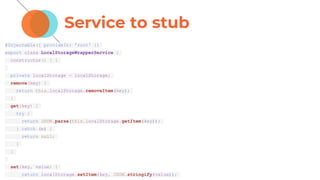
Service to stub
@Injectable({ provideIn: 'root' })
export class LocalStorageWrapperService {
constructor() { }
private localStorage = localStorage;
remove(key) {
return this.localStorage.removeItem(key);
}
get(key) {
try {
return JSON.parse(this.localStorage.getItem(key));
} catch (e) {
return null;
}
}
set(key, value) {
return localStorage.setItem(key, JSON.stringify(value));
Stub
@Injectable()
export class LocalStorageWrapperStubService {
constructor() { }
private localStorage = new Map();
remove(key) {
return this.localStorage.delete(key);
}
get(key) {
try {
return this.localStorage.get(key);
} catch (e) {
return null;
}
}
set(key, value) {
return this.localStorage.set(key, JSON.stringify(value));
}
Jasmine x
Jest❏ Unfriendly errors logs
❏ No code coverage include
❏ Runs tests runs sequentially
❏ Hard to run tests headless
❏ It’s already configured with
Angular - more examples and
code on the internet
❏ Great exceptions and logs
when tests fail
❏ Code coverage without any
additional setup
❏ Run tests in parallel
❏ Run 2.5x times faster than
Jasmine
❏ Tests headless by default
❏ Has all jasmine matchers and
include many more
❏ Has snapshot tests
Jasmine x
Jest❏ jasmine.createSpy()
❏ jasmine.createSpyObj('name',
['key'])
❏ jasmine.createSpy().and.retur
nValue()
❏ spyOn(...).and.callFake(() =>
{})
❏ jest.fn()
❏ jest.fn({key: jest.fn()}
❏ jest.fn().mockReturnValue(‘’)
❏ jest.spyOn(...).mockImplemen
tation(() => {})
Testing in
Angular
TestBed
❏ Every component need to run with a context (module and
dependencies)
❏ TestBed create the setup necessary to the component run
describe('AppComponent', () => {
beforeEach(async(() => {
TestBed.configureTestingModule({
imports: [
RouterTestingModule
],
declarations: [
AppComponent
],
}).compileComponents();
}));
Use the testing modules
library
❏ Instead of HttpClientModule use HttpClientTestingModule
❏ Instead of RouterModule use RouterTestingModule
❏ Instead of AnimationsModule use NoopAnimationsModule
❏ Always try to find a testing module to avoid side effects
Unit Testing
❏ Testing one thing at a time, tests should not care about the
points of interaction between different units of the application
❏ In Angular can be splitting into:
❏ Isolated - when we just test component functions.
❏ shallow unit tests - testing components template without
rendering its children. It may be achieved by simply not
registering child components inside of the TestBed
function.
Integration test?
Integration test
❏ Checking that multiples units are interacting with each other
correctly
❏ Use:
❏ When the integration between components is needed for
creating a meaningful test
❏ Testing DOM with a simple interaction involving multiple
components
❏ When testing integrations with third-party libraries
Snapshot
❏ It’s good for black box testing
❏ You can use snapshot tests based on some inputs
❏ Snapshots should be deterministic
❏ You can run multiple times the same test and won’t fail
❏ Use consistent values: Date.now = jest.fn(() =>
1482363367071);
❏ You can use snapshots for:
❏ Templates HTML - Dumb components
❏ JavaScript Lists and Objects
Snapshot
Snapshot - inline DOM
it('Snapshot of html component=', () => {
const fixture = TestBed.createComponent(AppComponent);
const ulList = fixture.debugElement.nativeElement.querySelector('.ul-
list');
expect(ulList).toMatchSnapshot('AppComponent ul-list');
});
Jest x Jasmine
❏ Jasmine and Jest API it's not that different.
❏ If we know how to test in Angular we know how to test in Jest
The unit test shoudn’t be
hard
Avoid side effects
Testing Module
@NgModule({
declarations: [],
imports: [
CommonModule,
NoopAnimationsModule,
HttpClientTestingModule,
RouterTestingModule,
],
// Tells the compiler not to error on unknown elements and attributes
schemas: [NO_ERRORS_SCHEMA]
providers: [
{ provide: SystemSettingsService, useClass: SystemSettingsServiceStub },
{ provide: LocalStorageWrapperService, useClass: LocalStorageWrapperServiceStub }
]
})
Using Testing Module
describe('LoginComponent', () => {
let component: LoginComponent;
let fixture: ComponentFixture<LoginComponent>;
beforeEach(async(() => {
TestBed.configureTestingModule({
imports: [
AuthModule,
TestingModule,
],
})
.compileComponents();
}));
Stick to black-box testing:
Test only public methods
Group your tests
❏ Group by type of tests (DOM tests, black box tests, integration
tests, snapshot tests and component tests)
❏ Each group of test may have your own beforeEach - tests run
faster
Group your tests
describe('DummyComponent.spec', () => {
beforeEach(() => {
// Setup Tests
})
describe('DOM Tests', () => {
it('Test Something', () => {
// ...
})
})
})
Clear mocks
beforeEach(() => {
jest.clearAllMocks();
});
What to test
❏ Navigation
❏ Set a guard and check if only logged users can access a
route
❏ Something happened and then the navigation occurs
❏ 404 view
❏ If someone type something wrong on URL goes to login
What to test?
❏ Services
❏ to HTTP requests use HTTPTestingModule and check if the
URL is correct called, queryParams based on inputs, if the
payload will be transform into a intance of something
❏ It's easy to test because you don't have the DOM
❏ That's why architecture matter - UI logic stay on
component and the rest in services
What to test?
❏ Component.ts
❏ Check if the component is running correctly
❏ Testing public methods
❏ If it has forms use reactive forms - easier to test
❏ Take snapshots
❏ List of objects
❏ Dumb components - DOM
❏ Any important logic. ex: data transformation to show on
the UI
What to test?
❏ DOM
❏ Rules - not ngIf itself, but the rule
❏ Use DebugElement
❏ How something appear in the view
❏ Use fixture.detectChanges() correctly
it('should find the <p> with fixture.debugElement.nativeElement)', () => {
const bannerDe: DebugElement = fixture.debugElement;
const bannerEl: HTMLElement = bannerDe.nativeElement;
const p = bannerEl.querySelector('p');
expect(p.textContent).toEqual('banner works!');
});
Plus: One E2E smoke test
it('When doing smoke testing over all page, should load them all
successfully', () => {
// exemplified using Cypress but can be implemented easily
// using any E2E suite
cy.visit('https://mysite.com/home');
cy.contains('Home');
cy.contains('https://mysite.com/Login');
cy.contains('Login');
cy.contains('https://mysite.com/About');
cy.contains('About');
})
Plus2: Good Tests Examples
https://codecraft.tv/courses/angular/unit-testing/overview/
Exercise
https://github.com/adrianlemess/frontend-components-jest-
training