ChromaVerb Output EQ in Logic Pro for iPad
ChromaVerb features a built-in six band Output EQ.
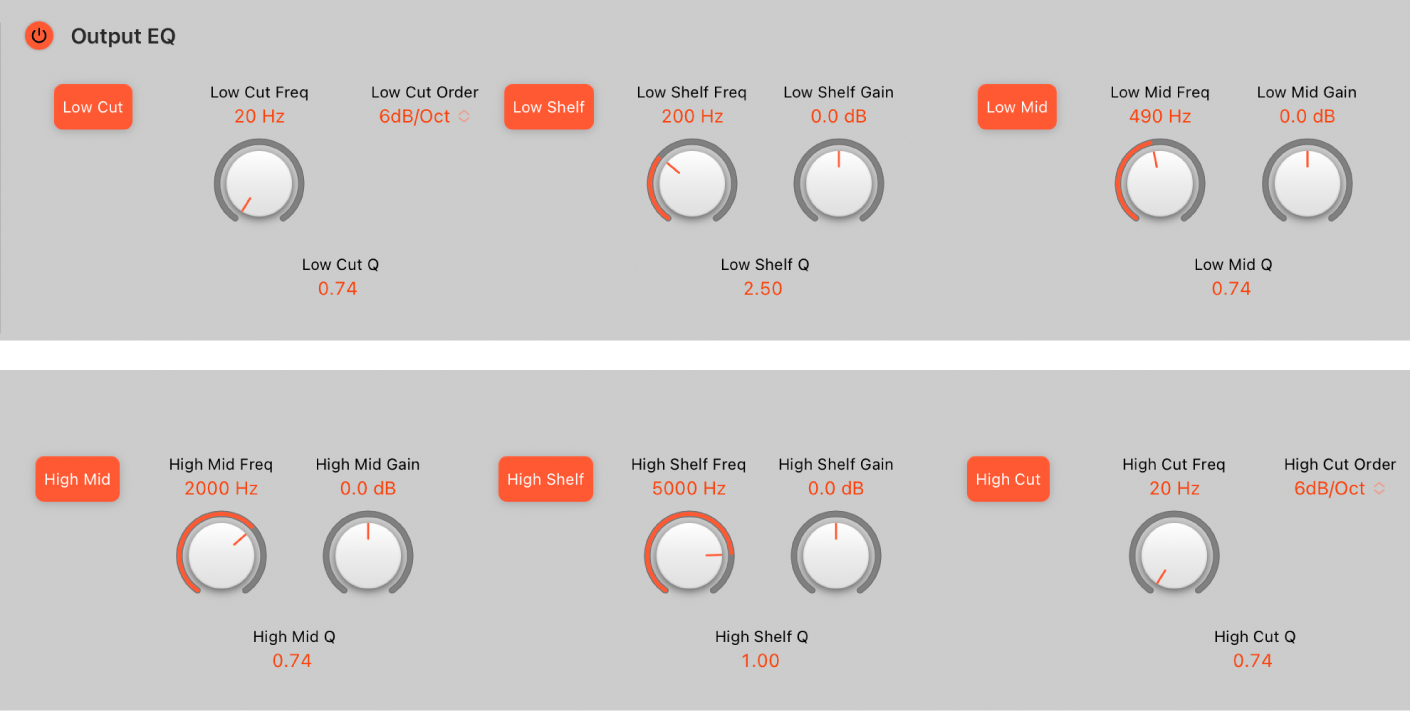
ChromaVerb Output EQ parameters
Output EQ On/Off button: Turn on to enable the Output EQ, which adjusts frequencies of the overall combined reverb and source signal.
Low Cut On/Off button: Switch on a highpass filter that allows high frequencies to pass and reduces the level of low frequencies near the cutoff (set) frequency.
Low Cut Freq knob and field: Set the frequency of the selected EQ band. You can also tap the field to enter a value in the numeric keypad. Double tap to reset to the default value.
Low Cut Order knob and field: Set the order (filter slope) for the Low Cut EQ band. You can also tap the field to enter a value in the numeric keypad. Double tap to reset to the default value.
Low Cut Q field: Drag vertically to set the band width surrounding the center frequency of the selected EQ band. You can also tap the field to enter a value in the numeric keypad.
Low Shelf On/Off button: Switch on a low shelving filter that adjusts the level of low frequencies and has a minimal impact on frequencies above the cutoff (set) frequency.
Low Shelf Freq knob and field: Set the frequency of the selected EQ band. You can also tap the field to enter a value in the numeric keypad. Double tap to reset to the default value.
Low Shelf Gain knob and field: Set the level of the selected EQ band. You can also tap the field to enter a value in the numeric keypad. Double tap to reset to the default value.
Low Shelf Q field: Drag vertically to set the band width surrounding the center frequency of the selected EQ band. You can also tap the field to enter a value in the numeric keypad.
Low Peak On/Off button: Switch on a low parametric filter with three controls. Frequency sets a center frequency. Q sets the width of the frequency band around the center frequency. Gain sets the level of the band.
Low Peak Freq knob and field: Set the frequency of the selected EQ band. You can also tap the field to enter a value in the numeric keypad. Double tap to reset to the default value.
Low Peak Gain knob and field: Set the level of the selected EQ band. You can also tap the field to enter a value in the numeric keypad. Double tap to reset to the default value.
Low Peak Q field: Drag vertically to set the band width surrounding the center frequency of the selected EQ band. You can also tap the field to enter a value in the numeric keypad.
High Peak On/Off button: Switch on a high parametric filter with three controls. Frequency sets a center frequency. Q sets the width of the frequency band around the center frequency. Gain sets the level of the band.
High Peak Freq knob and field: Set the frequency of the selected EQ band. You can also tap the field to enter a value in the numeric keypad. Double tap to reset to the default value.
High Peak Gain knob and field: Set the level of the selected EQ band. You can also tap the field to enter a value in the numeric keypad. Double tap to reset to the default value.
High Peak Q field: Drag vertically to set the band width surrounding the center frequency of the selected EQ band. You can also tap the field to enter a value in the numeric keypad.
High Shelf On/Off button: Switch on a high shelving filter that adjusts the level of high frequencies and has a minimal impact on frequencies below the cutoff (set) frequency.
High Shelf Freq knob and field: Set the frequency of the selected EQ band. You can also tap the field to enter a value in the numeric keypad. Double tap to reset to the default value.
High Shelf Gain knob and field: Set the level of the selected EQ band. You can also tap the field to enter a value in the numeric keypad. Double tap to reset to the default value.
High Shelf Q field: Drag vertically to set the band width surrounding the center frequency of the selected EQ band. You can also tap the field to enter a value in the numeric keypad.
High Cut On/Off button: Switch on a lowpass filter that allows low frequencies to pass and reduces the level of high frequencies near the cutoff (set) frequency.
High Cut Freq knob and field: Set the frequency of the selected EQ band. You can also tap the field to enter a value in the numeric keypad. Double tap to reset to the default value.
High Cut Order knob and field: Set the order (filter slope) for the High Cut EQ band. You can also tap the field to enter a value in the numeric keypad. Double tap to reset to the default value.
High Cut Q field: Drag vertically to set the band width surrounding the center frequency of the selected EQ band. You can also tap the field to enter a value in the numeric keypad.
Download this guide: PDF