
Use the amp EQ controls in GarageBand on Mac
The tone controls of different amplifiers work differently. For example, the treble knobs on two different models may target different frequencies or provide different levels of cut or boost. Some equalizer (EQ) sections amplify the guitar signal more than others, thus affecting the way the amp distorts.
Amp Designer provides multiple EQ types to mirror these differences. All EQ types have the same controls (Bass, Mids, and Treble), but the same EQ settings produce different results based on the amp used. Choosing an EQ type designed for a different amp can change the tone drastically.
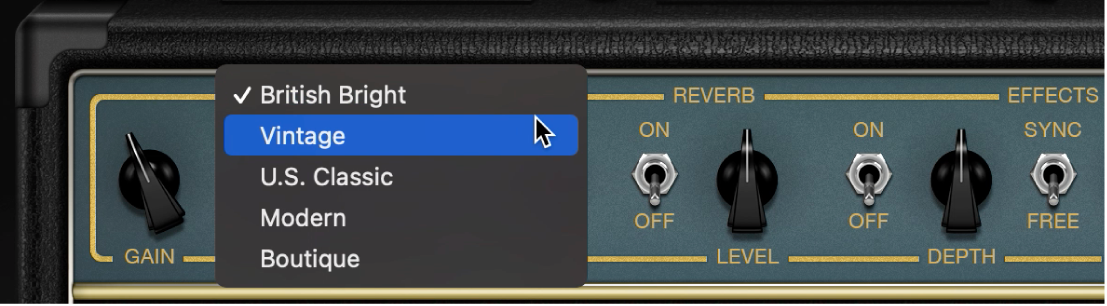
Choose an EQ model
EQ pop-up menu: Click the word EQ or CUSTOM EQ to choose an EQ type. Each EQ model has unique tonal qualities.
British Bright: Inspired by the EQ of British combo amps of the 1960s, it is loud and aggressive, with stronger highs.
Vintage: Emulates the EQ response of American Tweed-style amps and the vintage British stack amps that used a similar circuit.
U.S. Classic: Derived from the EQ circuit of the American Black Panel amps, it has a tone of higher fidelity than the Vintage EQ, with tighter lows and crisper highs.
Modern: Useful for sculpting the aggressive highs, deep lows, and scooped mids associated with that era’s rock and metal music styles.
Boutique: Replicating the tone of a “retro modern” boutique amp, this EQ is a good choice for a cleaner, brighter sound.
Adjust the tone controls
Bass, Mids, and Treble knobs: Adjust the EQ frequency ranges as you would with tone knobs on a hardware guitar amplifier. The behavior and response of these knobs change when different EQ models are chosen.