Keys are yesterday's tech, your smart home needs a smart door lock. This repository contains the code for making a smart door lock using Raspberry Pi.
A WLAN connected, servo-driven deadbolt actuator with IP camera stream that can be operated remotely using a smartphone.
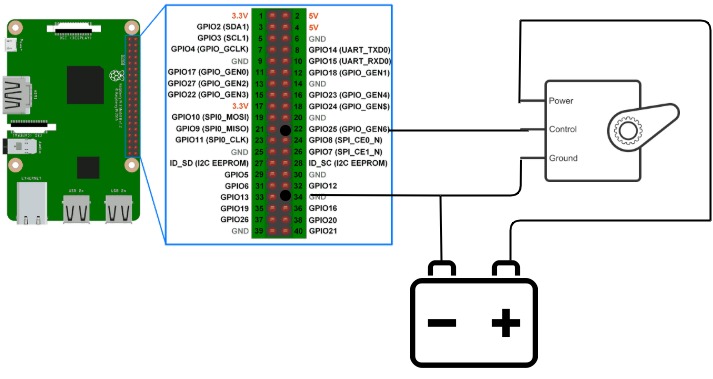
NOTE: In place of external battery we can place a capacitor in the circuit , since I did not have a capacitor while making this project over a weekend, had to manage the power using a battery. For more information on how to connect raspberry pi with a servo motor click here.
Clone the project using the following command
git clone https://github.com/Vipul-Kumar/smart-doorlock.gitUse the package manager pip to install smart-doorlock.
cd smart-doorlockIt is best to contain a Python application within its own environment together with all of its dependencies. An environment can be best described (in simple terms) as an isolated location (a directory) where everything resides. For this purpose, a tool called virtualenv is used.
Run the following to install virtualenv and create an env using pip:
sudo pip install virtualenv
virtualenv .env
Activate and install the requirements for the project
source .env/bin/activate
pip install -r requirements.txtpython app.pyOnce the flask server is up you can open the browser and test the app on the url http://127.0.0.1:5000/
Pull requests are welcome. For major changes, please open an issue first to discuss what you would like to change.
Please make sure to update tests as appropriate.