PhpRBACBundle is symfony 7 bundle with full access control library for PHP. It provides NIST Level 2 Standard Hierarchical Role Based Access Control as an easy to use library to PHP developers. It's a rework of the phprbac.net library made by OWASP for symfony 6.
- How it works ?
- Installation
- Configuration
- RBAC for controller
- Voter based RBAC
- Symfony CLI commands
- Twig functions
Go to https://phprbac.net/ :) to have the representation of permissions and roles as well as their interactions.
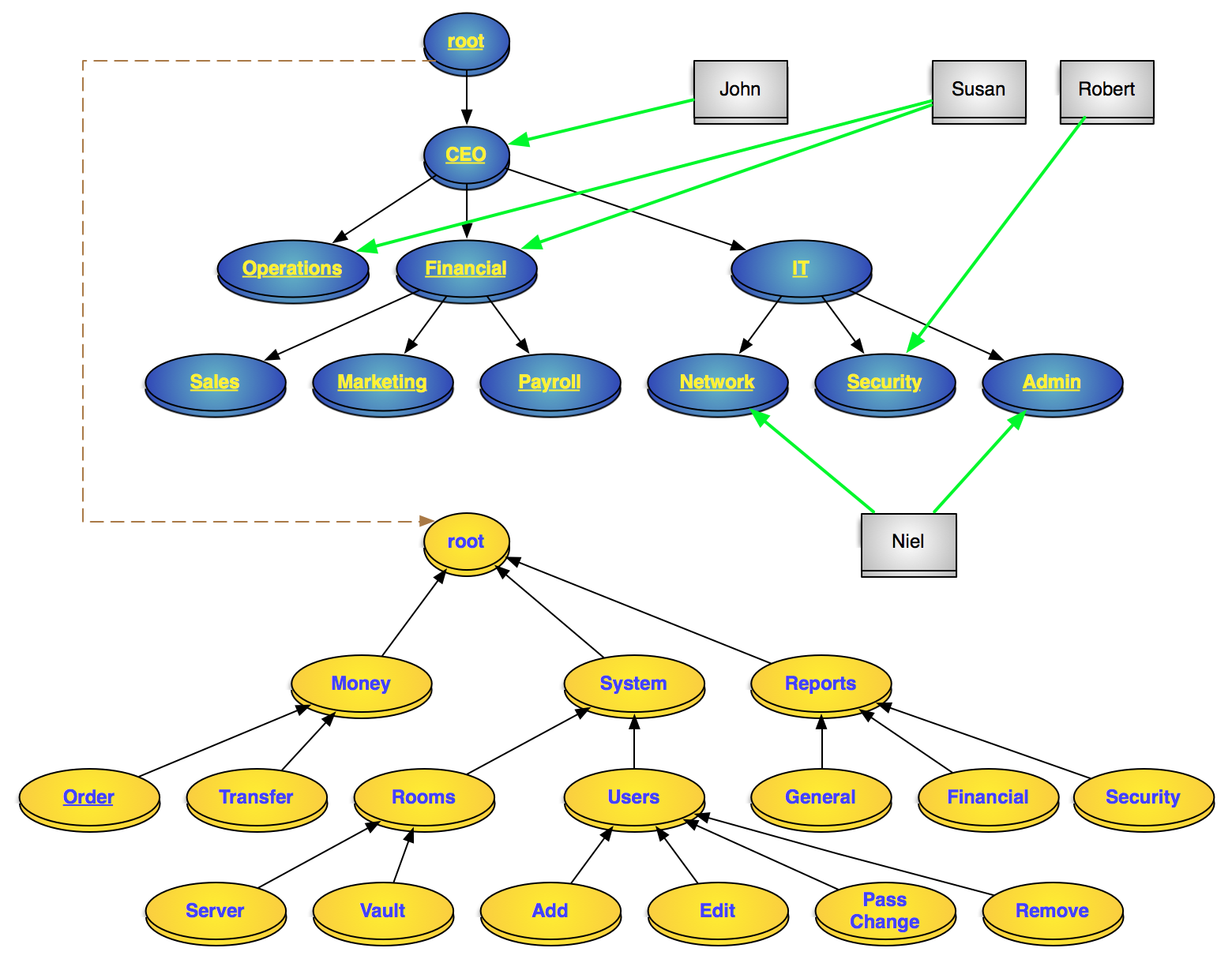
just include the package with composer:
composer require olivier127/rbac-bundle
register the bundle inside config/bundles.php
return [
    ...
    PhpRbacBundle\PhpRbacBundle::class => ['all' => true],
];
Add the PhpRbacBundle\Entity\UserRoleTrait inside the User entity class to add the rbac role relation.
Update the database schema with doctrine migration or doctrine schema update to create all the tables
Specify the different sections requiring prior authentication in the firewall security configuration section.
Access control only applies to authenticated sections of the website. Therefore, we will use basic ROLE_USER for all users. ROLE_ADMIN can be used for the main administrator but his rights will only be allocated by being associated with the role '/' of the roles tree.
example :
# config/packages/security.yaml
security:
    # ...

    role_hierarchy:
        ROLE_ADMIN: ROLE_USER

    access_control:
        - { path: ^/backend, roles: ROLE_USER }
- { path: ^/todolist, roles: ROLE_USER }You must create your own entities for driving permissions and roles.
example :
/* src/Entity/Role.php */
namespace App\Entity;

use Doctrine\ORM\Mapping as ORM;
use PhpRbacBundle\Entity\Role as EntityRole;
use PhpRbacBundle\Repository\RoleRepository;

#[ORM\Entity(repositoryClass: RoleRepository::class)]
#[ORM\Table('my_roles')]
class Role extends EntityRole
{

}
/* src/Entity/Permission.php */
namespace App\Entity;
use Doctrine\ORM\Mapping as ORM;
use PhpRbacBundle\Entity\Permission as EntityPermission;
use PhpRbacBundle\Repository\PermissionRepository;
#[ORM\Entity(repositoryClass: PermissionRepository::class)]
#[ORM\Table('my_permissions')]
class Permission extends EntityPermission
{
}add php_rbac.yaml to associate theses entities to the rbac core
# config/packages/php_rbac.yaml
php_rbac:
  no_authentication_section:
    default: deny
  resolve_target_entities:
    user: App\Entity\User
    role: App\Entity\Role
permission: App\Entity\PermissionAdd all the roles and the permissions you need with the RoleManager and the PermissionManager
examples :
to add a permission to the root
/** @var PhpRbacBundle\Core\PermissionManager $manager */
$manager = $this->container->get(PermissionManager::class);
$permission = $manager->add("notepad", "Notepad", PermissionManager::ROOT_ID);
To add a chain or permission
/** @var PhpRbacBundle\Core\PermissionManager $manager */
$manager = $this->container->get(PermissionManager::class);
$manager->addPath("/notepad/todolist/read", ['notepad' => 'Notepad', 'todolist' => "Todo list", "read" => "Read Access"]);Adding roles use same methods
for the example, i use the chain role "/editor/reviewer". The reviewer is the subrole of the editor, the editor is the subrole of the root "/".
/** @var PhpRbacBundle\Core\RoleManager $manager */
$manager = $this->container->get(RoleManager::class);
$manager->addPath("/editor/reviewer", ['editor' => 'Editor', 'reviewer' => "Reviewer"]);
Assign permissions to roles
/** @var PhpRbacBundle\Core\RoleManager $manager */
$manager = $this->container->get(RoleManager::class);
$editorId = $manager->getPathId("/editor");
$editor = $manager->getNode($editorId);
$reviewerId = $manager->getPathId("/editor/reviewer");
$reviewer = $manager->getNode($reviewerId);

$manager->assignPermission($editor, "/notepad");
$manager->assignPermission($reviewer, "/notepad/todolist/read");
$manager->assignPermission($reviewer, "/notepad/todolist/write");
The editor role will have /notepad permission and all sub permissions while the reviewer role will only have /notepad/todolist/read and /notepad/todolist/write permissions
If the UserRoleTrait is in the class User, you will have addRbacRole.
Just add the role in this entity
/** @var PhpRbacBundle\Core\RoleManager $manager */
$manager = $this->container->get(RoleManager::class);
$editorId = $manager->getPathId("/editor");
$editor = $manager->getNode($editorId);

$user = $userRepository->find($userId);
$user->addRbacRole($user);
$userRepository->add($user, true);
To test a user's permission or role, use the PhpRbacBundle\Core\Rbac class.
$rbacCtrl = $this->container->get(Rbac::class);
$rbacCtrl->hasPermission('/notepad', $userId);
$rbacCtrl->hasRole('/editor/reviewer', $userId);Just add attribute is granted like this example. The attributes IsGranted and HasRole check the security with the current user.
namespace App\Controller;

...
use PhpRbacBundle\Attribute\AccessControl as RBAC;

#[Route('/todolist')]
#[RBAC\IsGranted('/notepad/todolist/read')]
class TodolistController extends AbstractController
{
    #[RBAC\IsGranted('/notepad/todolist/read')]
    #[Route('/', name: 'app_todolist_index', methods: ['GET'])]
    public function index(TodolistRepository $todolistRepository): Response
    {
        ...
    }

    #[RBAC\IsGranted('/notepad/todolist/write')]
    #[Route('/new', name: 'app_todolist_new', methods: ['GET', 'POST'])]
    public function new(Request $request, TodolistRepository $todolistRepository): Response
    {
        ...
    }

    #[RBAC\IsGranted('/notepad/todolist/read')]
    #[Route('/{id}', name: 'app_todolist_show', methods: ['GET'])]
    public function show(Todolist $todolist): Response
    {
        ...
    }

    #[RBAC\IsGranted('/notepad/todolist/write')]
    #[Route('/{id}/edit', name: 'app_todolist_edit', methods: ['GET', 'POST'])]
    public function edit(Request $request, Todolist $todolist, TodolistRepository $todolistRepository): Response
    {
        ...
    }

    #[RBAC\IsGranted('/notepad/todolist')]
    #[Route('/{id}', name: 'app_todolist_delete', methods: ['POST'])]
    public function delete(Request $request, Todolist $todolist, TodolistRepository $todolistRepository): Response
    {
        ...
    }
}
the first RBAC\IsGranted on the class check the lowest permission to access to the controller with the current user.
The RBAC\IsGranted on each action check the minimum permission to make action work.
In the example :
- The permission
/notepad/todolist/readgives the access to the all controller and so index and show action. - The permission
/notepad/todolist/writegives the access to edit the todolist - The permission
/notepad/todolistparent to the read and write permission gives the access to delete
The permission /notepad/todolist has also the read and write permission.
With RbacVoter, you can use symfony security to check the user rbac permissions (not the roles).
example:
    #[IsGranted('/todolist/index', statusCode: 403, message: 'Access denied for user')]
    #[Route('/', name: 'app_todo_list_index', methods: ['GET'])]
    public function index(TodoListRepository $todoListRepository): Response
You need to set the security access control to be unanimous (all the voter must be ok)
add this lines to config/packages/security.yaml
security:
    ...
    access_decision_manager:
        strategy: unanimous
allow_if_all_abstain: falseThe install command sets the root node role and permission and associates them.
security:rbac:installAdd permission into the rbac permissions tree
security:rbac:permission:addAdd permission into the rbac roles tree
security:rbac:role:addAssign a permission to a role
security:rbac:role:assign-permissionAssign a role to a user
security:rbac:user:assign-roleTheses commandes are interactives.
test if user has a role
{% if hasRole('/the/role') %}
...
{% endif %}
test if user has a permission
{% if hasPermission('/the/permission') %}
...
{% endif %}