This Terraform module has some modifications to the original module posted in the official AviatrixSystems Github repository here. Mainly this module doesn't deploy a service principal, it requires the Service Principal to be created, and to pass the Serivce Principal and Secret as variables; additionally, it uses the latest Azure Terraform provider resources, and automatically adds the IP Address of the system that runs this code to the NSG of the Aviatrix Controller. It also adds logic to the null_resource that deploys the Azure Function to try deploying up to 5 times, this is needed because in the original code the script results in error "Timed out waiting for SCM to update Environment Settings" and requires to run Terraform apply twice. See here for more details on this issue
This Terraform module:
- Supports Azure controller deployment with only 6.5 and above versions.
- Creates an Aviatrix Controller in Azure using scale set and load balancer.
- Creates an access account on the controller.
- Creates storage account and container required for backup/function logs.
- Creates a KeyVault to safeguard secrets.
- Creates an Alert to check the loadbalancer health probes.
- Creates an Azure funtion to manage failover event along with periodic backup if needed.
- Terraform v0.13+ - execute terraform files
- Python3.9
- Azure Functions Core Tools
- Resource Providers mentioned below should be registered in the subscription:
    Microsoft.Compute
    Microsoft.Storage
    Microsoft.Network
    Microsoft.KeyVault
    Microsoft.ManagedIdentity
    Microsoft.insights
Microsoft.Web| Name | Version |
|---|---|
| azuread | ~> 2.0 |
| azurerm | ~> 2.0 |
| null | >= 2.0 |
| Module | Description |
|---|---|
| aviatrix_controller_initialize | Initializes the Aviatrix Controller (setting admin email, setting admin password, upgrading controller version, and setting up access account) |
Install Python3.9 virtual environment.
sudo apt install python3.9-venvCreate the virtual environment.
python3.9 -m venv venvActivate the virtual environment.
source venv/bin/activateInstall Python3.9-pip
sudo apt install python3.9-distutils
curl https://bootstrap.pypa.io/get-pip.py -o get-pip.py
python3.9 get-pip.py
Install required dependencies.
pip install -r requirements.txtLogin to the Azure CLI using:
az loginNote: Please refer to the documentation for different methods of authentication to Azure, incase above command is not applicable.
Pick the subscription you want and use it in the command below.
az account set --subscription <subscription_id>module "aviatrix_controller_azure" {
source = "github.com/jocortems/aviatrix_controller_ha_azure"
resource_group_name = "<RESOURCE GROUP NAME>" # Required; Creates a Resource Group with this name.
location = "<AZURE REGION>" # Required; Creates all resources in this region/location.
avtx_service_principal_secret = var.avtx_service_principal_secret #Required; Azure AD SP object secret to be used to onboard Azure to Aviatrix Controller. Sensitive
avtx_service_principal_appid = var.avtx_service_principal_appid #Required; Azure AD SP object AppId to be used to onboard Azure to Aviatrix Controller. Sensitive
storage_account_name = "aviatrixstorage<random hex value>" # Optional; Creates Storage account with this name. Default = "aviatrixstorage<random hex value>"
key_vault_name = "aviatrix-key-vault-<random hex value>" # Optional; Creates Key vault with this name. Default = "aviatrix-key-vault-<random hex value>"
virtual_network_name = "aviatrix-vnet" # Optional; Creates Virtual Network with this name. Default = "aviatrix-vnet"
virtual_network_cidr = "<VNET CIDR>" # Optional; Creates Virtual Network with this address space. Default = "10.0.0.0/23"
subnet_name = "controller-subnet" # Optional; Creates Subnet with this name. Default = "aviatrix-subnet"
subnet_cidr = "10.0.0.0/23" # Optional; Creates Subnet with this cidr. Default = "10.0.0.0/24"
load_balancer_frontend_public_ip_name = "aviatrix-lb-public-ip" # Optional; Creates LoadBalancer Frontend IP with this name. Default = "aviatrix-lb-public-ip"
load_balancer_name = "aviatrix-lb" # Optional; Creates LoadBalancer with this name. Default = "aviatrix-lb"
load_balancer_frontend_name = "aviatrix-lb-frontend" # Optional; Creates LoadBalancer Frontend Configurations with this name. Default = "aviatrix-lb-frontend"
load_balancer_controller_backend_pool_name = "aviatrix-controller-backend" # Optional; Creates LoadBalancer Backend Pool with this name. Default = "aviatrix-controller-backend"
load_balancer_controller_health_probe_name = "aviatrix-controller-probe" # Optional; Creates LoadBalancer Health Probe with this name. Default = "aviatrix-controller-probe"
load_balancer_controller_rule_name = "aviatrix-controller-lb-rule" # Optional; Creates LoadBalancer Rule with this name. Default = "aviatrix-controller-lb-rule"
network_security_group_controller_name = "aviatrix-controller-nsg" # Optional; Creates Network Security Group with this name. Default = "aviatrix-controller-nsg"
aviatrix_controller_security_group_allowed_ips = ["1.2.3.4"] # Required; Creates Network Security Group Rule with these allowed IP's. The IP address of the machine that runs this code doesn't need to be added to this variable, it is automatically retrieved using Terraform http provider
controller_virtual_machine_size = "Standard_A4_v2" # Optional; Creates Scale Set with this size Virtual Machine. Default = "Standard_A4_v2"
scale_set_controller_name = "aviatrix-controller-scale-set" # Optional; Creates Scale Set with this name. Default = "aviatrix-controller-scale-set"
avx_access_account_name = "azure-account" # Required; Creates an access account with this name in the Aviatrix Controller.
avx_account_email = "john@doe.com" # Required; Creates an access account with this email address in the Aviatrix Controller.
avx_controller_admin_email = "john@doe.com" # Required; Adds this email address to admin account in the Aviatrix Controller.
avx_aviatrix_customer_id = var.avx_aviatrix_customer_id # Required; Aviatrix Controller License Sensitive
avx_controller_admin_password = var.avx_controller_admin_password # Optional; Changes admin password to this password. Default = "<autogenerated value>". Sensitive
avx_controller_version = "latest" # Optional; Upgrades the controller to this version. Default = "latest"
application_insights_name = "controllerha-appinsights" # Optional; Creates Application Insights with this name. Default = "aviatrix-function-app-insights"
app_service_plan_name = "controllerha-appplan" # Optional; Creates App Service Plan with this name. Default = "aviatrix-function-app-sp"
function_app_name = "controllerha-functionapp" # Optional; Creates Function App with this name. Default = "aviatrix-controller-app-<random hex value>"
user_assigned_identity_name = "contorllerha-functionapp-identity" # Optional; Creates a User Assigned Identity with this name. Default = "aviatrix-function-identity"
aviatrix_function_app_custom_role_name = "controllerha-functionapp-role" # Optional; Creates a Custom Role with permissions for the User Assigned Identity. Default = "aviatrix-function-custom-role"
function_action_group_name = "controllerha-functionapp-ag" # Optional; Creates an Action Group for triggering the Function App with this name. Default = "aviatrix-function-action-group"
notification_action_group_name = "controllerha-functionapp-ng" # Optional; Creates an Action Group for notifying email with Function App results. Default = "aviatrix-notify-action-group"
enable_function_app_alerts = true/false # Optional; Enable Function App Notifications for success, failure, exception. Default = false
az_support = true/false # Required; Set to true if the Azure region supports AZ's.
disable_periodic_backup = true/false # Optional; Enable Periodic backup function. Default = true
schedule = "0 0 * * * *" # Optional; Creates a backup every hour by default when disable_periodic_backup is set to false. Default = "0 0 * * * *"
}
terraform init
terraform apply --var-file=<terraform.tfvars>
Additional Information:
-
Total expected time for failover ~20 mins
- ~5 min for azure alert to get fired as controller unhealthy.
- ~15 min to deploy, initialize, restore the new controller.
-
Make sure to enable the backup on the healthy controller prior to triggering the failover.
-
Failover logs can be viewed in function monitor logs.
-
List of regions that support availability zones for the az_support var.
-
Formatted names of the region for location var, can also be gathered using command below
az account list-locations -o table
-
Cron Timer examples
Known Caveat :
-
Function Timeout error can occur during the restore process. In case of this error please login to the new controller to validate if the backup has been restored successfully.

-
Failover may or may not be triggered when instance is stopped manually. As per azure, this inconsistent behavior is technically by design when manual auto scale feature is used in azure virtual machine scale set.
-
Run
python -m pip install -–upgrade pip, if below error occurs during dependencies installation.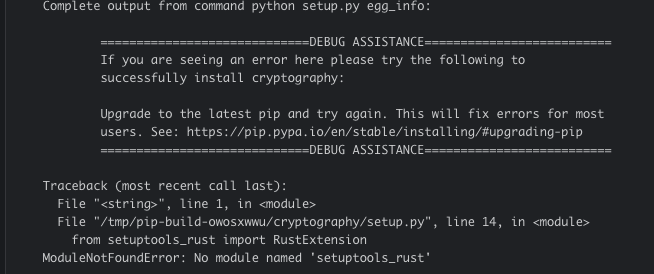


Note:
Alert will not be triggered when instance is deleted. It will only be triggered when loadbalancer health checks are failed. To test the failover, insert a deny rule on controller SG by blocking https traffic from Azure load balancer(sevice tag).
The material embodied in this software/code is provided to you "as-is" and without warranty of any kind, express, implied or otherwise, including without limitation, any warranty of fitness for a particular purpose. In no event shall the Aviatrix Inc. be liable to you or anyone else for any direct, special, incidental, indirect or consequential damages of any kind, or any damages whatsoever, including without limitation, loss of profit, loss of use, savings or revenue, or the claims of third parties, whether or not Aviatrix Inc. has been advised of the possibility of such loss, however caused and on any theory of liability, arising out of or in connection with the possession, use or performance of this software/code.