
|
    ██████╗ ███████╗███████╗██████╗  ██████╗ ██████╗ ██████╗ ███████╗
    ██╔══██╗██╔════╝██╔════╝██╔══██╗██╔════╝██╔═══██╗██╔══██╗██╔════╝
    ██║  ██║█████╗  █████╗  ██████╔╝██║     ██║   ██║██║  ██║█████╗
    ██║  ██║██╔══╝  ██╔══╝  ██╔═══╝ ██║     ██║   ██║██║  ██║██╔══╝
    ██████╔╝███████╗███████╗██║     ╚██████╗╚██████╔╝██████╔╝███████╗
    ╚═════╝ ╚══════╝╚══════╝╚═╝      ╚═════╝ ╚═════╝ ╚═════╝ ╚══════╝
|






Terminal-Based Development

⚡ Fast command-line workflow
🔧 Developer-friendly interface
📊 Real-time progress tracking
Professional terminal interface for advanced users and CI/CD integration
DeepCode has one Agent runtime and two interfaces: an interactive CLI for
terminal workflows and a Tauri Desktop workbench for visual Sessions, review,
and settings. Both open the same local Projects, Session history, models,
Skills, permissions, Goals, and Automations. See the
Desktop source guide to run the application locally.
🎯 Watch our complete introduction - See how DeepCode transforms research papers and natural language into production-ready code

"Where AI Agents Transform Ideas into Production-Ready Code"
- 📰 News
- 🧠 What Deep means in DeepCode
- 🚀 Core capabilities
- ⚡ Quick start
- 🧭 Using DeepCode
- 🔬 Paper2Code
- 🎬 Live demonstrations
- 🛠️ Development
- ⭐ Star History
- 📖 Citation
- 📄 License

2026-07-31 · One execution model across CLI and Desktop
- Interactive, headless, Goal, Automation, and Desktop work all use the same durable Project, Session, Thread, and Turn lifecycle.
- Workspace trust is explicit and independent from the Session access preset: Ask, Read only, or Full access.
- Model-aware Thinking controls and typed reasoning presentation remain separate, so changing display detail never changes the model request.
2026-07-21 · Durable Goals and safe Session lifecycle
- Run long tasks as resumable, evidence-driven Goals shared by CLI and Desktop.
- Archive history for later or permanently delete it through one guarded Session lifecycle, without touching repository files.
- Interrupted deletions recover from a durable tombstone instead of reviving stale Session records.
2026-07-20 · Session-level model control and shared Skills
- Configure named LLM connections once and use them throughout DeepCode.
- Switch the connection or model for future Turns without losing the conversation that came before it.
- Discover, import, enable, and select the same project or user Skills regardless of how the task was started.
2026-07-17 · Durable Session navigation and replay
- Projects organize their own collapsible Session history while older Sessions remain discoverable across directories.
- Long conversations replay incrementally instead of being rejected as one oversized message.
- Approvals, change review, tests, and Artifacts remain attached to the task that produced them.
2026-07-10 · Loop Engineering and parallel agents
- Give DeepCode a mutable Goal; it can inspect, implement, verify where appropriate, and repair across ordinary Turns while remaining steerable.
- Delegate focused work to agents in isolated worktrees, then surface conflicts explicitly before integration.
Earlier milestones
- 2026-07-08 · Durable Sessions and memory. Session history survives
restarts, project instructions can live in
AGENTS.mdorDEEPCODE.md, and persistent notes remain with the workspace. - 2026-07-08 · General coding agent. The free-form TUI, native file and shell tools, headless execution, context compaction, and cross-directory resume established the current product foundation.
- 2026-07-04 · Agent Harness foundation. A shared execution contract, three-valued permissions, sensitive-path protection, platform sandboxing, and normalized events made supervised local execution possible.
- The complete pre-restructure history is preserved in the legacy README.
The name is a product promise, not complexity for its own sake. DeepCode goes beyond a plausible answer or an isolated patch. It follows the task through repository relationships, real execution, verification failures, and the context required to continue the work later.
| Depth | What it means |
|---|---|
| Deep Context | Understand files together with their relationships, project instructions, selected Skills, history, and memory. |
| Deep Execution | Work on real files and commands through an Agent Harness with permissions, approvals, and workspace boundaries. |
| Deep Verification | Feed tests, diagnostics, and failures back into the task instead of stopping at a convincing-looking response. |
| Deep Continuity | Preserve the Session, decisions, evidence, and recovery state across time, directories, and model changes. |
Paper2Code established this pattern by following a research paper from document understanding through reference mining, implementation, and verification. The current general coding Agent applies the same depth to everyday repository work.
flowchart LR
    INTENT["Goal · constraints · definition of done"]

    subgraph CONTINUITY["Deep Continuity · durable Session and memory"]
        CONTEXT["Deep Context · repository relationships · instructions · Skills"]
        EXECUTION["Deep Execution · Agent Harness · tools · permissions"]
        VERIFY["Deep Verification · observe · test · repair"]
        EVIDENCE["Evidence · diff · commands · tests · Artifacts"]

        CONTEXT --> EXECUTION
        EXECUTION --> VERIFY
        VERIFY --> EVIDENCE
        EVIDENCE -->|not yet proved| CONTEXT
    end

    INTENT --> CONTEXT
    EVIDENCE -->|verified| RESULT["Reviewable result"]
This is the product's operating model. The interface only determines how the user enters and observes it.
The four kinds of depth become concrete through the following product capabilities.

The Harness is the part of DeepCode that turns a model response into work you can supervise. It gives the Agent native read, search, edit, patch, shell, test, and delegation capabilities while keeping every action inside one execution contract.
- tool activity is streamed as progress rather than hidden behind a spinner;
- permission decisions are explicit:
allow,ask, ordeny; - Ask and Read only retain protected-path rules and the available platform sandbox; Full access is an explicit unrestricted grant;
- each admitted Turn freezes its resolved execution profile, so later setting changes cannot alter work that is already running or queued;
- interrupted or crashed work is settled without silently replaying side effects.
One good response is not the same as a finished change. Loop Engineering lets DeepCode keep working across Turns against a mutable natural-language Goal. The working Agent uses the conversation, current code, and tool results to decide whether to continue, complete, or report a genuine blocker.
Users can revise the Goal or steer the active Turn without discarding useful work. Tests, builds, lint checks, and other explicit verifiers remain strong evidence when they apply. Stable Goal identity, frozen Turn permissions, and optional user-defined budgets keep long work attributable without imposing a fixed task limit. Session history and project memory keep the work continuous across restarts and model changes.
DeepCode builds context from the repository rather than relying on a single large prompt. It combines files and search results with project instructions, selected Skills, Session history, and persistent workspace notes. Long histories are compacted against the active model's context window so current evidence remains useful without discarding the task's continuity.
Context is refreshed as the repository changes and as commands produce new evidence. This keeps planning, implementation, and verification tied to the latest observable state.
DeepCode does not treat a fluent answer as proof that the task is finished. Completion should be supported by the artifacts the task can actually produce:
- a reviewable diff or generated file;
- command output, diagnostics, or test results;
- a recorded Artifact when the output is too large for the conversation;
- a concise explanation connecting the requested outcome to the evidence.
If verification fails, the failure becomes input to the next round. If a boundary prevents completion, the boundary remains visible instead of being reported as success.
Start DeepCode from any repository. Sessions are stored under
~/.deepcode/sessions/, indexed by their original workspace, and remain
discoverable across directories. Resume after a restart or explicitly continue
the task in another working directory without rewriting its recorded origin.
A Session is the complete conversation. A Turn is one accepted unit of work. Changing models affects future Turns only, so earlier work remains readable and retries remain attributable to the configuration that produced them.
DeepCode is not tied to one hosted model. Named connections can target OpenRouter, OpenAI, Anthropic, supported providers, OpenAI-compatible gateways, or local endpoints. Credentials stay in the user store; projects may select a connection without taking ownership of its secret.
Skills are reusable workflow instructions. Keep them with a project or in your user library, import them from a local directory, and select only the Skills a Turn needs. Every execution path resolves the same catalog, and a Skill can never raise its own permissions.
DeepCode can delegate bounded tasks to agents in isolated Git worktrees. Their changes are integrated with conflict detection instead of sharing one mutable checkout. Automations can submit recurring work through the same Session, model, permission, and recovery rules as a manual Turn.
Install uv first if it is not already available. On Windows PowerShell:
winget install --id astral-sh.uv --exactOpen a new terminal after the first uv installation, then run:
uv tool install deepcode-hku
deepcode init
deepcode init creates a minimal user configuration under ~/.deepcode/
without copying project settings or credentials. After that, deepcode can be
launched from any project directory. pipx install deepcode-hku and
pip install deepcode-hku are also supported in an appropriate Python 3.12+
environment.
deepcode provider set personal-openrouter --template openrouter --label "OpenRouter · Personal" --api-key

deepcode provider test personal-openrouter
deepcode provider models personal-openrouter --refresh
--api-key uses a non-echoing prompt. Saved keys live in
~/.deepcode/credentials.json in user-private storage; they are never returned
to a client or written into Session history. Use the model-list command above
instead of relying on a model name copied from an older example.
From the repository you want DeepCode to work in:
deepcode -c personal-openrouter -m <model-id> --effort autoOn first use, review the canonical workspace path and confirm trust. DeepCode remembers that decision for the Project; trust does not grant unrestricted tool access.
Or run one headless task:
deepcode exec "Fix the failing tests and explain the root cause" --connection personal-openrouter --model <model-id> --effort auto --trust --access full-access --json--trust records the workspace decision. --access full-access is an explicit
unrestricted grant suitable only for an isolated repository or CI runner. Omit
it in an interactive terminal to approve sensitive tools as they are requested,
or use --access read-only for inspection.
Choose whichever interface fits your workflow. deepcode opens the interactive
CLI; the same Sessions can also be opened in Desktop.
From the repository root:
uv venv --python 3.12
uv pip install --python .venv/bin/python -e .
cd desktop
npm ci
npm run setup:sidecar
npm run build:sidecar
cd ..
./scripts/deepcode-desktop
Windows requires Microsoft Edge WebView2 and the Visual Studio 2022 Build Tools workload Desktop development with C++. These are the system dependencies required by Tauri on Windows.
1. Install the toolchains. Accept the UAC prompt raised by Build Tools.
winget install --id astral-sh.uv --exact
winget install --id OpenJS.NodeJS.LTS --exact
winget install --id Rustlang.Rustup --exact
winget install --id Microsoft.VisualStudio.2022.BuildTools --exact `
  --override "--wait --passive --norestart --add Microsoft.VisualStudio.Workload.VCTools --includeRecommended"
2. Close PowerShell, open a new PowerShell window, and verify the tools.
uv --version
node --version
rustup default stable-msvc
rustc --version
cargo --version
3. Prepare and start DeepCode. Run these commands from the repository root.
uv venv --python 3.12
uv pip install --python .venv\Scripts\python.exe -e .
Set-Location desktop
npm ci
$env:DEEPCODE_PYTHON = (Resolve-Path ..\.venv\Scripts\python.exe)
npm run setup:sidecar
npm run build:sidecar
npm run tauri -- dev
The explicit --python path prevents an active Conda environment from receiving
the editable install. The first sidecar build creates the resource directory
that Tauri validates during development; later source-only Python changes still
run from the repository .venv. See the
Desktop source guide for troubleshooting
and subsequent-launch details.
Open Settings → Connections to configure a provider, then select a connection and model from the Session composer.
The interface changes how the work is presented, not the Agent, policy, configuration, or Session history behind it.
/new [title]             start a new Session
/resume                  list Sessions from the current directory
/resume all              list Sessions from every recorded directory
/resume <id>             restore one Session
/model [connection] [id] show or change the model for future Turns
/effort [auto|off|level] show or change Thinking for future Turns
/permissions [preset]   show or change access for future Turns
/transcript [mode]       choose normal, verbose, or summary detail
/clear                   clear the current in-memory context
@src/main.py             attach a file to the next prompt
Thinking effort controls what the model is asked to do; transcript mode controls
only what DeepCode displays. In the interactive CLI, press Ctrl+O to cycle
normal → verbose → summary. Headless runs accept the same choice through
deepcode exec --transcript <mode>. Reasoning remains a typed timeline item and
is never merged into the assistant's final answer. DeepCode labels and displays
only provider-returned summaries or provider reasoning details; some providers
return only opaque continuation state, in which case the UI says that details
are unavailable.
Start or resume directly:
deepcode -w ./my-project --trust
deepcode --resume <session-id>
Session files remain under ~/.deepcode/sessions/ no matter which client opens
them. An explicit cross-directory resume changes the current execution context
without rewriting the Session's recorded origin.
Archive keeps canonical history and only removes a Session from the normal Desktop list. Permanent deletion removes that history and its derived runtime records while leaving repository files untouched. Desktop exposes both actions in the Session menu; scripts can use the same application service through:
deepcode session delete <session-id> --yesDeepCode refuses permanent deletion while the Session is open in another CLI, has active work, owns a managed worktree, or belongs to an Automation. Resolve the reported blocker first; deletion never force-kills work or silently removes workspace state.
Common commands:
deepcode provider list
deepcode provider test <connection-id>
deepcode provider models <connection-id> --refresh
deepcode provider remove <connection-id>
Use an environment variable instead of the credential store:
deepcode provider set work-openrouter \
  --template openrouter \
  --api-key-env OPENROUTER_API_KEY
Connect an arbitrary OpenAI-compatible endpoint:
deepcode provider set company-proxy \
  --template custom \
  --adapter openai_compat \
  --api-base https://llm.example.com/v1 \
  --catalog openai \
  --api-key
Built-in templates include openrouter, openai, anthropic, deepseek,
gemini, zhipu, dashscope, ollama, vllm, and custom.
To make one connection/model the shared default, edit the user-level
~/.deepcode/deepcode_config.json:
{
  "agents": {
    "defaults": {
      "connection": "personal-openrouter",
      "model": "<model-id>",
      "reasoningEffort": "auto"
    }
  }
}
Project configuration may select a user-owned connection, but cannot replace its endpoint, adapter, headers, or credential.
Thinking levels come from the selected model's catalog rather than a global
hard-coded list. auto follows the provider/model default; off is offered
only when the model permits it. A Session switch affects future Turns without
rewriting earlier history. DeepCode never renders raw chain-of-thought as
assistant text; only a provider-designated summary may appear, while signed or
encrypted continuation state remains private in the canonical Session.
DeepCode discovers Skills from both DeepCode and Claude-compatible locations:
.deepcode/skills/        project DeepCode Skills
.claude/skills/          project Claude-compatible Skills
~/.deepcode/skills/      user DeepCode Skills
~/.claude/skills/        user Claude-compatible Skills
Manage them from the CLI:
deepcode skill list
deepcode skill show <id-or-name>
deepcode skill import ./my-skill --scope project
deepcode skill disable <skill-id> --scope project
Select Skills for the next interactive Turn:
/skills
/skill <id-or-name>
/skill remove <id-or-name>
/skill clear
Headless tasks accept repeatable --skill flags:
deepcode exec "Review this change for security regressions" \
  --skill security-review \
  --skill test-strategy \
  --trust \
  --access read-only
A Skill supplies workflow instructions. It cannot grant permissions or bypass project trust, sandbox, approval, or tool policy.
DeepCode treats execution as a product boundary rather than a client-side confirmation:
- Projects require explicit trust before Agent execution on every interface.
- Permission decisions are
allow,ask, ordeny. - An approval resumes the exact suspended tool call.
- Ask keeps the workspace command sandbox and protected-path checks; Read only denies mutating tools; Full access is an explicit, confirmed Session grant that removes approval and filesystem sandbox boundaries. Explicit deny rules still win.
- CLI and Desktop edit the same Session override. Each admitted Turn freezes the complete resolved security profile: changes apply to new submissions, while active and already queued Turns keep their recorded access after resume or worker handoff.
- Shell and code processes are terminated as owned process trees on timeout, interruption, or shutdown.
- Crash recovery settles incomplete Turns without automatically replaying side effects.
In the interactive CLI, attach a durable Goal to the current Session:
/permissions
/permissions ask
/permissions read-only
/permissions full-access
/permissions inherit
/goal Implement and verify the requested feature
/goal show
/goal edit Implement the feature and preserve the public API
/goal pause
/goal resume
/goal wait
/goal reopen Rework the completed result for the new requirement
/goal clear
/queue Run this instruction as the next Turn
/stop
The Goal is stored beside the canonical Session transcript and appears in
Desktop. Goal work runs beside the CLI prompt: ordinary input steers the active
Turn; when the Turn has already ended, the same input starts the next Turn in
the same Session. Queueing is always explicit through /queue or Queue
next—a failed Steer never silently changes delivery semantics. /stop
interrupts only the current Turn and leaves the CLI ready for the next input.
Editing updates the same durable Goal identity and injects the new objective
into its active Turn when possible. Every unit of work is an ordinary Turn, so
model selection, Skills, permissions, approvals, recovery, and history stay
aligned across clients. Switching a provider, model, or reasoning effort
affects future Turns without replacing the Goal or Session.
The working Agent requests complete or blocked from its full context.
DeepCode enforces ownership, lifecycle, permission, and budget boundaries, but
does not pretend a generic host-side rule can validate every coding task. A
normal semantic result is labelled Completed; tests, builds, diagnostics,
diffs, or independent review remain visible evidence. No provider, model, task
type, or test command is fixed by the Goal engine.
For scripts and CI, the compatibility command uses the same Goal engine and adds the requested command to the model-visible completion evidence:
deepcode loop "Implement the requested feature" \
  --test-cmd pytest \
  --trust \
  --access full-access
Resume the same Goal and canonical Session after leaving the process:
deepcode loop --resume <session-id>Resume keeps the Session ID, Goal ID, transcript, and stored workspace. An
explicit --workspace is a process-local override and does not rewrite the
Session origin. --connection, --model, and --effort apply only to the
next Turn started by this command. A Goal that reached its token limit requires
a larger --token-budget; a completed Goal is reported without starting or
rewriting work.
After the current repository has been opened and trusted in DeepCode, create a durable Automation:
deepcode automation create "Repository caretaker" \
  --prompt "Repair failing tests and verify the result." \
  --schedule interval \
  --interval-seconds 3600

deepcode automation list --limit 100 --offset 0
deepcode automation run <automation-id>
deepcode automation runs <automation-id> --limit 100 --offset 0
Automations submit work through the normal Turn path, so scheduled and manual
runs retain the same Session, permission, model, approval, and recovery rules.
The immutable instruction revision used by each Run remains auditable after the
Automation is edited or retired. Interval schedules run while a
scheduler-enabled Desktop or App Server runtime is active.
Paused/enabled controls only an interval schedule: manual definitions are
always enabled, and Run now remains available while an interval is paused.
Definition and Run-history queries are explicitly paged. JSON responses expose
hasMore and nextOffset; human-readable output prints the next offset
whenever additional results exist.
Paper2Code is the research origin of DeepCode and remains its specialized workflow for scientific code reproduction. The general coding Agent extends the product; it does not replace or flatten the original Paper2Code design.
Its central idea is unchanged: reproducing a paper is not a one-shot generation task. A central orchestrator coordinates distinct responsibilities for understanding the source, planning the reproduction, finding and indexing useful references, implementing the system, and verifying the result.
flowchart TB
    INPUT["Research paper · text · URL · document · repository"] --> ORCH["Central Orchestrating Agent"]

    ORCH --> INTENT["Intent Understanding Agent"]
    ORCH --> DOC["Document Parsing Agent"]
    INTENT --> PLAN["Code Planning Agent"]
    DOC --> PLAN

    PLAN --> MINE["Code Reference Mining Agent"]
    PLAN --> INDEX["Code Indexing Agent"]
    MINE --> INDEX
    INDEX --> BUILD["Code Generation Agent"]

    BUILD --> VERIFY["Execution · tests · verification"]
    VERIFY -->|evidence requires another pass| ORCH
    VERIFY -->|verified| OUTPUT["Codebase · results · tests · documentation"]
The specialist roles preserve the separation of concerns that made the original system effective:
| Role | Responsibility |
|---|---|
| Central Orchestrating Agent | Interprets progress, selects the next phase, coordinates specialists, and adapts the plan when evidence changes. |
| Intent Understanding Agent | Turns the user's objective into explicit functional requirements, technical constraints, and an actionable task decomposition. |
| Document Parsing Agent | Processes papers and technical documents, extracting algorithms, equations, methods, assumptions, and implementation requirements. |
| Code Planning Agent | Converts the understood method into an implementation roadmap, module boundaries, dependencies, interfaces, and verification goals. |
| Code Reference Mining Agent | Discovers relevant repositories, libraries, and implementation patterns, then evaluates their relevance and integration potential. |
| Code Indexing Agent | Builds a searchable semantic index and knowledge graph so useful components and relationships can be recovered during generation. |
| Code Generation Agent | Synthesizes the plan and evidence into executable code, tests, documentation, and the interfaces needed for a reproducible result. |
Four ideas connect those roles into one system:
- Intelligent orchestration. The central Agent chooses and revisits phases according to task state instead of treating reproduction as a fixed prompt chain.
- Document and intent grounding. Papers, specifications, URLs, and attached files are converted into explicit implementation requirements before code is written.
- Memory and CodeRAG. Large documents and reference repositories are segmented, indexed, and retrieved as bounded context rather than repeatedly placed into the model window.
- Iterative verification. Execution, tests, and observed failures feed back into planning and implementation until the deliverable has supporting evidence.
The supporting tool layer follows the same division:
| Layer | Purpose |
|---|---|
| Document ingestion | Fetch and normalize papers, URLs, PDFs, DOCX, presentations, text, and HTML. |
| Document segmentation | Divide long technical material into coherent, recoverable sections for analysis. |
| Reference discovery | Find candidate repositories and supporting implementations. |
| Code reference indexing | Build searchable context over external and local code, including cross-file relationships. |
| Implementation execution | Read and write files, run shell or Python commands, inspect the project structure, and keep logs. |
| Verification and delivery | Run tests, record results, and deliver the codebase together with documentation and Artifacts. |
The modern product adds durable plans, explicit plan review, checkpoints, bounded retries, and interactive inspection around this workflow. Those additions make recovery and supervision stronger while preserving the Paper2Code architecture and its order of reasoning.
The original DeepCode study evaluates scientific code reproduction on PaperBench, which asks agents to reproduce 20 ICML 2024 papers across 8,316 gradable components.
|
75.9% Human expert subset +3.5 points |
84.8% Commercial-agent subset +26.1 points |
73.5% Scientific coding +22.4 points |
73.5% LLM-agent baseline +30.2 points |

| Evaluation subset | DeepCode | Reported comparison | Difference |
|---|---|---|---|
| Human expert subset | 75.9% | Best reported human baseline: 72.4% | +3.5 points |
| Commercial-agent subset | 84.8% | Best reported commercial agent: 58.7% | +26.1 points |
| Scientific coding | 73.5% | PaperCoder: 51.1% | +22.4 points |
| LLM-agent baseline | 73.5% | Best reported LLM agent: 43.3% | +30.2 points |
These are PaperBench-specific results reported by the original study. They are not a general-purpose coding benchmark or a comparison against continuously updated products.
Read the paper for methodology, evaluation scope, models, and baseline details.
These recordings show projects produced by earlier DeepCode workflows. They are output demonstrations rather than screenshots of the current Desktop UI.
|
Research to implementation 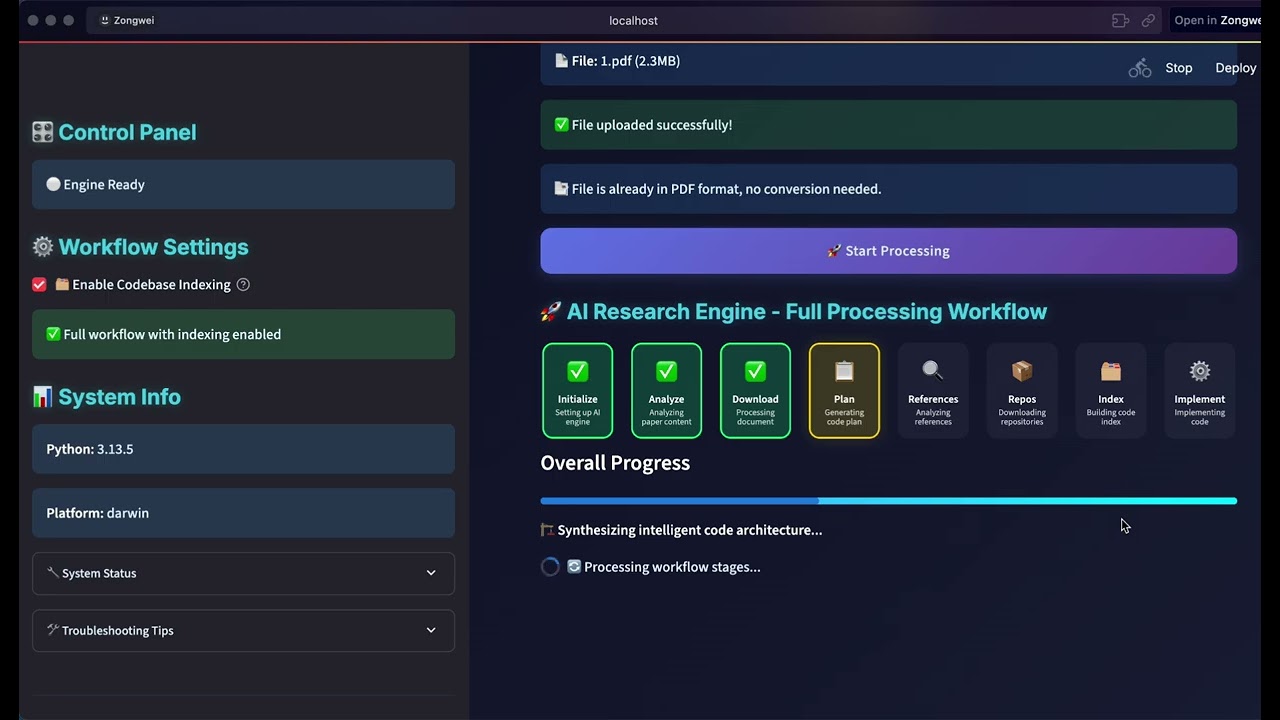
Reproduce a research paper as an executable project. |
Image workflow example 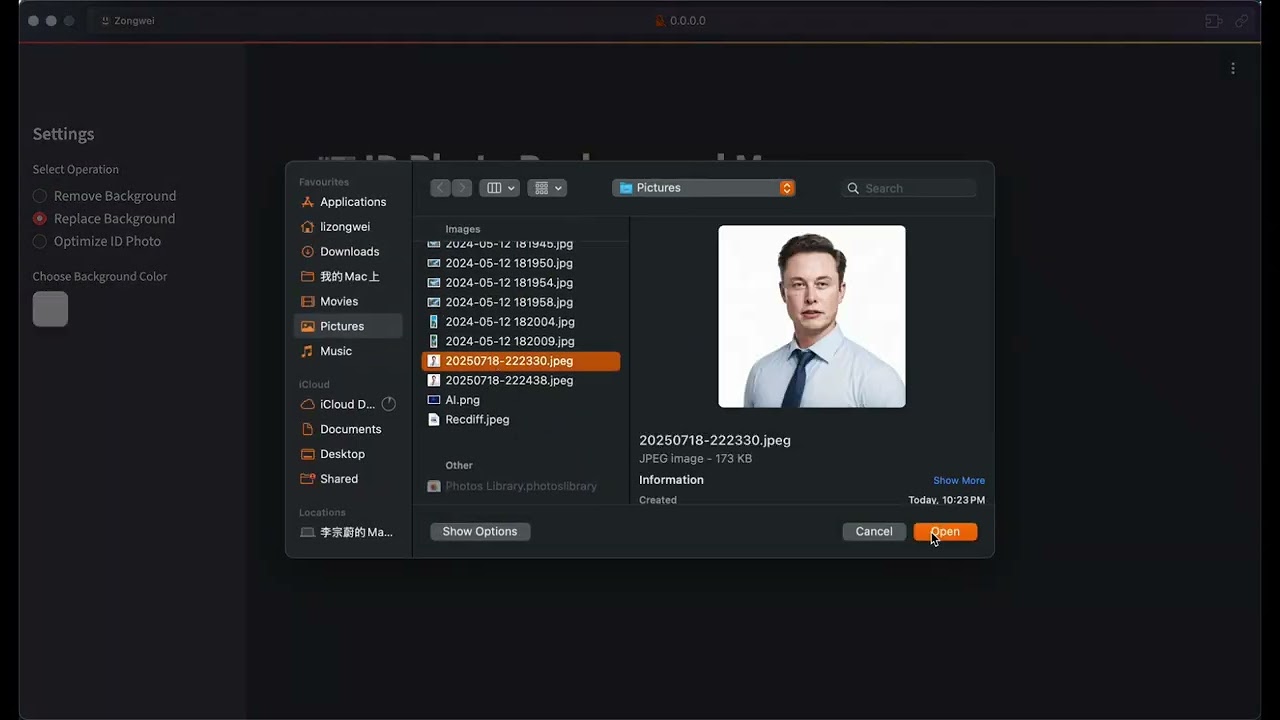
See an earlier generated image-processing workflow in use. |
Frontend implementation example 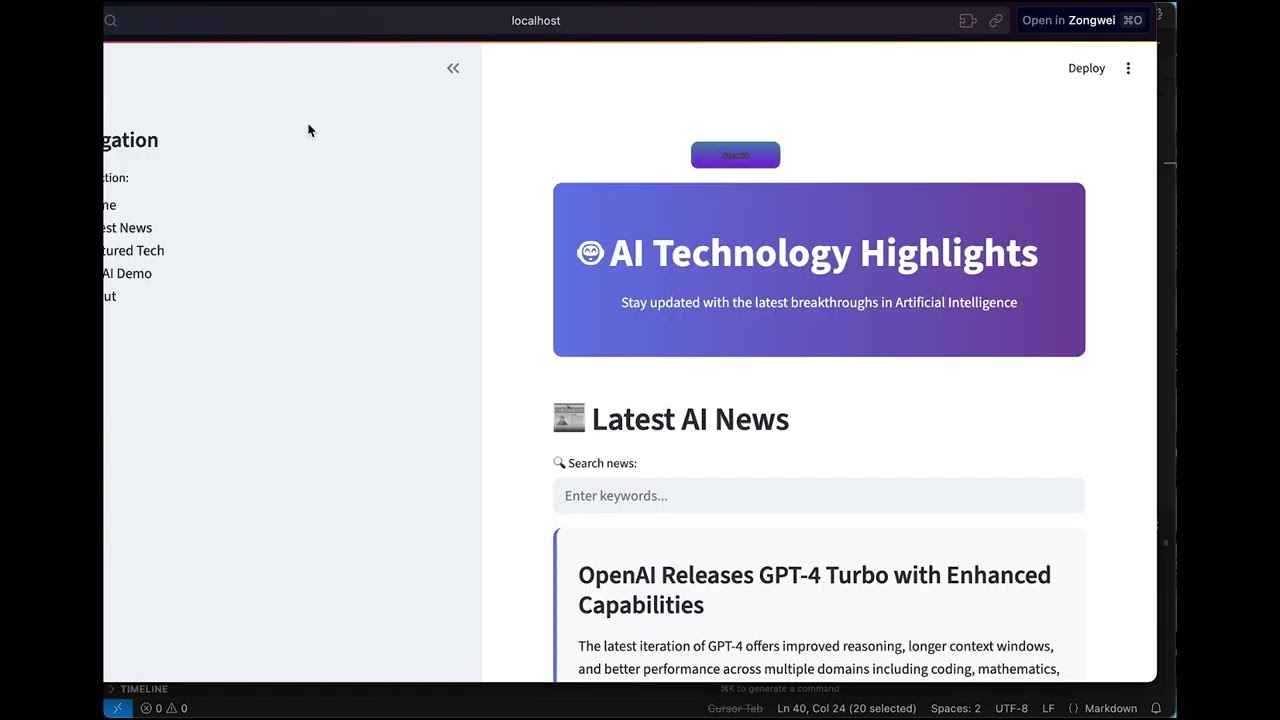
Follow a complete frontend implementation from idea to result. |
The project introduction remains available for a broader walkthrough.
git clone https://github.com/HKUDS/DeepCode.git
cd DeepCode

curl -LsSf https://astral.sh/uv/install.sh | sh
uv venv --python=3.13
source .venv/bin/activate
uv pip install -e .
On Windows PowerShell, activate with .\.venv\Scripts\Activate.ps1.
uvx pre-commit run --all-files
python -m compileall -q app_server cli core tools workflows
deepcode --version
deepcode-app-server --verify-runtime

cd desktop
npm run lint
npm test -- --run
npm run build
Desktop packaging, Rust checks, signing, and release procedures are documented
in desktop/README.md and the
Desktop release runbook.
Contributor architecture notes
| Topic | Document |
|---|---|
| Agent execution and approvals | P2 Agent execution |
| Desktop sidecar and lifecycle | P3 Desktop runtime |
| Git review, files, terminal, and tests | P4 Code workbench |
| Durable Paper2Code workflow | P5 Paper2Code |
| Canonical Sessions and cross-directory resume | P6 Session alignment |
| Skills identity, security, and persistence | Skills architecture |
| Automation scheduling and execution | Automation architecture |
| Desktop product and interaction model | Desktop UI specification |
| Privacy and diagnostics | Privacy contract |
The pre-restructure README is preserved in
docs/archive/README_LEGACY_2026-07-20.md.
The empty product-image slots have a shared
capture brief.
Community growth trajectory



If DeepCode contributes to your research, cite:
@misc{li2025deepcodeopenagenticcoding,
  title         = {DeepCode: Open Agentic Coding},
  author        = {Zongwei Li and Zhonghang Li and Zirui Guo and Xubin Ren and Chao Huang},
  year          = {2025},
  eprint        = {2512.07921},
  archivePrefix = {arXiv},
  primaryClass  = {cs.SE},
  url           = {https://arxiv.org/abs/2512.07921}
}
DeepCode is available under the MIT License.
Copyright © 2025 Data Intelligence Lab at The University of Hong Kong.