







It is a lexical analyzer based on DFA that is built using JS and supports multi-language extensions. For a quick understanding and experience , please check the online website
Contents
- 1、Background
- (1) Situation
- (2) Task
- (3) Solution
- 2、Features
- (1) Complete lexical analysis
- (2) Support multi-language extension
- (3) Provide state flow log
- 3、Get project
- 4、Ussage
- (1) In your project
- (2) Web preview
- 5、Contributions
- (1) Project Statistics
- (2) Branch Introduction
- (3) Commit Standards
- (4) Content contribution
- (5) Release version
- (6) Source code explanation
- (7) Q&A
- 6、License
Most lexical analyzers are closely coupled with the language, the amount of code is relatively large. It's hard to pay attention to the essential principles of lexical analyzer.
In order to focus on the working principle of lexical analyzer , not to consider the small differences caused by different languages , an idea of making a lexer project that is completely decoupled from the language was born.
lexer realizes the decoupling of lexical analyzer and language through the following two JS files. lexer.js is the execution engine, {lang}-define.js is the language rule set, and their responsibilities are clearly separated:
src/lexer.jsis the core of the lexical analyzer, kept within 300 lines and split intoISR(Input Stream Reader) andDFA(Deterministic Finite Automaton) — extremely clear and easy to understandsrc/lang/{lang}-define.jsis the language extension of the lexical analyzer, supporting different languages such assrc/lang/c-define.jsENUM_CONST— All enum values: token types, DFA state numbers, operator/symbol charactersCHARSET_CONST— Character set classifications: which characters are operators, symbols, keywords, etc.DFA_STATE_CONST— DFA state constants (references values fromENUM_CONST)tool— Utility functions: character type checks, token type inference, environment detectionflowModel— DFA state transition model: implementsgetNextState(ch, state)and records each step as a log entry
For the overall core execution flow, please refer to the Core Flowchart section
From inputting the character sequence to generating token after the analysis, lexer has complete steps for lexical analysis, and 11 token types for most language extensions

lexer supports different language extensions such as Python, Go, etc. How to make different language extensions, please check Contributions
- C :A popular programming language,click here to see its lexical analysis
- SQL :A popular database query language,click here to see its lexical analysis
- Goal :A goal parser problem from leetCode ,click here to see its lexical analysis
The core mechanism of lexical analyzer is based on the state flow of DFA. For this reason, lexer records detailed state flow log to achieve the following requirements of you
- Debug mode
- Automatically generate
DFAstate flow diagram

After git clone command, no need for any dependencies, and no extra installation steps
Branch Note: The
mainbranch is the primary branch, please use themainbranch. Other branches are for feature development. All branches includingmainwill have new feature iterations. Although themainbranch has been tested multiple times, new features may still cause bugs. You can choose according to your needs, or download a more stable Release version
If you need use lexer in your project, such as code editor, etc.
npm install chain-lexer
var chainLexer = require('chain-lexer');
let lexer = chainLexer.cLexer;

let stream = "int a = 10;";
lexer.start(stream);
let parsedTokens = lexer.DFA.result.tokens;

lexer = chainLexer.sqlLexer;
stream = "select * from test where id >= 10;";
lexer.start(stream);
parsedTokens = lexer.DFA.result.tokens;Import the package/{lang}-lexer.min.js file, then visit lexer variable to get the object of lexical analyzer,and visit lexer.DFA.result.tokens to get tokens
// 1. The code that needs lexical analysis
let stream = "int a = 10;";

// 2. Start lexical analysis
lexer.start(strem);

// 3. After the lexical analysis is done, get the generated tokens
let parsedTokens = lexer.DFA.result.tokens;

// 4. Do what you want to do
parsedTokens.forEach((token) => {
    // ... ...
});
The Provide state flow log part in features,visit flowModel.result.paths will get the detail logs of state flow inside lexer. The data format is as follows
[
    {
        state: 0, // now state
        ch: "a", // read char
        nextSstate: 2, // next state
        match: true, // is match
        end: false, // is last char
    },
    // ... ...
]In order to preview the process of lexer in real time, to debug and test, there is a index.html file in the root directory of this project. Open it directly in your browser, and after entering the code will automatically output the Token generated after lexer analysis, as shown in the figure below
int a = 10;
int b =20;
int c = 20;

float f = 928.2332;
char b = 'b';

if(a == b){
    printf("Hello, World!");
}else if(b!=c){
    printf("Hello, World! Hello, World!");
}else{
    printf("Hello!");
}
or check the online website
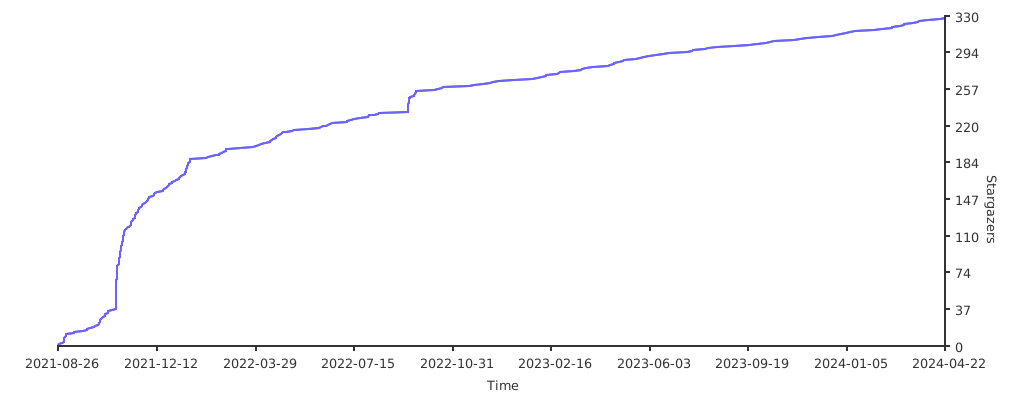
main: Primary branchdevelop: Development branchtesting: Deprecated, no longer usedv{x}: Version branch (e.g.,v2indicates version 2 branch), generally not used. Only during major version updates, a version branch is created. Code fromdevelopbranch is first merged intov{x}branch, and only after the version is fully tested and approved, it is merged intomainbranch
test: Description related to testingperf: Description related to optimizationfeat: Description related to new featuresfix: Description related to bug fixesdoc: Description related to documentation updatesstyle: Description related to code formattingrefactor: Description related to architectural refactoring
For example, if the lexer architecture is adjusted, the commit message should be refactor: refactor lexer
- Add more new features
- Add more extensions
/src/lang/{lang}-define.js
The project is released with the version number of A-B-C,regarding release log, you can check the CHANGELOG or the release record
A:Major upgradeB:Minor upgradeC:bug fix / features / ...
When a new version is ready, use the following commands to publish to npm:
git checkout main
git pull origin main
npm login
npm publishDocuments about source code development, project design, unit testing, automated testing, development specifications, and how to make extensions in different languages, please read source code explanation
If you have any problems or questions, please submit an issue
