Saltar al contenido principal
Lecture Outline

 DOM

 Accessing and Modifying DOM

 Events, revisited

 HTML-Only DOM

 Form Elements and Events
DOM

 The Document Object Model represents the browser as
  a node tree (parent, child, and sibling).

 Types of Nodes:
      Element Nodes
      Text Nodes
      Attribute Nodes
      Comment Nodes
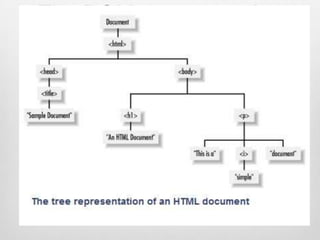
HTML Example

 <html>
   <head><title>Sample Document</title></head>
   <body>
      <h1>An HTML Document</h1>
      <p>This is a <i>simple</i>document</p>
   </body>

 </html>
The DOM representation
    of the example
<p title="a gentle reminder">Don‟t
forget to buy this stuff.</p>,
Accessing DOM Nodes
 All nodes have
    nodeType,
    nodeName (mostly are tag names),
    nodeValue (for text nodes; the value is the actual text)

 window.document: access to the current document.
    documentElement: the root node <html>
    childNodes:
        In order to tell if a node has any children you use
         hasChildNodes(): true/false
        childNodes[] array to access child nodes of any element, has all
         array properties.
    parentNode:
        Provided to child to access its parent
childNodes Vs. children

 .children is a property of an Element. Only Elements
  have children, and these children are all of type
  Element.

 .childNodes is a property of Node. .childNodes can
  contain any node.
Accessing DOM Nodes

 window.document (Cont’d):
   attributes
      In order to tell if a node has any attributes you use
       hasAttributes()  true/false
      attributes[] array to access all attribute nodes of any element,
       has all array properties
      getAttribute(attrname)  to get a certain attribute by
       name .
      Each attribute node has nodeName and nodeValue
<html><head><title>My
page</title>
</head><body>
   <p class="opener">
        first paragraph           var bd=document.documentElement.
   </p>                                        children[1];
   <p>
                                   bd.childNodes.length =???
                                                            9
        <em>second</em>
        paragraph
                                   bd.childNodes[1].hasAttributes()
   </p>                             =??
                                      true
   <p id="closer">final</p>
   <!-- and that's about it -->
                                   bd.childNodes[1].getAttribute('class')
                                    =????
                                      “opener”
</body>
</html>
Accessing the Content
          Inside a Tag
 After reaching a desired node, you may need to get the
  text/HTML contained in the node by using the
  properties.
    innerText - textContent
    innerHTML (to change content of Element nodes only)
    nodeValue (this changes value of any node)

 It sets and gets the content of the element as text or as
  HTML.
A Shortcut to DOM
             elements
 document.getElementById(id)  returns an object
  representing element or null if not found
 document.getElementsByTagName(tag)  returns a
  collection of objects with the specified tag name or [] an
  empty array if not found
 document.getElementsByName(name)  returns a
  collection of objects with the specified name attribute or
  [] an empty array if not found
 Shortcut to body element:
    document.body
More on Attributes

 Once you retrieved an Element you can get/set its
  attributes through
      .attributes[index]
      .attributes[name]
      .getAttribute()/setAttribute
      .attributeName
        document.getElementsByTagName('p')[2].id
        document.getElementsByTagName('p')[2].className
A Shortcut to DOM
             elements
 document.getElementById(id)  returns an object
  representing element or null if not found

 document.getElementsByTagName(tag)  returns a
  collection of objects with the specified tag name or [] an
  empty array if not found

 document.getElementsByName(name)  returns a
  collection of objects with the specified name attribute or
  [] an empty array if not found
Modifying Style

 Most of the element nodes have a style property, which in
  turn has a property mapped to each CSS property.

 Example:
    var my = document.getElementById(’mydiv');
    my.style.border = "1px solid red";

 CSS properties have dashes but in JavaScript map their
  names to properties by skipping the dash and uppercase
  the next letter.
    padding-top  paddingTop, margin-left  marginLeft…..
Modifying Style (Cont‟d)

 You can change the css class using the className
  property or setAttribute() function.

 Example:
    var m=document.getElementById(„mydiv‟);
    m.className=“errorclass”;

 OR
    m.setAttribute(„class‟,‟errorname‟);
Creating New Nodes

 Create element nodes by createElement() and
  createTextNode().

 Once you have the new nodes, you add them to the
  DOM tree with appendChild().

 Example
      var myp = document.createElement('p');
      myp.innerHTML = 'yet another';
      myp.style.border = '2px dotted blue’
      document.body.appendChild(myp) //here appended to end
       of body directly
Clone Existing Node

 cloneNode()
   The method accepts a boolean parameter (true = deep
    copy with all the children, false = shallow copy, only
    this node).
   Get a reference to the element you want to clone:
      var el = document.getElementsByTagName('p')[1];
   Create a shallow clone of el and append it to the body:
      document.body.appendChild(el.cloneNode(false))
   Create a deep copy, the whole DOM subtree
      document.body.appendChild(el.cloneNode(true))
insertBefore

 insertBefore is the same as appendChild(), but accepts
  an extra parameter, specifying before which element to
  insert the new node.

 Example:
    At the end of the body:
       document.body.appendChild(document.createTextNode('boo!'));
    Add it as the first child of the body:
       document.body.insertBefore(document.createTextNode('boo!'),
        document.body.firstChild);
Removing/Replacing
             Nodes
 removeChild().

    Specify node to be removed, send it to removeChild
        var removed = document.body.removeChild(myp);
    The method returns the removed node if you want to use it
     later.

 replaceChild()
    Removes a node and puts another one in its place.
    First specify node to remove and node to add, then send them
     to function
        var replaced = document.body.replaceChild(removed, pAdded);
    It returns a reference to the node that is now out of the tree.
Question?

 How to remove all subtree of body?

        document.body.innerHTML = ’’;
Events

 Events can be attached to JavaScript code through one
  of the following ways:
    Inline HTML Attributes (already discussed)
    Element Properties
    DOM Event Listeners
Elements Properties
 assign a function to the on-event property of a DOM node
  element.
 Example:
 <div id="my-div">click</div>
 <script type="text/javascript">
       var myelement = document.getElementById('my-div');
       myelement.onclick = function()
       {
                alert('Div Clicked!');
       }
 </script>

 You can attach only one function to the event.
DOM Event Listeners

 This method allows for many functions listening to an
  event. When the event fires, all functions are executed.
 Example:
   <p id="closer">final</p>
   var mypara = document.getElementById('my-div');
   mypara.addEventListener('click', function(){alert('Boo!’)}, false);
   mypara.addEventListener('click', myHandler, false);
   Where myHandler is a name of a defined function

 You can use anonymous functions such as
  function(){alert('Boo!')} or existing functions such as
  myHandler.
DOM Event Listeners

 As events are added using listeners they can be
  removed too.

 removeEventListener()  accepts exactly the same
  parameters. mypara.removeEventListener('click',
  myHandler, false);

 You cannot remove listeners that use anonymous
  functions.

 If you remove a listener, you have to pass a pointer to
  the same function you previously attached.
Always keep in mind that
HTML is for content, JavaScript
for behavior and CSS for
formatting, and you should keep
these three SEPARATE as
much as possible.
HTML-only DOM objects

 document objects that represent a number of collections:
      document.images
      document.anchors
      document.forms
      document.links
      document.styleSheets

 Other useful properties
    document.cookie
    document.referrer
document.images

 A collection of all images images on the page

 Equivalent to
  document.getElementsByTagName(„img)
Image Objects
 Image Object represent an HTML Image

 Has its own set of Properties, Collections, Methods & Event
  handlers.

 Properties:
       name
       id
       src
       height
       width

 Image Preloading can boost performance, by creating Image objects
  and after loading start assigning them to HTML
document.anchors

 document.anchors- contains all links with a name
  attribute (<a name="..."></a>).

 Anchor Object
    The Anchor object represents an HTMLAnchor.
    Properties:
       href
       name
       target
document.forms
               Form Object
 document.forms - contains a list of <form> tags.

 Properties of Form Object
    elements[]: a collection of elements of the form
    Example:
       <input name="search" id="search" type="text” value="Enter
        email..." />
       To change the text in the field by:
             document.forms[0].elements[0].value = 'me@example.org’
       To disable the field dynamically:
             document.forms[0].elements[0].disabled = true;
    method,action
document.forms

 When forms or form elements have a name attribute, you can
  access them by name too:
    document.forms[0].elements['search']; // array notation
    document.forms[0].elements.search; // object property

 Methods of Form Object:
    reset()
    submit()

 Events of Form Object:
    Onreset
    onsubmit
Form Elements Events

 Use „this‟ keyword to refer to the current object.

 Self reference to the object is used
    document.forms[0].elements['name'].onchange=function(){al
     ert(this)} on text change will alert
Form Elements

 Common Properties    Common Methods
      name              focus()/blur()
      value
                       Common Events
      form
                         onfocus/onblur
      disabled
                         onclick/ondblclick
                         onmousedown
                         onmousemove/onmouseo
                          ve
                         onmouseout/onmouseup
Input Text/Password

 Properties:
    maxLength
    readOnly

 Methods
    select()

 Events
    onchange
Input Radio/Checkbox

 Properties:
    length
    checked
    defaultChecked

 Events
    onclick
    onchange
Input Button

 Events:
     onclick
     ondblclick
     onmousedown
     onmouseout
     onmouseover
     onmouseup
Select

 Properties                      Method (not with IE
      length                      prior 8 )
      multiple                      add()
      selectedIndex                 remove()
      options[]
                                  Events
          selected
                                     onchange
          text
          defaultSelected
Option

 Properties
    selected
    text
    defaultSelected

 Options can be added dynamically to a Select element.
    First create a new Option object.
    Set its value and text.
    Send to add method of Select Element.
Textarea

 Properties                Method:
      cols                   select()
      defaultValue
                            Events
      readOnly
                              onselect
      rows
Try Form validation
styleSheets

 document.styleSheets[]
    All the external style sheets on the page, either defined
     using the <style> or <link rel="stylesheet"> tag.
    To add or delete rules within any stylesheet on the page.
styleSheets Properties
 cssRules[]
        Returns an array containing all the CSS rules of a stylesheet. NS6+/Firefox
         only object. In IE (Win), use rules[] instead.
        cssText
              Read/write property that contains the entire contents of the stylesheet. IE
              only property. Note that Firefox support a "cssText" property on individual
              rules to return the contents of each rule.

 disabled :
        Read/write property that specifies whether a stylesheet is diabled or not.
         Default value is false.

 href
        Read/write property that specifies the URL of an external stylesheet.

 media
        Specifies the medium of the stylesheet. Default value is "screen.”
styleSheets[] Methods
 addRule(selector, declaration, [index])
       IE : adds a new rule to the stylesheet,
        "selector” ex: "p", "div b” ……etc
        "declaration” ex: "background-color: yellow; color: brown”
        "index" optional, default is -1, which adds the new rule to the
         end.
 removeRule([index]) :
    IE: removes the first rule, index (optional) to remove rule at index.
 deleteRule(index):
    Removes a rule based on its index. DOM2 NS/Firefox only
     property.
 insertRule(rule, index):
       Inserts a new rule to the stylesheet,
        "rule” ex: #myid{color: red; border: 1px solid black}
        "index", NS/Firefox only property.
document.cookie

 It is a property that contains a string, the content of the
  cookies exchanged between the server and the client.

 When the server sends a page to the browser, it may
  include the Set-Cookie HTTP header.

 When the client sends a request to the server, it sends
  the cookie information back with the Cookie header.
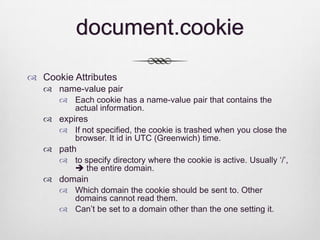
document.cookie

 Cookie Attributes
    name-value pair
       Each cookie has a name-value pair that contains the actual
        information.
    expires
       If not specified, the cookie is trashed when you close the
        browser. It id in UTC (Greenwich) time.
    path
       to specify directory where the cookie is active. Usually „/‟,
         the entire domain.
    domain
       Which domain the cookie should be sent to. Other domains
        cannot read them.
       Can‟t be set to a domain other than the one setting it.
document.cookie

 To set cookie, assign string with all attributes to
  document.cookie

 Example:
    var nextyear = new Date( );
     nextyear.setFullYear(nextyear.getFullYear( ) + 1);
    document.cookie = ”intake=33;track=PD; expires=" +
     nextyear.toGMTString( );
How to DELETE a cookie

 Create a cookie with expired date
document.referrer

 Returns the URI of the page that linked to this page.

 This is the same value the browser sends in the Referer
  HTTP header when requesting the page.

 There is also:
    document.location
    document.title
    document.domain
References
 DomScripting, Web Design with JavaScript and DOM, Jeremy
  Keith, 2008 .

 Object-Oriented JavaScript Create Scalable, reusable, high
  quality JavaScript applications and libraries, Stoyan Stefanov,
  2008.

 JavaScript by Example, Second Edition, Ellie Quigley, 2011

 JavaScript, the Definitive Guide, 5th edition, David Flanagan,
  2006

 http://www.quirksmode.org/js