Saltar al contenido principal
JavaScript

       By
Dr. Ejaz Ahmed
Scripting Language Javascript
• JavaScript was designed to add interactivity to HTML
  pages
• JavaScript is a scripting language
• A scripting language is a lightweight programming
  language
• JavaScript is usually embedded directly into HTML
  pages
• JavaScript is an interpreted language (means that
  scripts execute without preliminary compilation)
• Everyone can use JavaScript without purchasing a
  license
Are Java and JavaScript the same?
• NO!
• Java and JavaScript are two completely different
  languages in both concept and design!
• Java (developed by Sun Microsystems) is a
  powerful and much more complex programming
  language - in the same category as C and C++.
• JavaScript was invented by Brendan Eich at
  Netscape (with Navigator 2.0), and has appeared
  in all browsers since 1996.
Introduction
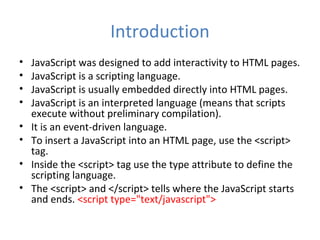
•   JavaScript was designed to add interactivity to HTML pages.
•   JavaScript is a scripting language.
•   JavaScript is usually embedded directly into HTML pages.
•   JavaScript is an interpreted language (means that scripts
    execute without preliminary compilation).
•   It is an event-driven language.
•   To insert a JavaScript into an HTML page, use the <script>
    tag.
•   Inside the <script> tag use the type attribute to define the
    scripting language.
•   The <script> and </script> tells where the JavaScript starts
    and ends. <script type="text/javascript">
How to use javascript?
• The common way to use the javascript is as follows;
• Define some HTML tag with ID attribute value given.
• In that HTML tag add/call the function statement and
  bind it to some event on which you want to invoke the
  javascript function (event handler).
• Write the said function (event handler) between
  <script> and </script> tags.
• When the page downloads, your handler will be called
  on event you described within the HTML tag.
What can a JavaScript do?
• JavaScript gives HTML designers a programming tool - HTML authors
  are normally not programmers, but JavaScript is a scripting language
  with a very simple syntax! Almost anyone can put small "snippets" of
  code into their HTML pages
• JavaScript can put dynamic text into an HTML page - A JavaScript
  statement like this:
       document.write("<h1>" + name + "</h1>")
• can write a variable text into an HTML page
• JavaScript can react to events - A JavaScript can be set to execute
  when something happens, like when a page has finished loading or
  when a user clicks on an HTML element
• JavaScript can read and write HTML elements - A JavaScript can read
  and change the content of an HTML element
• JavaScript can be used to validate data - A JavaScript can be used to
  validate form data before it is submitted to a server. This saves the
  server from extra processing
Ajax
• AJAX = Asynchronous JavaScript and XML.
• AJAX is not a new programming language, but a new way to
  use existing standards.
• AJAX is the art of exchanging data with a server, and update
  parts of a web page - without reloading the whole page.
• AJAX allows web pages to be updated asynchronously by
  exchanging small amounts of data with the server behind the
  scenes. This means that it is possible to update parts of a
  web page, without reloading the whole page.
• Classic web pages, (which do not use AJAX) must reload the
  entire page if the content should change.
• Examples of applications using AJAX: Google Maps, Gmail,
  Youtube, and Facebook tabs.
How Ajax Works?
Web Servers
•   jakarta-tomcat-5.0.28 (with jdk)
•   Dot Net (.Net) Framwork
•   IBM WebSphere
•   ZendCore
•   etc.
Getting Started with JavaScript
         Event: onclick
Introducing document
‘getElementById()’ method
Validation Through JavaScript
Example
Example …
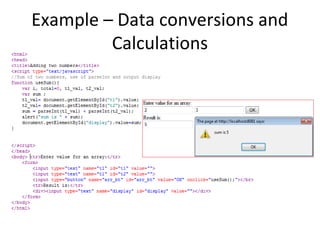
Example – Data conversions and
         Calculations
Example – Dialogue Box & Pop up
            Window
Code - Dialogue Box & Pop up
           Window
Example – Dialogue Box &
      Calculations
Pop up window and Document
           Write
HTML JavaScript Arrays