# Regex (Regular Expression)

## 1. What's it?

From the 2.3.0 version, Proxyman supports **Wildcard** and **Regex** (Match a whole word) when you define matching rules for all available tools:

* Map Local
* Map Remote
* Block & Allow List
* Breakpoints
* Protocol Buffers (Protobuf)
* Reverse Proxy
* Network Throttling
* ...

It's a handy tool to help you exactly define which requests should trigger the tool.

![Match a request by Wildcard or Regex](https://1856518738-files.gitbook.io/~/files/v0/b/gitbook-legacy-files/o/assets%2F-LlPt_6BePnJ3oK3saP1%2F-MC_ByEFfDEzSzI1C7Zz%2F-MC_DZnVSPfddI4tnDir%2FScreen%20Shot%202020-07-19%20at%2010.17.34.png?alt=media\&token=f468fd18-608d-4841-9c4b-fa47236b4f24)

## 2. Test your URL (New feature 🎉)

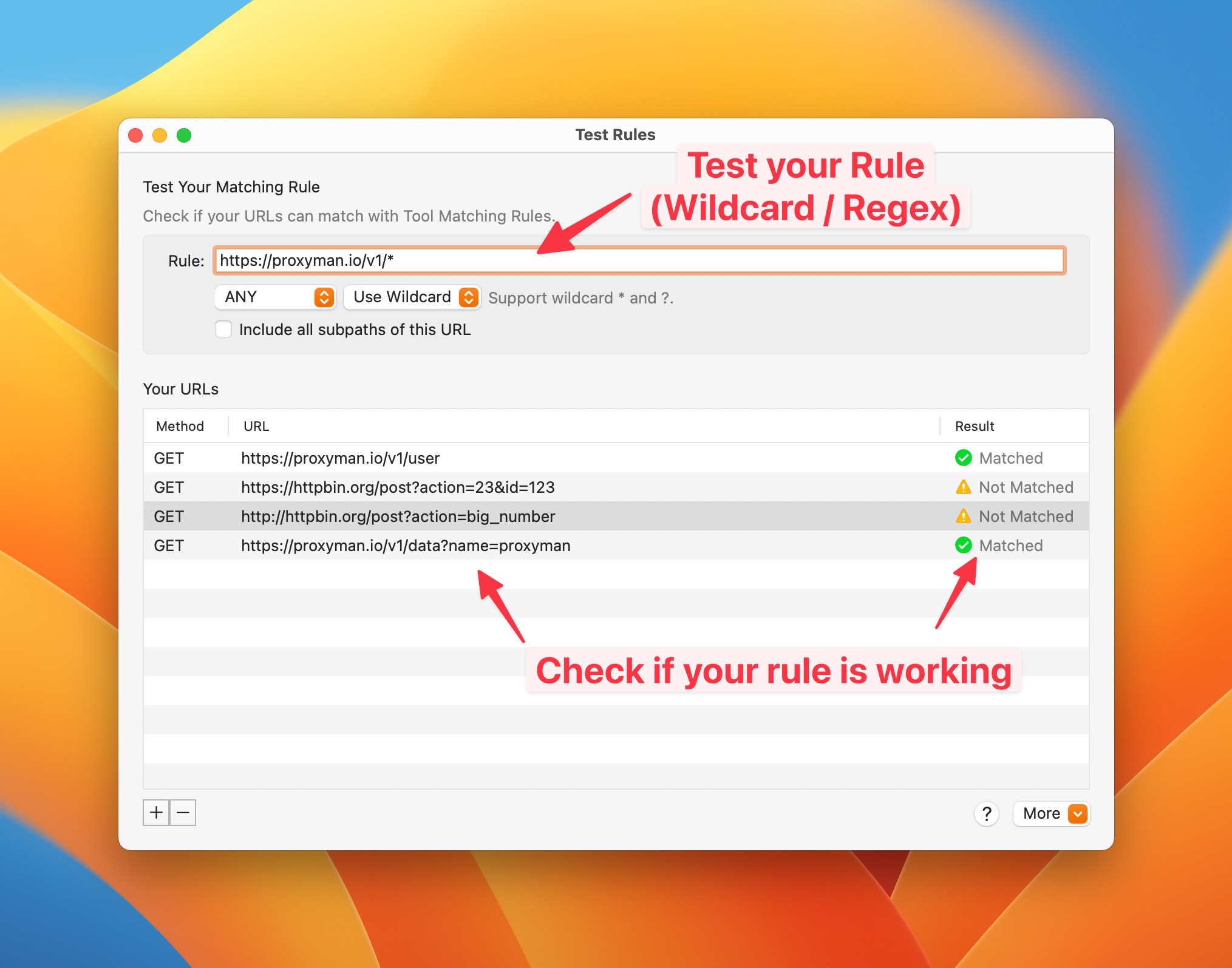
From Proxyman v4.8.0, you can quickly test your Rule (Wildcard / Regex).

* You can quickly test & play around with your Wildcard/Regex
* **Save time**: You don't need to go back and forth to check your URL.
* Less error-prone.

<figure><img src="https://1856518738-files.gitbook.io/~/files/v0/b/gitbook-x-prod.appspot.com/o/spaces%2F-LlPt_6BePnJ3oK3saP1%2Fuploads%2FCV72j0RaTiGL2BkCUv0l%2FCleanShot%202023-05-09%20at%2009.54.22%402x.jpg?alt=media&#x26;token=bf4a216a-476b-4cb1-acbd-17f6db58919c" alt=""><figcaption></figcaption></figure>

#### How to use it?

1. Open any debugging tools (Breakpoint, Map Local, ...) -> Create a new rule
2. Click on the "Test your Rule" underline button -> New Window is opened.
3. Add your Rule and URLs you'd like to check

* :white\_check\_mark: Matched: Your URL is matched with your rule.
* :warning: Not Matched: Your URL doesn't match your rule. You might rewrite your wildcard/Regex rule.

## 3. Wildcard

Proxyman supports simple Wildcard characters, which include `*` and `?`

| Wildcard | Purpose                                                              |
| -------- | -------------------------------------------------------------------- |
| `*`      | The asterisk in a wildcard matches any character zero or more times. |
| `?`      | A question mark matches a single character once.                     |

For instance:

* <http://proxyman.io/v1/\\>\*
* <https://myserver.com/v?/\\>\*

## 4. Regex

Proxyman also supports Regex.&#x20;

* Make sure your regex is **matching a whole URL**.
* **Partial Matching** is considered as not matching.
* Make sure you **escape characters** properly: Splash (/), full-stop (.), etc.

For instance:

| Regex                                                                        | Matched URL Examples                                                                                                                              |
| ---------------------------------------------------------------------------- | ------------------------------------------------------------------------------------------------------------------------------------------------- |
| https:\\/\\/proxyman\\.io.\*                                                 | <p><https://proxyman.io><br><https://proxyman.io/v1/data?id=123><br><https://proxyman.io/pricing></p>                                             |
| ^(http\|https):\\/\\/www\\.google\\.com.\*                                   | <p><http://www.google.com><br><http://www.google.com/user?id=proxyman><br><https://www.google.com></p>                                            |
| ^(http\|https)?:\\/\\/www\\.google\\.com\\/v\[0-9]?\\/build\\?query=proxyman | <p><http://www.google.com/v1/build?query=proxyman><br>[www.google.com/v2/build?query=proxyman](http://www.google.com/v2/build?query=proxyman)</p> |

You can use <https://regex101.com/> to verify your Regex that matches the whole text.

![Make sure your Regex matches whole words](https://1856518738-files.gitbook.io/~/files/v0/b/gitbook-x-prod.appspot.com/o/spaces%2F-LlPt_6BePnJ3oK3saP1%2Fuploads%2FNUJWU7lPdcdGjhR9f6ye%2F1.png?alt=media\&token=681d1a5d-e0a8-42a1-8aa5-8df6fb2adb4e)

{% hint style="info" %}
Please check the [**Regex** **Metacharacters, Operator and Flag**](https://developer.apple.com/documentation/foundation/nsregularexpression#1965590) from Apple Developer Documents to know which one is supported.
{% endhint %}

{% hint style="info" %}
Check <https://regex101.com> and make sure your Regex is full-matching with the given URL
{% endhint %}

* Select Regex when creating rules

![](https://1856518738-files.gitbook.io/~/files/v0/b/gitbook-legacy-files/o/assets%2F-LlPt_6BePnJ3oK3saP1%2F-MC_ByEFfDEzSzI1C7Zz%2F-MC_GHgRHPy8AUEjilO4%2FScreen%20Shot%202020-07-19%20at%2010.17.44.png?alt=media\&token=c380ce78-9b3f-4ee8-be9e-6e6ee31d3e76)

{% hint style="info" %}
With regular expressions the meaning of `?` and `*` is different from that of wildcards. The equivalent of wildcard `?` is the regex `.` and the equivalent of wildcard `*` is the regex `.*`
{% endhint %}