# Langflow

## About

[Langflow](https://www.langflow.org/) is a new visual framework for building multi-agent and RAG applications. It is open-source, Python-powered, fully customizable, and LLM and vector store agnostic.

Its intuitive interface allows for easy manipulation of AI building blocks, enabling developers to quickly prototype and turn their ideas into powerful, real-world solutions.

## How to Use AIML API via Langflow

A user of the Langflow framework can create a working AI pipeline (a *flow*) by simply adding visual components, connecting their inputs and outputs in the required order, and setting various available parameters in each component.

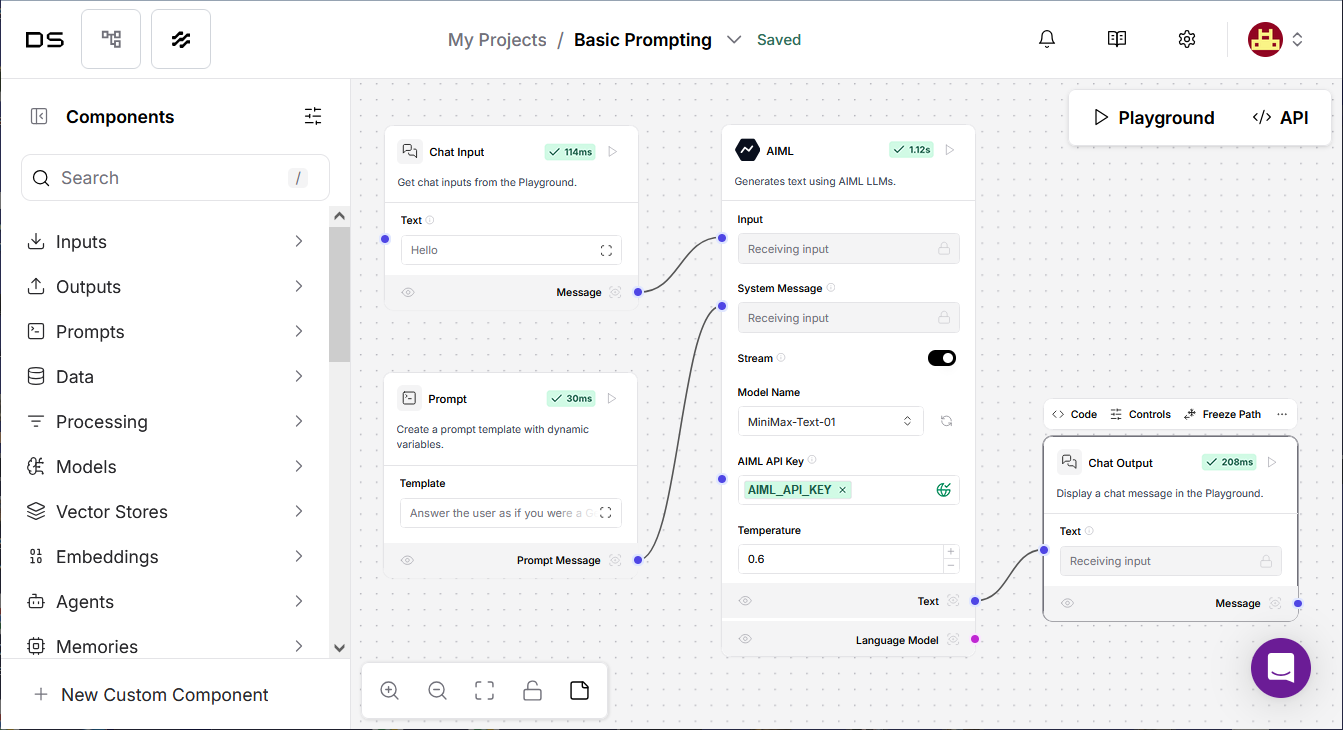
At the center of such a flow is one or more sequential **model components** that generate text using LLMs. Choose **Models > AIML** in the sidebar, then click the "+" button or simply drag and drop the model element onto the work area. After that, connect it to your input and output elements:

<figure><img src="https://3927338786-files.gitbook.io/~/files/v0/b/gitbook-x-prod.appspot.com/o/spaces%2FROMd1X5PuqtikJ48n2N9%2Fuploads%2Fgit-blob-18cc3bc036ab2851f7b57250f9d4714320d12d7b%2Flangflow%20aimlapi%20flow.png?alt=media" alt=""><figcaption><p>The component at the center creates a chat model instance powered by AIML API.</p></figcaption></figure>

### Inputs <a href="#inputs" id="inputs"></a>

{% hint style="info" %}
Only 1-2 key parameters are usually displayed directly on the model component body. To configure most parameters, you need to click on the model element and then click the **Controls** button that appears above the model component.
{% endhint %}

<table><thead><tr><th width="177">Name</th><th width="161">Type</th><th>Description</th></tr></thead><tbody><tr><td><code>max_tokens</code></td><td>Integer</td><td>The maximum number of tokens to generate. Set to 0 for unlimited tokens. Range: 0-128000.</td></tr><tr><td><code>model_kwargs</code></td><td>Dictionary</td><td>Additional keyword arguments for the model.</td></tr><tr><td><code>model_name</code></td><td>String</td><td>The name of the AIML model to use. Options are predefined in <code>AIML_CHAT_MODELS</code>.</td></tr><tr><td><code>aiml_api_base</code></td><td>String</td><td>The base URL of the AIML API. Defaults to <code>https://api.aimlapi.com</code>.</td></tr><tr><td><code>api_key</code></td><td>SecretString</td><td>The AIML API Key to use for the model.</td></tr><tr><td><code>temperature</code></td><td>Float</td><td>Controls randomness in the output. Default: <code>0.1</code>.</td></tr><tr><td><code>seed</code></td><td>Integer</td><td>Controls reproducibility of the job.</td></tr></tbody></table>

### Outputs <a href="#outputs" id="outputs"></a>

<table><thead><tr><th width="178">Name</th><th width="164.0001220703125">Type</th><th>Description</th></tr></thead><tbody><tr><td><code>text</code></td><td>String</td><td>Chat model response.</td></tr><tr><td><code>model</code></td><td>LanguageModel</td><td>An instance of ChatOpenAI configured with the specified parameters.</td></tr></tbody></table>

For further information about the framework, please check [the official Langflow documentation](https://docs.langflow.org/).
