<?xml version="1.0" encoding="utf-8"?>
<feed xmlns="http://www.w3.org/2005/Atom">
    <id>https://casbin.org/ja/blog</id>
    <title>Apache Casbin (Incubating) Blog</title>
    <updated>2025-12-11T00:00:00.000Z</updated>
    <generator>https://github.com/jpmonette/feed</generator>
    <link rel="alternate" href="https://casbin.org/ja/blog"/>
    <subtitle>Apache Casbin (Incubating) Blog</subtitle>
    <icon>https://casbin.org/ja/img/favicon.png</icon>
    <entry>
        <title type="html"><![CDATA[Casbin in 2025: Authorization for the AI Agent Era]]></title>
        <id>https://casbin.org/ja/blog/casbin-2025-ai-agent-era</id>
        <link href="https://casbin.org/ja/blog/casbin-2025-ai-agent-era"/>
        <updated>2025-12-11T00:00:00.000Z</updated>
        <summary type="html"><![CDATA[2024 was the year AI agents moved from demos to production. The Model Context Protocol (MCP) has been adopted by Google, OpenAI, Microsoft, and many others, and the way applications talk to external services is changing. That shift brings a new set of authorization challenges we at Casbin have been working on.]]></summary>
        <content type="html"><![CDATA[<p>2024 was the year AI agents moved from demos to production. The Model Context Protocol (MCP) has been adopted by Google, OpenAI, Microsoft, and many others, and the way applications talk to external services is changing. That shift brings a new set of authorization challenges we at Casbin have been working on.</p>
<h2 class="anchor anchorTargetHideOnScrollNavbar_vjPI" id="the-world-has-changed">The World Has Changed<a href="https://casbin.org/ja/blog/casbin-2025-ai-agent-era#the-world-has-changed" class="hash-link" aria-label="The World Has Changed への直接リンク" title="The World Has Changed への直接リンク" translate="no">​</a></h2>
<p>When we started Casbin back in 2017, the typical authorization scenario was straightforward: a user makes a request, we check if they have permission, done. Today? An AI agent might be acting on behalf of a user, calling multiple MCP servers, each with their own tool permissions, and the whole thing needs to happen in milliseconds at the edge.</p>
<p>The MCP spec now classifies MCP servers as OAuth 2.0 Resource Servers (June 2025 update), with fine-grained scopes like <code>mcp:tools:weather</code> or <code>mcp:resources:customer-data:read</code>. That is the kind of granular permission model Casbin was built for; integration with MCP and OAuth still needs more work.</p>
<h2 class="anchor anchorTargetHideOnScrollNavbar_vjPI" id="what-were-working-on">What We're Working On<a href="https://casbin.org/ja/blog/casbin-2025-ai-agent-era#what-were-working-on" class="hash-link" aria-label="What We're Working On への直接リンク" title="What We're Working On への直接リンク" translate="no">​</a></h2>
<h3 class="anchor anchorTargetHideOnScrollNavbar_vjPI" id="mcp-server-authorization">MCP Server Authorization<a href="https://casbin.org/ja/blog/casbin-2025-ai-agent-era#mcp-server-authorization" class="hash-link" aria-label="MCP Server Authorization への直接リンク" title="MCP Server Authorization への直接リンク" translate="no">​</a></h3>
<p>This is one of our main focus areas. When an AI agent calls an MCP server, the server must decide: can this agent, on behalf of this user, invoke this tool with these parameters?</p>
<p>Traditional RBAC is not enough. You need something like ABAC—e.g. “is this agent allowed to access customer data for Alice’s region during business hours?” We are exploring how Casbin’s policy model can express these constraints.</p>
<p>The catch: MCP servers must decide very quickly. We are looking at lightweight policy evaluation inside the MCP server process instead of calling a separate authorization service.</p>
<h3 class="anchor anchorTargetHideOnScrollNavbar_vjPI" id="edge-first-authorization">Edge-First Authorization<a href="https://casbin.org/ja/blog/casbin-2025-ai-agent-era#edge-first-authorization" class="hash-link" aria-label="Edge-First Authorization への直接リンク" title="Edge-First Authorization への直接リンク" translate="no">​</a></h3>
<p>Cloudflare Workers, Deno Deploy, Vercel Edge Functions - the edge computing space has exploded. In 2025, sub-50ms response times are table stakes, and you can't afford to add 100ms for an authorization check to some central server.</p>
<p>This is pushing us to think differently about how Casbin works. Can we compile policies to WebAssembly and run them directly in V8 isolates? Can we do smart policy caching at the edge while maintaining consistency? These are hard problems, and we don't have all the answers yet, but it's where things are heading.</p>
<p>We're particularly interested in the Cloudflare Workers ecosystem - they've built out a whole platform for MCP servers with built-in OAuth support. A native Casbin integration there could be powerful.</p>
<h3 class="anchor anchorTargetHideOnScrollNavbar_vjPI" id="rag-pipeline-authorization">RAG Pipeline Authorization<a href="https://casbin.org/ja/blog/casbin-2025-ai-agent-era#rag-pipeline-authorization" class="hash-link" aria-label="RAG Pipeline Authorization への直接リンク" title="RAG Pipeline Authorization への直接リンク" translate="no">​</a></h3>
<p>A recurring theme: companies building RAG systems where the LLM must access internal documents, but each user should only see documents they are allowed to see.</p>
<p>The OWASP Top 10 for LLM Applications 2025 lists “Sensitive Information Disclosure” as a major risk. The fix is not only to filter outputs but to ensure the LLM never retrieves documents the user is not authorized to access.</p>
<p>So authorization must happen at the vector store query level. We are looking at turning Casbin policies into metadata filters for vector DBs—i.e. a permission check becomes a WHERE clause pushed down to retrieval.</p>
<h3 class="anchor anchorTargetHideOnScrollNavbar_vjPI" id="multi-agent-scenarios">Multi-Agent Scenarios<a href="https://casbin.org/ja/blog/casbin-2025-ai-agent-era#multi-agent-scenarios" class="hash-link" aria-label="Multi-Agent Scenarios への直接リンク" title="Multi-Agent Scenarios への直接リンク" translate="no">​</a></h3>
<p>With multiple agents in a chain (e.g. coding agent → deployment agent → monitoring agent), permission delegation is tricky. Each agent may have different capabilities, and you must track the full chain.</p>
<p>OAuth’s On-Behalf-Of (OBO) flow covers part of this, but the logic for “can agent B do X on behalf of agent A on behalf of user alice” needs a clear model. Casbin’s role hierarchies and domain RBAC could extend to agent hierarchies; we are working through the semantics.</p>
<h2 class="anchor anchorTargetHideOnScrollNavbar_vjPI" id="the-traditional-roadmap-stuff">The Traditional Roadmap Stuff<a href="https://casbin.org/ja/blog/casbin-2025-ai-agent-era#the-traditional-roadmap-stuff" class="hash-link" aria-label="The Traditional Roadmap Stuff への直接リンク" title="The Traditional Roadmap Stuff への直接リンク" translate="no">​</a></h2>
<p>Of course, we're not abandoning the basics. Some practical things on our list:</p>
<p><strong>Language implementations catching up</strong> - SwiftCasbin and Lua-Casbin are still behind on features compared to the Go and Node.js versions. The <code>in</code> operator, WatcherEx, better caching for the <code>g</code> function - these need to be consistent everywhere.</p>
<p><strong>New framework middlewares</strong> - go-zero has been requested repeatedly. Poem for Rust is gaining traction. Play Framework for Java has been on the wishlist forever.</p>
<p><strong>Performance work</strong> - As policies get more complex for these new use cases, evaluation speed matters more. We need better benchmarking, profiling, and optimization across all implementations.</p>
<h2 class="anchor anchorTargetHideOnScrollNavbar_vjPI" id="what-we-dont-know-yet">What we don’t know yet<a href="https://casbin.org/ja/blog/casbin-2025-ai-agent-era#what-we-dont-know-yet" class="hash-link" aria-label="What we don’t know yet への直接リンク" title="What we don’t know yet への直接リンク" translate="no">​</a></h2>
<p>The AI agent authorization space is moving fast; we are learning as we go. Open questions:</p>
<ul>
<li class="">Should Casbin have first-class primitives for "agent identity" vs "user identity"?</li>
<li class="">How do you handle authorization for tools that are dynamically discovered via MCP?</li>
<li class="">What's the right caching strategy when policies might depend on real-time context?</li>
</ul>
<p>If you are building in this space and hitting authorization problems, we want to hear from you. The best features come from real use cases.</p>
<h2 class="anchor anchorTargetHideOnScrollNavbar_vjPI" id="getting-involved">Getting involved<a href="https://casbin.org/ja/blog/casbin-2025-ai-agent-era#getting-involved" class="hash-link" aria-label="Getting involved への直接リンク" title="Getting involved への直接リンク" translate="no">​</a></h2>
<p>We have been a GSoC organization for years, and these AI-related topics are a good fit for summer projects. You do not need to wait for GSoC—if this sounds interesting, reach out on Discord or open an issue on GitHub.</p>
<p>The next few years are going to be wild for authorization. The problems are harder, but also more interesting. We're excited to figure them out together.</p>]]></content>
        <author>
            <name>Yang Luo</name>
            <uri>https://github.com/hsluoyz</uri>
        </author>
        <category label="casbin" term="casbin"/>
        <category label="roadmap" term="roadmap"/>
        <category label="AI" term="AI"/>
        <category label="MCP" term="MCP"/>
        <category label="edge-computing" term="edge-computing"/>
        <category label="LLM" term="LLM"/>
    </entry>
    <entry>
        <title type="html"><![CDATA[Understanding How Casbin Matching Works in Detail]]></title>
        <id>https://casbin.org/ja/blog/2023/12/08/understanding-casbin-matching-in-detail</id>
        <link href="https://casbin.org/ja/blog/2023/12/08/understanding-casbin-matching-in-detail"/>
        <updated>2023-12-08T00:00:00.000Z</updated>
        <summary type="html"><![CDATA[This post explains how to design and implement RBAC with the Casbin library. For SaaS platforms with resource hierarchies and roles that inherit permissions, Casbin is a performant option.]]></summary>
        <content type="html"><![CDATA[<p>This post explains how to design and implement RBAC with the <a href="https://casbin.org/" target="_blank" rel="noopener noreferrer" class="">Casbin</a> library. For SaaS platforms with resource hierarchies and roles that inherit permissions, Casbin is a performant option.</p>
<h2 class="anchor anchorTargetHideOnScrollNavbar_vjPI" id="introduction-to-rbac">Introduction to RBAC<a href="https://casbin.org/ja/blog/2023/12/08/understanding-casbin-matching-in-detail#introduction-to-rbac" class="hash-link" aria-label="Introduction to RBAC への直接リンク" title="Introduction to RBAC への直接リンク" translate="no">​</a></h2>
<p>RBAC restricts access based on the roles users hold. To see how <strong>hierarchical</strong> RBAC works, we look at Azure’s RBAC and then implement something similar in Casbin.</p>
<h2 class="anchor anchorTargetHideOnScrollNavbar_vjPI" id="azures-hierarchical-rbac">Azure’s hierarchical RBAC<a href="https://casbin.org/ja/blog/2023/12/08/understanding-casbin-matching-in-detail#azures-hierarchical-rbac" class="hash-link" aria-label="Azure’s hierarchical RBAC への直接リンク" title="Azure’s hierarchical RBAC への直接リンク" translate="no">​</a></h2>
<p><img decoding="async" loading="lazy" alt="Azure Hierarchy" src="https://casbin.org/ja/assets/images/azure-scope-levels-ab777b508163e62784aaf8f3e05f1db5.png" width="433" height="281" class="img_ev3q"></p>
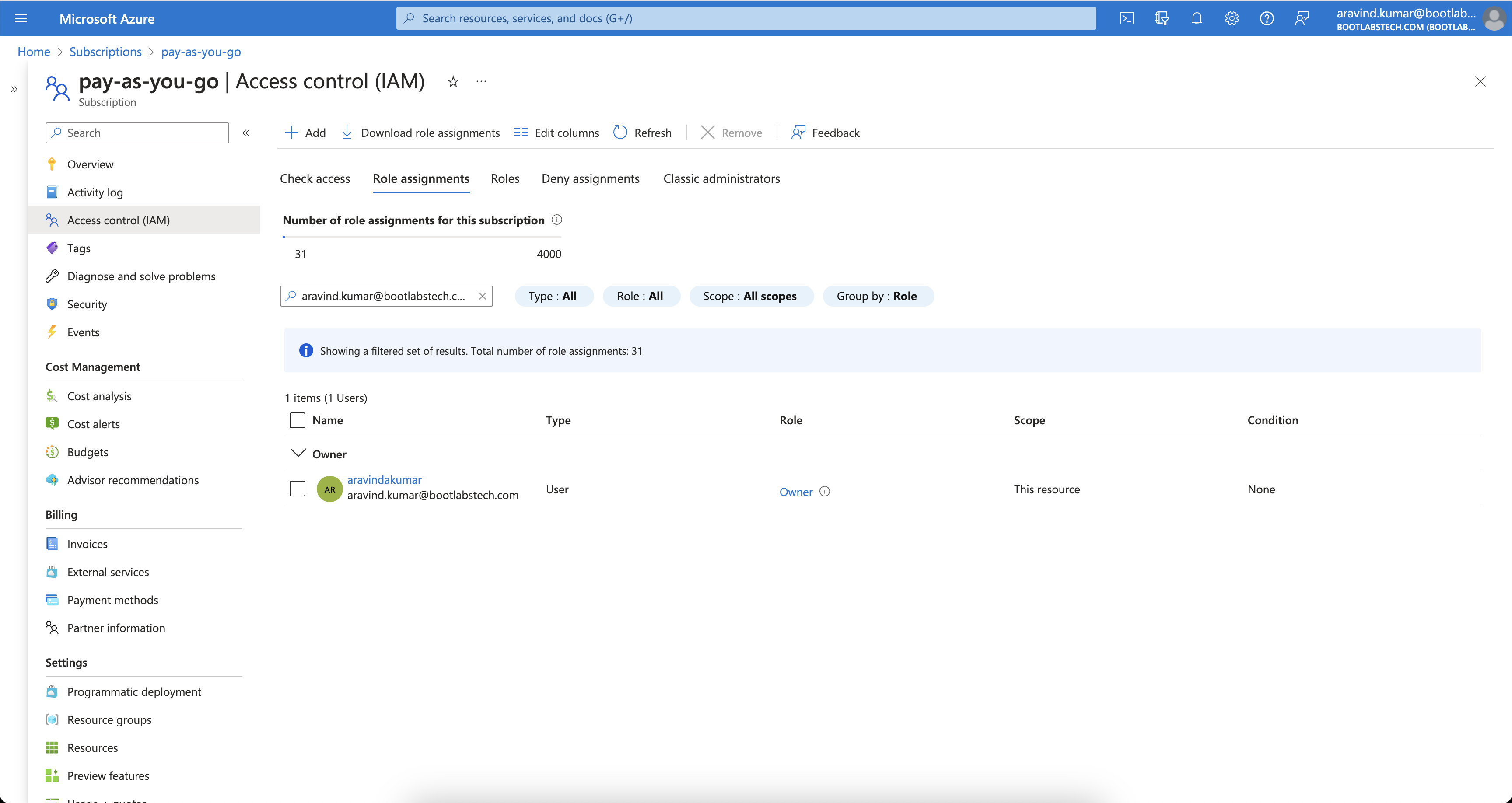
<p>In Azure, the <strong>Owner</strong> role applies at different scopes. If I have <strong>Owner</strong> at the subscription level, I am Owner of all resource groups and resources under that subscription. If I have Owner at a resource group level, I am Owner of all resources in that group.</p>
<p>The image below shows Owner access at the subscription level. <img decoding="async" loading="lazy" alt="Subscription Owner" src="https://casbin.org/ja/assets/images/subscription-owner-f1a7e1c9c03d7c587ce910ae5e6d8a35.png" width="3456" height="1836" class="img_ev3q"></p>
<p>Checking IAM for a resource group under that subscription shows inherited Owner access. <img decoding="async" loading="lazy" alt="RG Owner" src="https://casbin.org/ja/assets/images/rg-owner-9c6cd2ae5997a5fba717c445f43130e6.png" width="3456" height="1836" class="img_ev3q"></p>
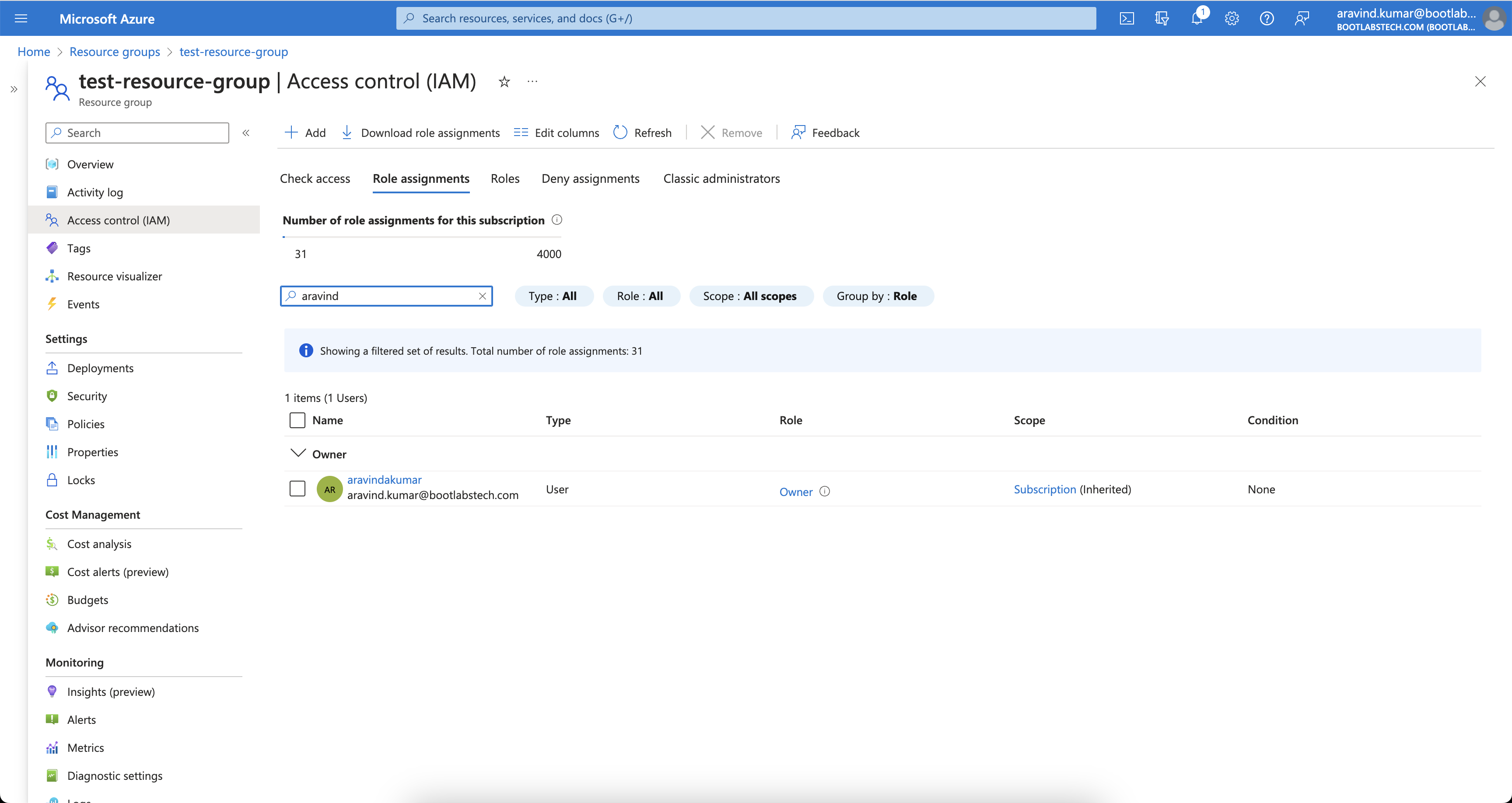
<p>That is how Azure’s RBAC is hierarchical. Many systems use similar hierarchies. In this tutorial we implement a comparable model with Casbin.</p>
<h2 class="anchor anchorTargetHideOnScrollNavbar_vjPI" id="how-casbin-works">How Casbin works<a href="https://casbin.org/ja/blog/2023/12/08/understanding-casbin-matching-in-detail#how-casbin-works" class="hash-link" aria-label="How Casbin works への直接リンク" title="How Casbin works への直接リンク" translate="no">​</a></h2>
<p>Understanding Casbin’s building blocks (request, policy, matcher, effect) makes it easier to design and tune your RBAC model.</p>
<h2 class="anchor anchorTargetHideOnScrollNavbar_vjPI" id="what-is-acl">What is ACL?<a href="https://casbin.org/ja/blog/2023/12/08/understanding-casbin-matching-in-detail#what-is-acl" class="hash-link" aria-label="What is ACL? への直接リンク" title="What is ACL? への直接リンク" translate="no">​</a></h2>
<p><strong>ACL (Access Control List)</strong> maps users to actions and actions to resources.</p>
<h3 class="anchor anchorTargetHideOnScrollNavbar_vjPI" id="model-definition">Model definition<a href="https://casbin.org/ja/blog/2023/12/08/understanding-casbin-matching-in-detail#model-definition" class="hash-link" aria-label="Model definition への直接リンク" title="Model definition への直接リンク" translate="no">​</a></h3>
<p>A minimal ACL model:</p>
<div class="language-toml codeBlockContainer_Ckt0 theme-code-block" style="--prism-color:#393A34;--prism-background-color:#f6f8fa"><div class="codeBlockContent_QJqH"><pre tabindex="0" class="prism-code language-toml codeBlock_bY9V thin-scrollbar" style="color:#393A34;background-color:#f6f8fa"><code class="codeBlockLines_e6Vv"><span class="token-line" style="color:#393A34"><span class="token plain">[request_definition]</span><br></span><span class="token-line" style="color:#393A34"><span class="token plain">r = sub, act, obj</span><br></span><span class="token-line" style="color:#393A34"><span class="token plain" style="display:inline-block"></span><br></span><span class="token-line" style="color:#393A34"><span class="token plain">[policy_definition]</span><br></span><span class="token-line" style="color:#393A34"><span class="token plain">p = sub, act, obj</span><br></span><span class="token-line" style="color:#393A34"><span class="token plain" style="display:inline-block"></span><br></span><span class="token-line" style="color:#393A34"><span class="token plain">[policy_effect]</span><br></span><span class="token-line" style="color:#393A34"><span class="token plain">e = some(where (p.eft == allow))</span><br></span><span class="token-line" style="color:#393A34"><span class="token plain" style="display:inline-block"></span><br></span><span class="token-line" style="color:#393A34"><span class="token plain">[matchers]</span><br></span><span class="token-line" style="color:#393A34"><span class="token plain">m = r.sub == p.sub &amp;&amp; r.obj == p.obj &amp;&amp; r.act == p.act</span><br></span></code></pre></div></div>
<ol>
<li class=""><strong>request_definition</strong> — Defines the request format. E.g. <code>alice, write, data1</code> means “Can Alice write data1?”</li>
<li class=""><strong>policy_definition</strong> — Defines the policy format. E.g. a policy <code>alice, write, data1</code> grants Alice permission to write data1.</li>
<li class=""><strong>policy_effect</strong> — How multiple matching policies are combined (e.g. allow-override).</li>
<li class=""><strong>matchers</strong> — The condition that must hold: <code>r.sub == p.sub &amp;&amp; r.obj == p.obj &amp;&amp; r.act == p.act</code>.</li>
</ol>
<h3 class="anchor anchorTargetHideOnScrollNavbar_vjPI" id="try-it-in-the-casbin-editor">Try it in the Casbin editor<a href="https://casbin.org/ja/blog/2023/12/08/understanding-casbin-matching-in-detail#try-it-in-the-casbin-editor" class="hash-link" aria-label="Try it in the Casbin editor への直接リンク" title="Try it in the Casbin editor への直接リンク" translate="no">​</a></h3>
<p>Open the <a href="https://casbin.org/editor" target="_blank" rel="noopener noreferrer" class="">Casbin editor</a> and paste the model above into the Model editor.</p>
<p>Paste the following in the Policy editor:</p>
<div class="language-csv codeBlockContainer_Ckt0 theme-code-block" style="--prism-color:#393A34;--prism-background-color:#f6f8fa"><div class="codeBlockContent_QJqH"><pre tabindex="0" class="prism-code language-csv codeBlock_bY9V thin-scrollbar" style="color:#393A34;background-color:#f6f8fa"><code class="codeBlockLines_e6Vv"><span class="token-line" style="color:#393A34"><span class="token value">p</span><span class="token punctuation" style="color:#393A34">,</span><span class="token value"> alice</span><span class="token punctuation" style="color:#393A34">,</span><span class="token value"> read</span><span class="token punctuation" style="color:#393A34">,</span><span class="token value"> data1</span><span class="token plain"></span><br></span><span class="token-line" style="color:#393A34"><span class="token plain"></span><span class="token value">p</span><span class="token punctuation" style="color:#393A34">,</span><span class="token value"> bob</span><span class="token punctuation" style="color:#393A34">,</span><span class="token value"> write</span><span class="token punctuation" style="color:#393A34">,</span><span class="token value"> data2</span><br></span></code></pre></div></div>
<p>and the following in the Request editor:</p>
<div class="language-csv codeBlockContainer_Ckt0 theme-code-block" style="--prism-color:#393A34;--prism-background-color:#f6f8fa"><div class="codeBlockContent_QJqH"><pre tabindex="0" class="prism-code language-csv codeBlock_bY9V thin-scrollbar" style="color:#393A34;background-color:#f6f8fa"><code class="codeBlockLines_e6Vv"><span class="token-line" style="color:#393A34"><span class="token value">alice</span><span class="token punctuation" style="color:#393A34">,</span><span class="token value"> read</span><span class="token punctuation" style="color:#393A34">,</span><span class="token value"> data1</span><br></span></code></pre></div></div>
<p>The result will be:</p>
<div class="language-text codeBlockContainer_Ckt0 theme-code-block" style="--prism-color:#393A34;--prism-background-color:#f6f8fa"><div class="codeBlockContent_QJqH"><pre tabindex="0" class="prism-code language-text codeBlock_bY9V thin-scrollbar" style="color:#393A34;background-color:#f6f8fa"><code class="codeBlockLines_e6Vv"><span class="token-line" style="color:#393A34"><span class="token plain">true</span><br></span></code></pre></div></div>
<h3 class="anchor anchorTargetHideOnScrollNavbar_vjPI" id="visual-representation-of-the-acl-model-policy-and-request-matching">Visual representation of the ACL model, policy, and request matching<a href="https://casbin.org/ja/blog/2023/12/08/understanding-casbin-matching-in-detail#visual-representation-of-the-acl-model-policy-and-request-matching" class="hash-link" aria-label="Visual representation of the ACL model, policy, and request matching への直接リンク" title="Visual representation of the ACL model, policy, and request matching への直接リンク" translate="no">​</a></h3>
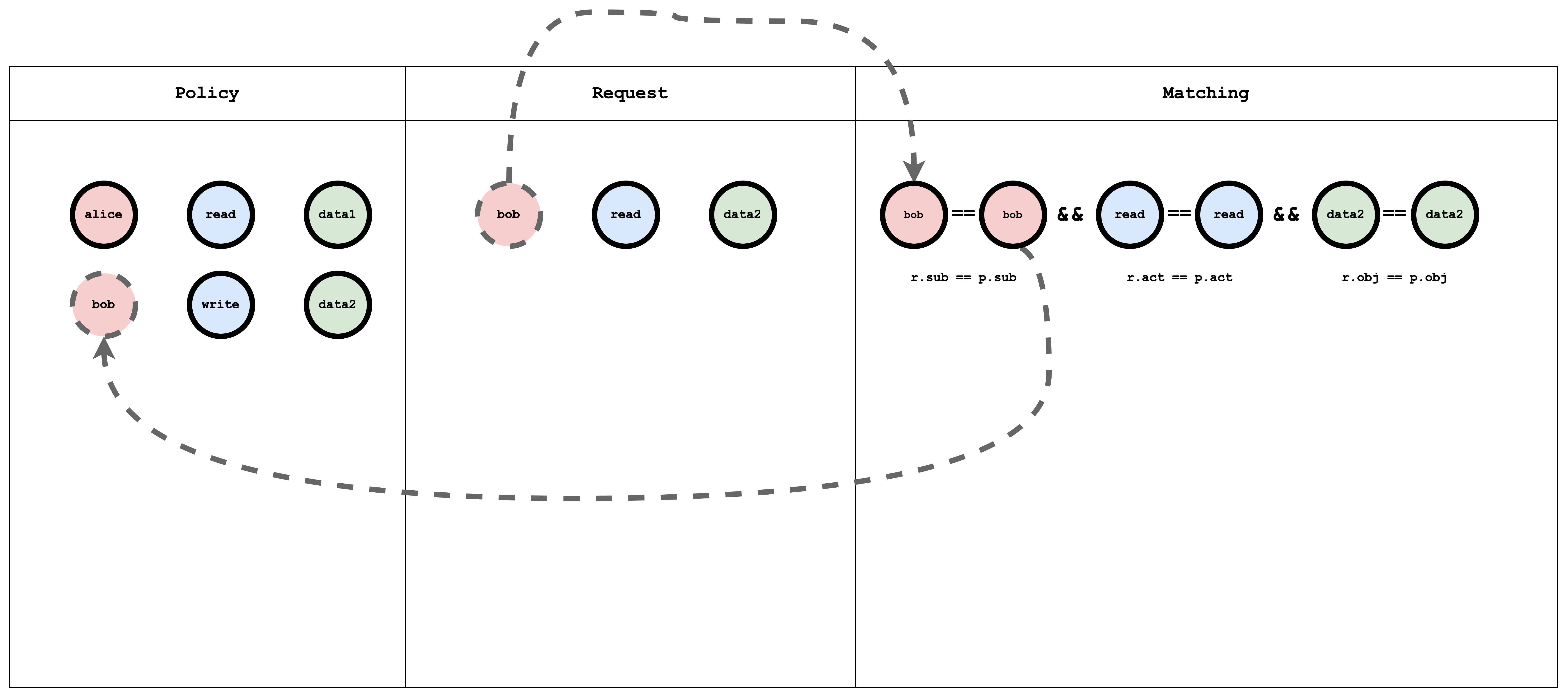
<p><img decoding="async" loading="lazy" alt="acl" src="https://casbin.org/ja/assets/images/acl-704097c47b27a1f2235c82f593af469e.png" width="6968" height="3096" class="img_ev3q"></p>
<h2 class="anchor anchorTargetHideOnScrollNavbar_vjPI" id="what-is-rbac">What is RBAC?<a href="https://casbin.org/ja/blog/2023/12/08/understanding-casbin-matching-in-detail#what-is-rbac" class="hash-link" aria-label="What is RBAC? への直接リンク" title="What is RBAC? への直接リンク" translate="no">​</a></h2>
<p><strong>RBAC (Role-Based Access Control)</strong> assigns users to roles; roles have permissions on resources. A request checks whether the user’s role allows the action on the resource.</p>
<h3 class="anchor anchorTargetHideOnScrollNavbar_vjPI" id="model-definition-1">Model definition<a href="https://casbin.org/ja/blog/2023/12/08/understanding-casbin-matching-in-detail#model-definition-1" class="hash-link" aria-label="Model definition への直接リンク" title="Model definition への直接リンク" translate="no">​</a></h3>
<p>A simple RBAC model:</p>
<div class="language-toml codeBlockContainer_Ckt0 theme-code-block" style="--prism-color:#393A34;--prism-background-color:#f6f8fa"><div class="codeBlockContent_QJqH"><pre tabindex="0" class="prism-code language-toml codeBlock_bY9V thin-scrollbar" style="color:#393A34;background-color:#f6f8fa"><code class="codeBlockLines_e6Vv"><span class="token-line" style="color:#393A34"><span class="token plain">[request_definition]</span><br></span><span class="token-line" style="color:#393A34"><span class="token plain">r = sub, act, obj</span><br></span><span class="token-line" style="color:#393A34"><span class="token plain" style="display:inline-block"></span><br></span><span class="token-line" style="color:#393A34"><span class="token plain">[policy_definition]</span><br></span><span class="token-line" style="color:#393A34"><span class="token plain">p = sub, act, obj</span><br></span><span class="token-line" style="color:#393A34"><span class="token plain" style="display:inline-block"></span><br></span><span class="token-line" style="color:#393A34"><span class="token plain">[role_definition]</span><br></span><span class="token-line" style="color:#393A34"><span class="token plain">g = _, _</span><br></span><span class="token-line" style="color:#393A34"><span class="token plain">g2 = _, _</span><br></span><span class="token-line" style="color:#393A34"><span class="token plain" style="display:inline-block"></span><br></span><span class="token-line" style="color:#393A34"><span class="token plain">[policy_effect]</span><br></span><span class="token-line" style="color:#393A34"><span class="token plain">e = some(where (p.eft == allow))</span><br></span><span class="token-line" style="color:#393A34"><span class="token plain" style="display:inline-block"></span><br></span><span class="token-line" style="color:#393A34"><span class="token plain">[matchers]</span><br></span><span class="token-line" style="color:#393A34"><span class="token plain">m = r.sub == p.sub &amp;&amp; g(p.act, r.act) &amp;&amp; r.obj == p.obj</span><br></span></code></pre></div></div>
<ol>
<li class=""><strong>role_definition</strong> — Defines graph relations (e.g. <code>g</code> for role–role or user–role). The matcher uses these to resolve roles and permissions.</li>
</ol>
<h3 class="anchor anchorTargetHideOnScrollNavbar_vjPI" id="try-it-in-the-casbin-editor-1">Try it in the Casbin editor<a href="https://casbin.org/ja/blog/2023/12/08/understanding-casbin-matching-in-detail#try-it-in-the-casbin-editor-1" class="hash-link" aria-label="Try it in the Casbin editor への直接リンク" title="Try it in the Casbin editor への直接リンク" translate="no">​</a></h3>
<p>Open the <a href="https://casbin.org/editor" target="_blank" rel="noopener noreferrer" class="">editor</a> and paste the model above.</p>
<p>Paste the following in the Policy editor:</p>
<div class="language-csv codeBlockContainer_Ckt0 theme-code-block" style="--prism-color:#393A34;--prism-background-color:#f6f8fa"><div class="codeBlockContent_QJqH"><pre tabindex="0" class="prism-code language-csv codeBlock_bY9V thin-scrollbar" style="color:#393A34;background-color:#f6f8fa"><code class="codeBlockLines_e6Vv"><span class="token-line" style="color:#393A34"><span class="token value">p</span><span class="token punctuation" style="color:#393A34">,</span><span class="token value"> alice</span><span class="token punctuation" style="color:#393A34">,</span><span class="token value"> reader</span><span class="token punctuation" style="color:#393A34">,</span><span class="token value"> data1</span><span class="token plain"></span><br></span><span class="token-line" style="color:#393A34"><span class="token plain"></span><span class="token value">p</span><span class="token punctuation" style="color:#393A34">,</span><span class="token value"> bob</span><span class="token punctuation" style="color:#393A34">,</span><span class="token value"> owner</span><span class="token punctuation" style="color:#393A34">,</span><span class="token value"> data2</span><span class="token plain"></span><br></span><span class="token-line" style="color:#393A34"><span class="token plain" style="display:inline-block"></span><br></span><span class="token-line" style="color:#393A34"><span class="token plain"></span><span class="token value">g</span><span class="token punctuation" style="color:#393A34">,</span><span class="token value"> reader</span><span class="token punctuation" style="color:#393A34">,</span><span class="token value"> read</span><span class="token plain"></span><br></span><span class="token-line" style="color:#393A34"><span class="token plain"></span><span class="token value">g</span><span class="token punctuation" style="color:#393A34">,</span><span class="token value"> owner</span><span class="token punctuation" style="color:#393A34">,</span><span class="token value"> read</span><span class="token plain"></span><br></span><span class="token-line" style="color:#393A34"><span class="token plain"></span><span class="token value">g</span><span class="token punctuation" style="color:#393A34">,</span><span class="token value"> owner</span><span class="token punctuation" style="color:#393A34">,</span><span class="token value"> write</span><br></span></code></pre></div></div>
<p>and the following in the Request editor:</p>
<div class="language-csv codeBlockContainer_Ckt0 theme-code-block" style="--prism-color:#393A34;--prism-background-color:#f6f8fa"><div class="codeBlockContent_QJqH"><pre tabindex="0" class="prism-code language-csv codeBlock_bY9V thin-scrollbar" style="color:#393A34;background-color:#f6f8fa"><code class="codeBlockLines_e6Vv"><span class="token-line" style="color:#393A34"><span class="token value">alice</span><span class="token punctuation" style="color:#393A34">,</span><span class="token value"> read</span><span class="token punctuation" style="color:#393A34">,</span><span class="token value"> data1</span><span class="token plain"></span><br></span><span class="token-line" style="color:#393A34"><span class="token plain"></span><span class="token value">alice</span><span class="token punctuation" style="color:#393A34">,</span><span class="token value"> write</span><span class="token punctuation" style="color:#393A34">,</span><span class="token value"> data1</span><span class="token plain"></span><br></span><span class="token-line" style="color:#393A34"><span class="token plain"></span><span class="token value">bob</span><span class="token punctuation" style="color:#393A34">,</span><span class="token value"> write</span><span class="token punctuation" style="color:#393A34">,</span><span class="token value"> data2</span><span class="token plain"></span><br></span><span class="token-line" style="color:#393A34"><span class="token plain"></span><span class="token value">bob</span><span class="token punctuation" style="color:#393A34">,</span><span class="token value"> read</span><span class="token punctuation" style="color:#393A34">,</span><span class="token value"> data2</span><span class="token plain"></span><br></span><span class="token-line" style="color:#393A34"><span class="token plain"></span><span class="token value">bob</span><span class="token punctuation" style="color:#393A34">,</span><span class="token value"> write</span><span class="token punctuation" style="color:#393A34">,</span><span class="token value"> data1</span><br></span></code></pre></div></div>
<p>The result will be:</p>
<div class="language-text codeBlockContainer_Ckt0 theme-code-block" style="--prism-color:#393A34;--prism-background-color:#f6f8fa"><div class="codeBlockContent_QJqH"><pre tabindex="0" class="prism-code language-text codeBlock_bY9V thin-scrollbar" style="color:#393A34;background-color:#f6f8fa"><code class="codeBlockLines_e6Vv"><span class="token-line" style="color:#393A34"><span class="token plain">true</span><br></span><span class="token-line" style="color:#393A34"><span class="token plain">false</span><br></span><span class="token-line" style="color:#393A34"><span class="token plain">true</span><br></span><span class="token-line" style="color:#393A34"><span class="token plain">true</span><br></span><span class="token-line" style="color:#393A34"><span class="token plain">false</span><br></span></code></pre></div></div>
<h3 class="anchor anchorTargetHideOnScrollNavbar_vjPI" id="visual-representation-of-the-rbac-model-policy-and-request-matching">Visual representation of the RBAC model, policy, and request matching<a href="https://casbin.org/ja/blog/2023/12/08/understanding-casbin-matching-in-detail#visual-representation-of-the-rbac-model-policy-and-request-matching" class="hash-link" aria-label="Visual representation of the RBAC model, policy, and request matching への直接リンク" title="Visual representation of the RBAC model, policy, and request matching への直接リンク" translate="no">​</a></h3>
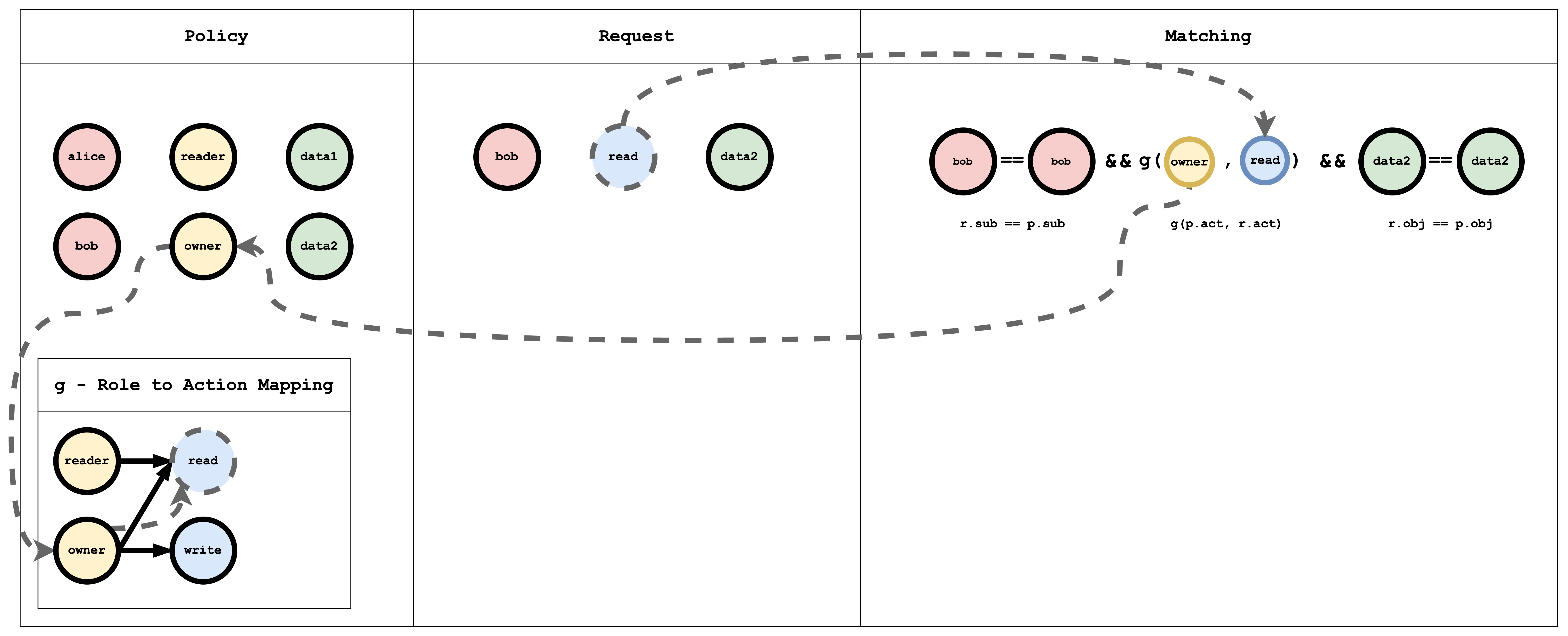
<p><img decoding="async" loading="lazy" alt="rbac" src="https://casbin.org/ja/assets/images/rbac-4c8e405408b9e4df554f7cd619eae897.png" width="7016" height="2844" class="img_ev3q"></p>
<p>The <strong>g</strong> (role-to-action) relation is a graph. In policy it is written as edges, for example:</p>
<div class="language-csv codeBlockContainer_Ckt0 theme-code-block" style="--prism-color:#393A34;--prism-background-color:#f6f8fa"><div class="codeBlockContent_QJqH"><pre tabindex="0" class="prism-code language-csv codeBlock_bY9V thin-scrollbar" style="color:#393A34;background-color:#f6f8fa"><code class="codeBlockLines_e6Vv"><span class="token-line" style="color:#393A34"><span class="token value">g</span><span class="token punctuation" style="color:#393A34">,</span><span class="token value"> reader</span><span class="token punctuation" style="color:#393A34">,</span><span class="token value"> read</span><span class="token plain"></span><br></span><span class="token-line" style="color:#393A34"><span class="token plain"></span><span class="token value">g</span><span class="token punctuation" style="color:#393A34">,</span><span class="token value"> owner</span><span class="token punctuation" style="color:#393A34">,</span><span class="token value"> read</span><span class="token plain"></span><br></span><span class="token-line" style="color:#393A34"><span class="token plain"></span><span class="token value">g</span><span class="token punctuation" style="color:#393A34">,</span><span class="token value"> owner</span><span class="token punctuation" style="color:#393A34">,</span><span class="token value"> write</span><br></span></code></pre></div></div>
<div class="theme-admonition theme-admonition-info admonition_xJq3 alert alert--info"><div class="admonitionHeading_Gvgb"><span class="admonitionIcon_Rf37"><svg viewBox="0 0 14 16"><path fill-rule="evenodd" d="M7 2.3c3.14 0 5.7 2.56 5.7 5.7s-2.56 5.7-5.7 5.7A5.71 5.71 0 0 1 1.3 8c0-3.14 2.56-5.7 5.7-5.7zM7 1C3.14 1 0 4.14 0 8s3.14 7 7 7 7-3.14 7-7-3.14-7-7-7zm1 3H6v5h2V4zm0 6H6v2h2v-2z"></path></svg></span>情報</div><div class="admonitionContent_BuS1"><p><strong>p</strong> is a normal policy (compared with <code>==</code>). <strong>g</strong> is a graph relation. You can add more with suffixes: <strong>g2</strong>, <strong>g3</strong>, etc.</p></div></div>
<h2 class="anchor anchorTargetHideOnScrollNavbar_vjPI" id="hierarchical-rbac">Hierarchical RBAC<a href="https://casbin.org/ja/blog/2023/12/08/understanding-casbin-matching-in-detail#hierarchical-rbac" class="hash-link" aria-label="Hierarchical RBAC への直接リンク" title="Hierarchical RBAC への直接リンク" translate="no">​</a></h2>
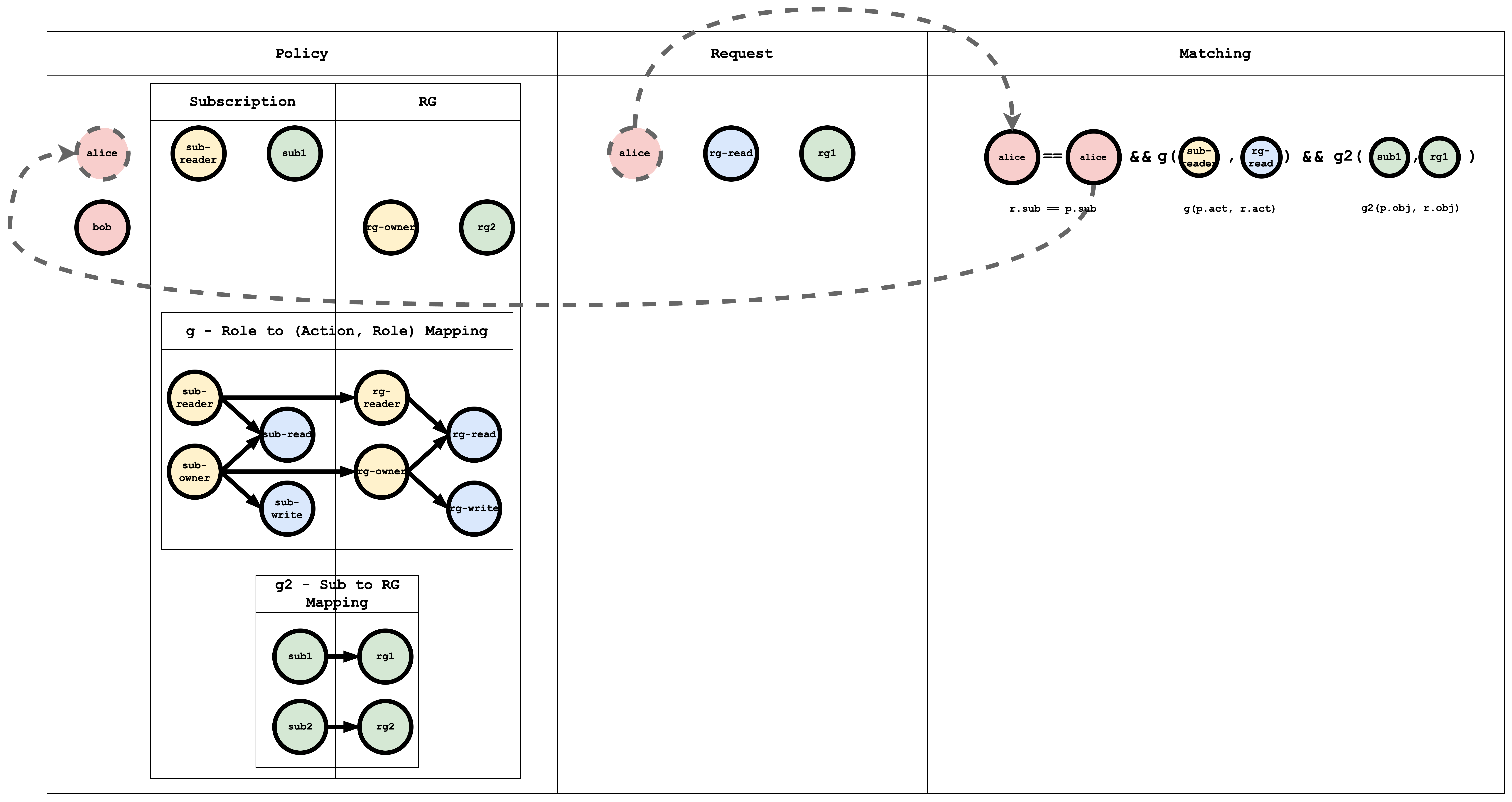
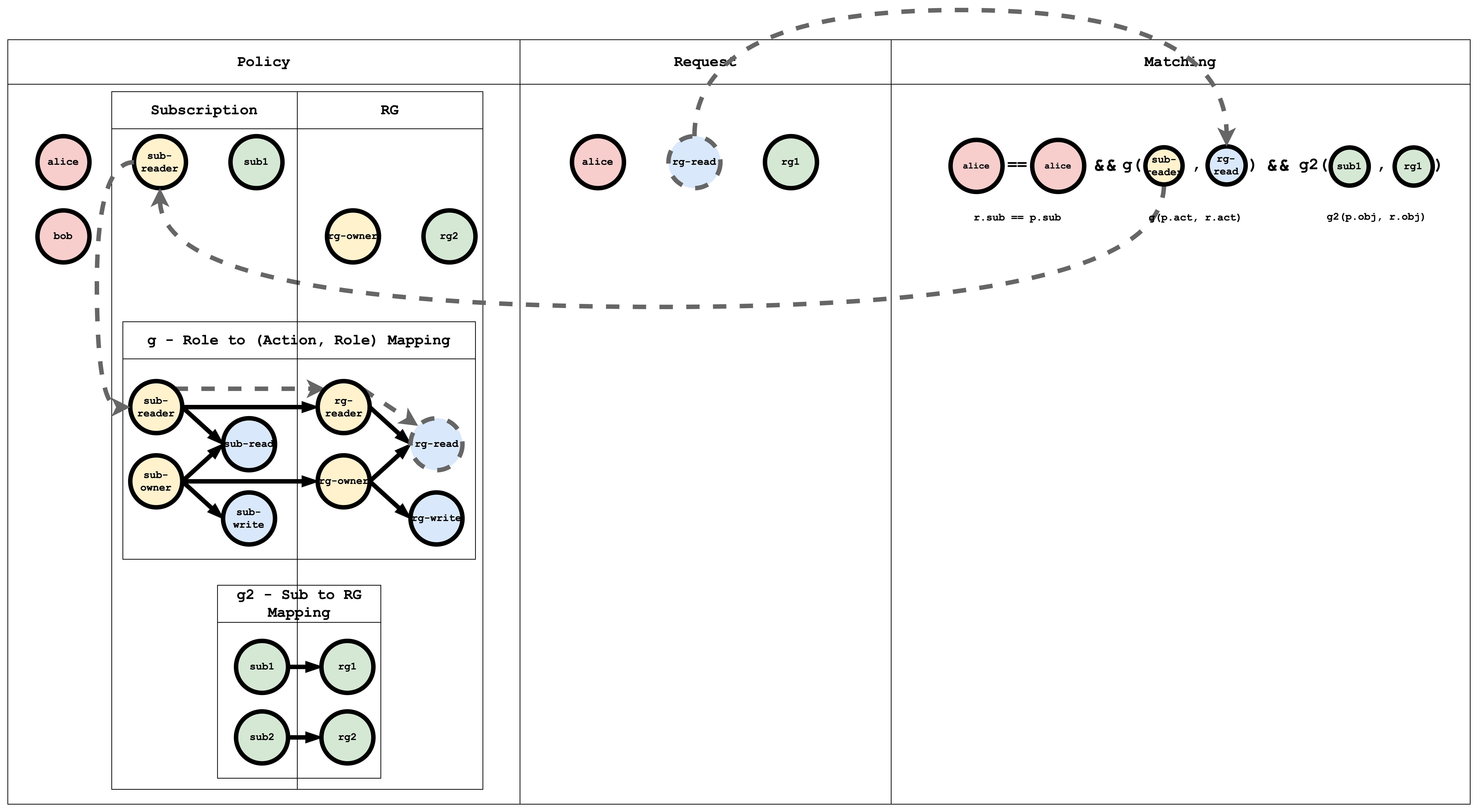
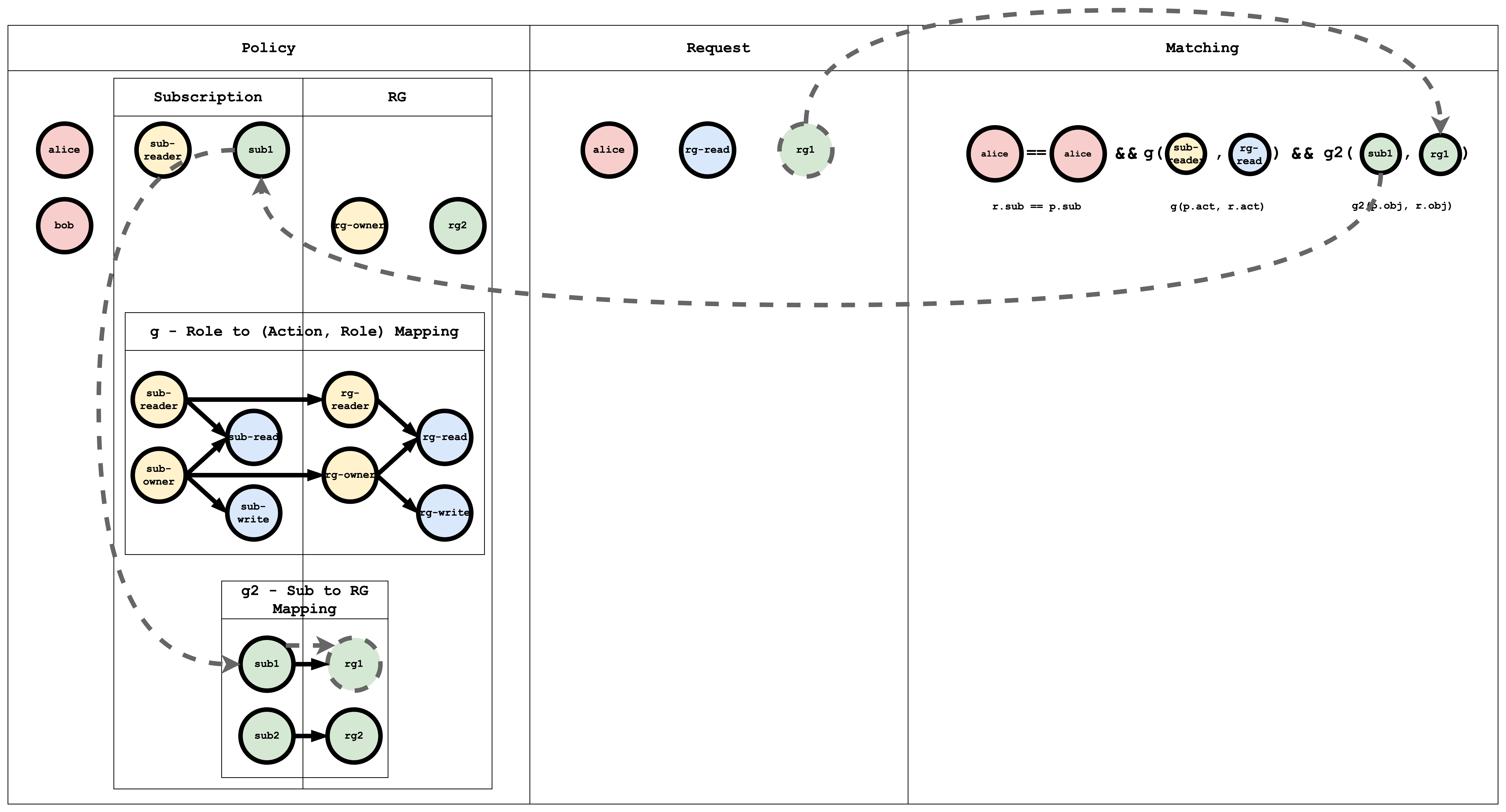
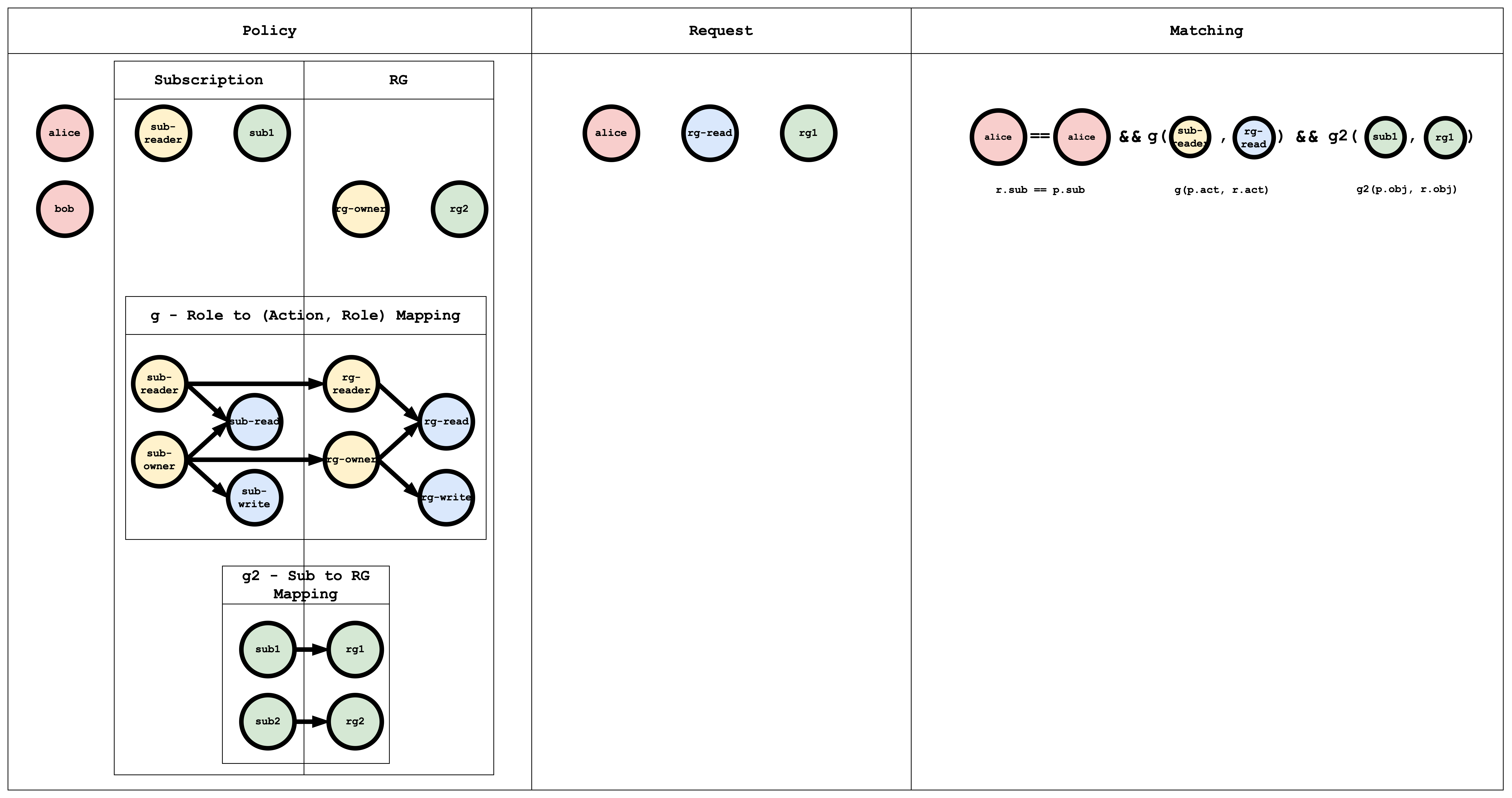
<p>In hierarchical RBAC there are multiple <strong>resource types</strong> with inheritance (e.g. Subscription → ResourceGroup). A subscription <strong>sub1</strong> can contain resource groups <strong>rg1</strong>, <strong>rg2</strong>. Similarly, there are subscription-level roles/actions and resource-group-level roles/actions, with inheritance between them. For example, the subscription role <strong>sub-owner</strong> might inherit to the resource-group role <strong>rg-owner</strong>: if I have <strong>sub-owner</strong> on <strong>sub1</strong>, I effectively have <strong>rg-owner</strong> on <strong>rg1</strong> and <strong>rg2</strong>.</p>
<h3 class="anchor anchorTargetHideOnScrollNavbar_vjPI" id="model-definition-2">Model definition<a href="https://casbin.org/ja/blog/2023/12/08/understanding-casbin-matching-in-detail#model-definition-2" class="hash-link" aria-label="Model definition への直接リンク" title="Model definition への直接リンク" translate="no">​</a></h3>
<p>A minimal hierarchical RBAC model:</p>
<div class="language-toml codeBlockContainer_Ckt0 theme-code-block" style="--prism-color:#393A34;--prism-background-color:#f6f8fa"><div class="codeBlockContent_QJqH"><pre tabindex="0" class="prism-code language-toml codeBlock_bY9V thin-scrollbar" style="color:#393A34;background-color:#f6f8fa"><code class="codeBlockLines_e6Vv"><span class="token-line" style="color:#393A34"><span class="token plain">[request_definition]</span><br></span><span class="token-line" style="color:#393A34"><span class="token plain">r = sub, act, obj</span><br></span><span class="token-line" style="color:#393A34"><span class="token plain" style="display:inline-block"></span><br></span><span class="token-line" style="color:#393A34"><span class="token plain">[policy_definition]</span><br></span><span class="token-line" style="color:#393A34"><span class="token plain">p = sub, act, obj</span><br></span><span class="token-line" style="color:#393A34"><span class="token plain" style="display:inline-block"></span><br></span><span class="token-line" style="color:#393A34"><span class="token plain">[role_definition]</span><br></span><span class="token-line" style="color:#393A34"><span class="token plain">g = _, _</span><br></span><span class="token-line" style="color:#393A34"><span class="token plain">g2 = _, _</span><br></span><span class="token-line" style="color:#393A34"><span class="token plain" style="display:inline-block"></span><br></span><span class="token-line" style="color:#393A34"><span class="token plain">[policy_effect]</span><br></span><span class="token-line" style="color:#393A34"><span class="token plain">e = some(where (p.eft == allow))</span><br></span><span class="token-line" style="color:#393A34"><span class="token plain" style="display:inline-block"></span><br></span><span class="token-line" style="color:#393A34"><span class="token plain">[matchers]</span><br></span><span class="token-line" style="color:#393A34"><span class="token plain">m = r.sub == p.sub &amp;&amp; g(p.act, r.act) &amp;&amp; g2(p.obj, r.obj)</span><br></span></code></pre></div></div>
<p>Here <strong>g</strong> links roles/actions and <strong>g2</strong> links resources (e.g. subscription to resource group).</p>
<h3 class="anchor anchorTargetHideOnScrollNavbar_vjPI" id="try-it-in-the-casbin-editor-2">Try it in the Casbin editor<a href="https://casbin.org/ja/blog/2023/12/08/understanding-casbin-matching-in-detail#try-it-in-the-casbin-editor-2" class="hash-link" aria-label="Try it in the Casbin editor への直接リンク" title="Try it in the Casbin editor への直接リンク" translate="no">​</a></h3>
<p>Open the <a href="https://casbin.org/editor" target="_blank" rel="noopener noreferrer" class="">editor</a> and paste the model above.</p>
<p>Paste the following in the Policy editor:</p>
<div class="language-csv codeBlockContainer_Ckt0 theme-code-block" style="--prism-color:#393A34;--prism-background-color:#f6f8fa"><div class="codeBlockContent_QJqH"><pre tabindex="0" class="prism-code language-csv codeBlock_bY9V thin-scrollbar" style="color:#393A34;background-color:#f6f8fa"><code class="codeBlockLines_e6Vv"><span class="token-line" style="color:#393A34"><span class="token value">p</span><span class="token punctuation" style="color:#393A34">,</span><span class="token value"> alice</span><span class="token punctuation" style="color:#393A34">,</span><span class="token value"> sub-reader</span><span class="token punctuation" style="color:#393A34">,</span><span class="token value"> sub1</span><span class="token plain"></span><br></span><span class="token-line" style="color:#393A34"><span class="token plain"></span><span class="token value">p</span><span class="token punctuation" style="color:#393A34">,</span><span class="token value"> bob</span><span class="token punctuation" style="color:#393A34">,</span><span class="token value"> rg-owner</span><span class="token punctuation" style="color:#393A34">,</span><span class="token value"> rg2</span><span class="token plain"></span><br></span><span class="token-line" style="color:#393A34"><span class="token plain" style="display:inline-block"></span><br></span><span class="token-line" style="color:#393A34"><span class="token plain"></span><span class="token value">// subscription role to subscription action mapping</span><span class="token plain"></span><br></span><span class="token-line" style="color:#393A34"><span class="token plain"></span><span class="token value">g</span><span class="token punctuation" style="color:#393A34">,</span><span class="token value"> sub-reader</span><span class="token punctuation" style="color:#393A34">,</span><span class="token value"> sub-read</span><span class="token plain"></span><br></span><span class="token-line" style="color:#393A34"><span class="token plain"></span><span class="token value">g</span><span class="token punctuation" style="color:#393A34">,</span><span class="token value"> sub-owner</span><span class="token punctuation" style="color:#393A34">,</span><span class="token value"> sub-read</span><span class="token plain"></span><br></span><span class="token-line" style="color:#393A34"><span class="token plain"></span><span class="token value">g</span><span class="token punctuation" style="color:#393A34">,</span><span class="token value"> sub-owner</span><span class="token punctuation" style="color:#393A34">,</span><span class="token value"> sub-write</span><span class="token plain"></span><br></span><span class="token-line" style="color:#393A34"><span class="token plain" style="display:inline-block"></span><br></span><span class="token-line" style="color:#393A34"><span class="token plain"></span><span class="token value">// resourceGroup role to resourceGroup action mapping</span><span class="token plain"></span><br></span><span class="token-line" style="color:#393A34"><span class="token plain"></span><span class="token value">g</span><span class="token punctuation" style="color:#393A34">,</span><span class="token value"> rg-reader</span><span class="token punctuation" style="color:#393A34">,</span><span class="token value"> rg-read</span><span class="token plain"></span><br></span><span class="token-line" style="color:#393A34"><span class="token plain"></span><span class="token value">g</span><span class="token punctuation" style="color:#393A34">,</span><span class="token value"> rg-owner</span><span class="token punctuation" style="color:#393A34">,</span><span class="token value"> rg-read</span><span class="token plain"></span><br></span><span class="token-line" style="color:#393A34"><span class="token plain"></span><span class="token value">g</span><span class="token punctuation" style="color:#393A34">,</span><span class="token value"> rg-owner</span><span class="token punctuation" style="color:#393A34">,</span><span class="token value"> rg-write</span><span class="token plain"></span><br></span><span class="token-line" style="color:#393A34"><span class="token plain" style="display:inline-block"></span><br></span><span class="token-line" style="color:#393A34"><span class="token plain"></span><span class="token value">// subscription role to resourceGroup role mapping</span><span class="token plain"></span><br></span><span class="token-line" style="color:#393A34"><span class="token plain"></span><span class="token value">g</span><span class="token punctuation" style="color:#393A34">,</span><span class="token value"> sub-reader</span><span class="token punctuation" style="color:#393A34">,</span><span class="token value"> rg-reader</span><span class="token plain"></span><br></span><span class="token-line" style="color:#393A34"><span class="token plain"></span><span class="token value">g</span><span class="token punctuation" style="color:#393A34">,</span><span class="token value"> sub-owner</span><span class="token punctuation" style="color:#393A34">,</span><span class="token value"> rg-owner</span><span class="token plain"></span><br></span><span class="token-line" style="color:#393A34"><span class="token plain" style="display:inline-block"></span><br></span><span class="token-line" style="color:#393A34"><span class="token plain"></span><span class="token value">// subscription resource to resourceGroup resource mapping</span><span class="token plain"></span><br></span><span class="token-line" style="color:#393A34"><span class="token plain"></span><span class="token value">g2</span><span class="token punctuation" style="color:#393A34">,</span><span class="token value"> sub1</span><span class="token punctuation" style="color:#393A34">,</span><span class="token value"> rg1</span><span class="token plain"></span><br></span><span class="token-line" style="color:#393A34"><span class="token plain"></span><span class="token value">g2</span><span class="token punctuation" style="color:#393A34">,</span><span class="token value"> sub2</span><span class="token punctuation" style="color:#393A34">,</span><span class="token value"> rg2</span><br></span></code></pre></div></div>
<p>And paste the following in the Request editor:</p>
<div class="language-csv codeBlockContainer_Ckt0 theme-code-block" style="--prism-color:#393A34;--prism-background-color:#f6f8fa"><div class="codeBlockContent_QJqH"><pre tabindex="0" class="prism-code language-csv codeBlock_bY9V thin-scrollbar" style="color:#393A34;background-color:#f6f8fa"><code class="codeBlockLines_e6Vv"><span class="token-line" style="color:#393A34"><span class="token value">alice</span><span class="token punctuation" style="color:#393A34">,</span><span class="token value"> rg-read</span><span class="token punctuation" style="color:#393A34">,</span><span class="token value"> rg1</span><br></span></code></pre></div></div>
<p>The result will be:</p>
<div class="language-text codeBlockContainer_Ckt0 theme-code-block" style="--prism-color:#393A34;--prism-background-color:#f6f8fa"><div class="codeBlockContent_QJqH"><pre tabindex="0" class="prism-code language-text codeBlock_bY9V thin-scrollbar" style="color:#393A34;background-color:#f6f8fa"><code class="codeBlockLines_e6Vv"><span class="token-line" style="color:#393A34"><span class="token plain">true</span><br></span></code></pre></div></div>
<h3 class="anchor anchorTargetHideOnScrollNavbar_vjPI" id="visual-representation-of-the-rbac-model-policy-and-request-matching-1">Visual representation of the RBAC model, policy, and request matching<a href="https://casbin.org/ja/blog/2023/12/08/understanding-casbin-matching-in-detail#visual-representation-of-the-rbac-model-policy-and-request-matching-1" class="hash-link" aria-label="Visual representation of the RBAC model, policy, and request matching への直接リンク" title="Visual representation of the RBAC model, policy, and request matching への直接リンク" translate="no">​</a></h3>
<p><img decoding="async" loading="lazy" alt="hrbac" src="https://casbin.org/ja/assets/images/hrbac-1350d755e04234a34394996344d2b259.png" width="7968" height="4204" class="img_ev3q"></p>
<p>The <strong>g</strong> edges (role → action, role → role) can be written in policy as:</p>
<div class="language-csv codeBlockContainer_Ckt0 theme-code-block" style="--prism-color:#393A34;--prism-background-color:#f6f8fa"><div class="codeBlockContent_QJqH"><pre tabindex="0" class="prism-code language-csv codeBlock_bY9V thin-scrollbar" style="color:#393A34;background-color:#f6f8fa"><code class="codeBlockLines_e6Vv"><span class="token-line" style="color:#393A34"><span class="token value">// subscription role to subscription action mapping</span><span class="token plain"></span><br></span><span class="token-line" style="color:#393A34"><span class="token plain"></span><span class="token value">g</span><span class="token punctuation" style="color:#393A34">,</span><span class="token value"> sub-reader</span><span class="token punctuation" style="color:#393A34">,</span><span class="token value"> sub-read</span><span class="token plain"></span><br></span><span class="token-line" style="color:#393A34"><span class="token plain"></span><span class="token value">g</span><span class="token punctuation" style="color:#393A34">,</span><span class="token value"> sub-owner</span><span class="token punctuation" style="color:#393A34">,</span><span class="token value"> sub-read</span><span class="token plain"></span><br></span><span class="token-line" style="color:#393A34"><span class="token plain"></span><span class="token value">g</span><span class="token punctuation" style="color:#393A34">,</span><span class="token value"> sub-owner</span><span class="token punctuation" style="color:#393A34">,</span><span class="token value"> sub-write</span><span class="token plain"></span><br></span><span class="token-line" style="color:#393A34"><span class="token plain" style="display:inline-block"></span><br></span><span class="token-line" style="color:#393A34"><span class="token plain"></span><span class="token value">// resourceGroup role to resourceGroup action mapping</span><span class="token plain"></span><br></span><span class="token-line" style="color:#393A34"><span class="token plain"></span><span class="token value">g</span><span class="token punctuation" style="color:#393A34">,</span><span class="token value"> rg-reader</span><span class="token punctuation" style="color:#393A34">,</span><span class="token value"> rg-read</span><span class="token plain"></span><br></span><span class="token-line" style="color:#393A34"><span class="token plain"></span><span class="token value">g</span><span class="token punctuation" style="color:#393A34">,</span><span class="token value"> rg-owner</span><span class="token punctuation" style="color:#393A34">,</span><span class="token value"> rg-read</span><span class="token plain"></span><br></span><span class="token-line" style="color:#393A34"><span class="token plain"></span><span class="token value">g</span><span class="token punctuation" style="color:#393A34">,</span><span class="token value"> rg-owner</span><span class="token punctuation" style="color:#393A34">,</span><span class="token value"> rg-write</span><span class="token plain"></span><br></span><span class="token-line" style="color:#393A34"><span class="token plain" style="display:inline-block"></span><br></span><span class="token-line" style="color:#393A34"><span class="token plain"></span><span class="token value">// subscription role to resourceGroup role mapping</span><span class="token plain"></span><br></span><span class="token-line" style="color:#393A34"><span class="token plain"></span><span class="token value">g</span><span class="token punctuation" style="color:#393A34">,</span><span class="token value"> sub-reader</span><span class="token punctuation" style="color:#393A34">,</span><span class="token value"> rg-reader</span><span class="token plain"></span><br></span><span class="token-line" style="color:#393A34"><span class="token plain"></span><span class="token value">g</span><span class="token punctuation" style="color:#393A34">,</span><span class="token value"> sub-owner</span><span class="token punctuation" style="color:#393A34">,</span><span class="token value"> rg-owner</span><br></span></code></pre></div></div>
<p>The <strong>g2</strong> edges map subscription to resource group:</p>
<div class="language-csv codeBlockContainer_Ckt0 theme-code-block" style="--prism-color:#393A34;--prism-background-color:#f6f8fa"><div class="codeBlockContent_QJqH"><pre tabindex="0" class="prism-code language-csv codeBlock_bY9V thin-scrollbar" style="color:#393A34;background-color:#f6f8fa"><code class="codeBlockLines_e6Vv"><span class="token-line" style="color:#393A34"><span class="token value">// subscription resource to resourceGroup resource mapping</span><span class="token plain"></span><br></span><span class="token-line" style="color:#393A34"><span class="token plain"></span><span class="token value">g2</span><span class="token punctuation" style="color:#393A34">,</span><span class="token value"> sub1</span><span class="token punctuation" style="color:#393A34">,</span><span class="token value"> rg1</span><span class="token plain"></span><br></span><span class="token-line" style="color:#393A34"><span class="token plain"></span><span class="token value">g2</span><span class="token punctuation" style="color:#393A34">,</span><span class="token value"> sub2</span><span class="token punctuation" style="color:#393A34">,</span><span class="token value"> rg2</span><br></span></code></pre></div></div>
<h4 class="anchor anchorTargetHideOnScrollNavbar_vjPI" id="subject-matching-visual-representation">Subject Matching Visual representation<a href="https://casbin.org/ja/blog/2023/12/08/understanding-casbin-matching-in-detail#subject-matching-visual-representation" class="hash-link" aria-label="Subject Matching Visual representation への直接リンク" title="Subject Matching Visual representation への直接リンク" translate="no">​</a></h4>
<p><img decoding="async" loading="lazy" alt="hrbac-sub-match" src="https://casbin.org/ja/assets/images/hrbac-sub-match-55dffd4e5fadb9773658dc90bacbb091.png" width="8176" height="4336" class="img_ev3q"></p>
<h4 class="anchor anchorTargetHideOnScrollNavbar_vjPI" id="action-matching-visual-representation">Action Matching Visual representation<a href="https://casbin.org/ja/blog/2023/12/08/understanding-casbin-matching-in-detail#action-matching-visual-representation" class="hash-link" aria-label="Action Matching Visual representation への直接リンク" title="Action Matching Visual representation への直接リンク" translate="no">​</a></h4>
<p><img decoding="async" loading="lazy" alt="hrbac-act-match" src="https://casbin.org/ja/assets/images/hrbac-act-match-bbb086158782591771f2df01419dc4b8.png" width="7964" height="4376" class="img_ev3q"></p>
<h4 class="anchor anchorTargetHideOnScrollNavbar_vjPI" id="object-matching-visual-representation">Object Matching Visual representation<a href="https://casbin.org/ja/blog/2023/12/08/understanding-casbin-matching-in-detail#object-matching-visual-representation" class="hash-link" aria-label="Object Matching Visual representation への直接リンク" title="Object Matching Visual representation への直接リンク" translate="no">​</a></h4>
<p><img decoding="async" loading="lazy" alt="hrbac-obj-match" src="https://casbin.org/ja/assets/images/hrbac-obj-match-aad370d5cbfe1020ec108b9242f8d4bd.png" width="7964" height="4296" class="img_ev3q"></p>
<div class="theme-admonition theme-admonition-info admonition_xJq3 alert alert--info"><div class="admonitionHeading_Gvgb"><span class="admonitionIcon_Rf37"><svg viewBox="0 0 14 16"><path fill-rule="evenodd" d="M7 2.3c3.14 0 5.7 2.56 5.7 5.7s-2.56 5.7-5.7 5.7A5.71 5.71 0 0 1 1.3 8c0-3.14 2.56-5.7 5.7-5.7zM7 1C3.14 1 0 4.14 0 8s3.14 7 7 7 7-3.14 7-7-3.14-7-7-7zm1 3H6v5h2V4zm0 6H6v2h2v-2z"></path></svg></span>情報</div><div class="admonitionContent_BuS1"><p>Casbin evaluates the request against all policies. If at least one policy matches, the result is <strong>true</strong>; otherwise <strong>false</strong>.</p></div></div>
<h2 class="anchor anchorTargetHideOnScrollNavbar_vjPI" id="conclusion">Conclusion<a href="https://casbin.org/ja/blog/2023/12/08/understanding-casbin-matching-in-detail#conclusion" class="hash-link" aria-label="Conclusion への直接リンク" title="Conclusion への直接リンク" translate="no">​</a></h2>
<p>This tutorial showed how ACL, RBAC, and hierarchical RBAC can be expressed in Casbin. In a follow-up, we will implement this in a Spring Boot app and secure APIs with Casbin.</p>]]></content>
        <author>
            <name>Aravinda Kumar</name>
            <uri>https://github.com/aravindarc</uri>
        </author>
    </entry>
    <entry>
        <title type="html"><![CDATA[Authorization in APISIX Using Casbin]]></title>
        <id>https://casbin.org/ja/blog/2021/08/19/apisix-casbin-authorization</id>
        <link href="https://casbin.org/ja/blog/2021/08/19/apisix-casbin-authorization"/>
        <updated>2021-08-19T00:00:00.000Z</updated>
        <summary type="html"><![CDATA[Enforce and update Casbin RBAC on the APISIX request path with reproducible allow, deny, and cleanup checks.]]></summary>
        <content type="html"><![CDATA[<h2 class="anchor anchorTargetHideOnScrollNavbar_vjPI" id="はじめに">はじめに<a href="https://casbin.org/ja/blog/2021/08/19/apisix-casbin-authorization#%E3%81%AF%E3%81%98%E3%82%81%E3%81%AB" class="hash-link" aria-label="はじめに への直接リンク" title="はじめに への直接リンク" translate="no">​</a></h2>
<p><a href="https://apisix.apache.org/" target="_blank" rel="noopener noreferrer" class="">Apache APISIX</a> can enforce Casbin authorization policies at the gateway with its built-in <a href="https://apisix.apache.org/docs/apisix/plugins/authz-casbin/" target="_blank" rel="noopener noreferrer" class=""><code>authz-casbin</code></a> plugin. The plugin uses <a href="https://github.com/apache/casbin-lua-casbin" target="_blank" rel="noopener noreferrer" class="">Lua Casbin</a> and supports access control models such as ACL, RBAC, and ABAC.</p>
<p>This guide puts a small RBAC policy on the APISIX request path. You will verify allowed and denied requests, then update a shared policy through plugin metadata without changing the route.</p>
<p>The Casbin community originally proposed the integration in <a href="https://github.com/apache/apisix/issues/4674" target="_blank" rel="noopener noreferrer" class="">APISIX Issue #4674</a>, and <a href="https://github.com/apache/apisix/pull/4710" target="_blank" rel="noopener noreferrer" class="">APISIX PR #4710</a> added the plugin.</p>
<div class="theme-admonition theme-admonition-info admonition_xJq3 alert alert--info"><div class="admonitionHeading_Gvgb"><span class="admonitionIcon_Rf37"><svg viewBox="0 0 14 16"><path fill-rule="evenodd" d="M7 2.3c3.14 0 5.7 2.56 5.7 5.7s-2.56 5.7-5.7 5.7A5.71 5.71 0 0 1 1.3 8c0-3.14 2.56-5.7 5.7-5.7zM7 1C3.14 1 0 4.14 0 8s3.14 7 7 7 7-3.14 7-7-3.14-7-7-7zm1 3H6v5h2V4zm0 6H6v2h2v-2z"></path></svg></span>August 2026 refresh</div><div class="admonitionContent_BuS1"><p>This guide was refreshed in August 2026. The examples were validated with Apache APISIX 3.17.0. The original 2021 author remains credited, and Yilia Lin is added for the 2026 refresh.</p></div></div>
<div class="theme-admonition theme-admonition-warning admonition_xJq3 alert alert--warning"><div class="admonitionHeading_Gvgb"><span class="admonitionIcon_Rf37"><svg viewBox="0 0 16 16"><path fill-rule="evenodd" d="M8.893 1.5c-.183-.31-.52-.5-.887-.5s-.703.19-.886.5L.138 13.499a.98.98 0 0 0 0 1.001c.193.31.53.501.886.501h13.964c.367 0 .704-.19.877-.5a1.03 1.03 0 0 0 .01-1.002L8.893 1.5zm.133 11.497H6.987v-2.003h2.039v2.003zm0-3.004H6.987V5.987h2.039v4.006z"></path></svg></span>Authentication boundary</div><div class="admonitionContent_BuS1"><p>Casbin performs authorization, not authentication. The example uses a <code>user</code> request header as the subject only to keep the test small. In production, do not trust an identity header supplied directly by a client. An authentication layer or trusted proxy should establish the identity and remove or overwrite untrusted values before Casbin evaluates the request.</p></div></div>
<h2 class="anchor anchorTargetHideOnScrollNavbar_vjPI" id="prerequisites-and-starting-state">Prerequisites and starting state<a href="https://casbin.org/ja/blog/2021/08/19/apisix-casbin-authorization#prerequisites-and-starting-state" class="hash-link" aria-label="Prerequisites and starting state への直接リンク" title="Prerequisites and starting state への直接リンク" translate="no">​</a></h2>
<p>This guide starts with a disposable Apache APISIX 3.17.0 instance already running. If you need a local instance, follow the <a href="https://apisix.apache.org/docs/docker/manual/" target="_blank" rel="noopener noreferrer" class="">APISIX Docker deployment guide</a> and pin the APISIX image to <code>apache/apisix:3.17.0-debian</code>.</p>
<p>The instance must have:</p>
<ul>
<li class="">the data plane available at <code>http://127.0.0.1:9080</code>;</li>
<li class="">the Admin API available at <code>http://127.0.0.1:9180</code>;</li>
<li class="">the built-in <code>authz-casbin</code> and <code>mocking</code> plugins enabled.</li>
</ul>
<p>You also need <code>curl</code> and <code>jq</code>. Set <code>admin_key</code> to the key configured for your Admin API:</p>
<div class="language-sh codeBlockContainer_Ckt0 theme-code-block" style="--prism-color:#393A34;--prism-background-color:#f6f8fa"><div class="codeBlockContent_QJqH"><pre tabindex="0" class="prism-code language-sh codeBlock_bY9V thin-scrollbar" style="color:#393A34;background-color:#f6f8fa"><code class="codeBlockLines_e6Vv"><span class="token-line" style="color:#393A34"><span class="token plain">export admin_key='&lt;your-admin-api-key&gt;'</span><br></span></code></pre></div></div>
<p>Replace the placeholder before continuing. Confirm that the Admin API is reachable and the plugin is enabled:</p>
<div class="language-sh codeBlockContainer_Ckt0 theme-code-block" style="--prism-color:#393A34;--prism-background-color:#f6f8fa"><div class="codeBlockContent_QJqH"><pre tabindex="0" class="prism-code language-sh codeBlock_bY9V thin-scrollbar" style="color:#393A34;background-color:#f6f8fa"><code class="codeBlockLines_e6Vv"><span class="token-line" style="color:#393A34"><span class="token plain">curl --fail-with-body \</span><br></span><span class="token-line" style="color:#393A34"><span class="token plain">  "http://127.0.0.1:9180/apisix/admin/plugins/list" \</span><br></span><span class="token-line" style="color:#393A34"><span class="token plain">  -H "X-API-KEY: $admin_key" | \</span><br></span><span class="token-line" style="color:#393A34"><span class="token plain">jq -e '(["authz-casbin", "mocking"] - .) | length == 0'</span><br></span></code></pre></div></div>
<p>The command should print <code>true</code>. Do not publish the Admin API to an untrusted network or reuse demonstration credentials in another environment.</p>
<h2 class="anchor anchorTargetHideOnScrollNavbar_vjPI" id="define-the-model-and-policy">Define the model and policy<a href="https://casbin.org/ja/blog/2021/08/19/apisix-casbin-authorization#define-the-model-and-policy" class="hash-link" aria-label="Define the model and policy への直接リンク" title="Define the model and policy への直接リンク" translate="no">​</a></h2>
<p>The plugin evaluates three request values:</p>
<ul>
<li class=""><code>sub</code>: the subject from the configured request header;</li>
<li class=""><code>obj</code>: the request URI path; and</li>
<li class=""><code>act</code>: the HTTP method.</li>
</ul>
<p>Create <code>model.conf</code>:</p>
<div class="language-ini codeBlockContainer_Ckt0 theme-code-block" style="--prism-color:#393A34;--prism-background-color:#f6f8fa"><div class="codeBlockContent_QJqH"><pre tabindex="0" class="prism-code language-ini codeBlock_bY9V thin-scrollbar" style="color:#393A34;background-color:#f6f8fa"><code class="codeBlockLines_e6Vv"><span class="token-line" style="color:#393A34"><span class="token section punctuation" style="color:#393A34">[</span><span class="token section section-name selector" style="color:#00009f">request_definition</span><span class="token section punctuation" style="color:#393A34">]</span><span class="token plain"></span><br></span><span class="token-line" style="color:#393A34"><span class="token plain"></span><span class="token key attr-name" style="color:#00a4db">r</span><span class="token plain"> </span><span class="token punctuation" style="color:#393A34">=</span><span class="token plain"> </span><span class="token value attr-value" style="color:#e3116c">sub, obj, act</span><span class="token plain"></span><br></span><span class="token-line" style="color:#393A34"><span class="token plain" style="display:inline-block"></span><br></span><span class="token-line" style="color:#393A34"><span class="token plain"></span><span class="token section punctuation" style="color:#393A34">[</span><span class="token section section-name selector" style="color:#00009f">policy_definition</span><span class="token section punctuation" style="color:#393A34">]</span><span class="token plain"></span><br></span><span class="token-line" style="color:#393A34"><span class="token plain"></span><span class="token key attr-name" style="color:#00a4db">p</span><span class="token plain"> </span><span class="token punctuation" style="color:#393A34">=</span><span class="token plain"> </span><span class="token value attr-value" style="color:#e3116c">sub, obj, act</span><span class="token plain"></span><br></span><span class="token-line" style="color:#393A34"><span class="token plain" style="display:inline-block"></span><br></span><span class="token-line" style="color:#393A34"><span class="token plain"></span><span class="token section punctuation" style="color:#393A34">[</span><span class="token section section-name selector" style="color:#00009f">role_definition</span><span class="token section punctuation" style="color:#393A34">]</span><span class="token plain"></span><br></span><span class="token-line" style="color:#393A34"><span class="token plain"></span><span class="token key attr-name" style="color:#00a4db">g</span><span class="token plain"> </span><span class="token punctuation" style="color:#393A34">=</span><span class="token plain"> </span><span class="token value attr-value" style="color:#e3116c">_, _</span><span class="token plain"></span><br></span><span class="token-line" style="color:#393A34"><span class="token plain" style="display:inline-block"></span><br></span><span class="token-line" style="color:#393A34"><span class="token plain"></span><span class="token section punctuation" style="color:#393A34">[</span><span class="token section section-name selector" style="color:#00009f">policy_effect</span><span class="token section punctuation" style="color:#393A34">]</span><span class="token plain"></span><br></span><span class="token-line" style="color:#393A34"><span class="token plain"></span><span class="token key attr-name" style="color:#00a4db">e</span><span class="token plain"> </span><span class="token punctuation" style="color:#393A34">=</span><span class="token plain"> </span><span class="token value attr-value" style="color:#e3116c">some(where (p.eft == allow))</span><span class="token plain"></span><br></span><span class="token-line" style="color:#393A34"><span class="token plain" style="display:inline-block"></span><br></span><span class="token-line" style="color:#393A34"><span class="token plain"></span><span class="token section punctuation" style="color:#393A34">[</span><span class="token section section-name selector" style="color:#00009f">matchers</span><span class="token section punctuation" style="color:#393A34">]</span><span class="token plain"></span><br></span><span class="token-line" style="color:#393A34"><span class="token plain"></span><span class="token key attr-name" style="color:#00a4db">m</span><span class="token plain"> </span><span class="token punctuation" style="color:#393A34">=</span><span class="token plain"> </span><span class="token value attr-value" style="color:#e3116c">(g(r.sub, p.sub) || keyMatch(r.sub, p.sub)) &amp;&amp; keyMatch(r.obj, p.obj) &amp;&amp; keyMatch(r.act, p.act)</span><br></span></code></pre></div></div>
<p>Create <code>policy.csv</code>:</p>
<div class="language-csv codeBlockContainer_Ckt0 theme-code-block" style="--prism-color:#393A34;--prism-background-color:#f6f8fa"><div class="codeBlockContent_QJqH"><pre tabindex="0" class="prism-code language-csv codeBlock_bY9V thin-scrollbar" style="color:#393A34;background-color:#f6f8fa"><code class="codeBlockLines_e6Vv"><span class="token-line" style="color:#393A34"><span class="token value">p</span><span class="token punctuation" style="color:#393A34">,</span><span class="token value"> *</span><span class="token punctuation" style="color:#393A34">,</span><span class="token value"> /anything</span><span class="token punctuation" style="color:#393A34">,</span><span class="token value"> GET</span><span class="token plain"></span><br></span><span class="token-line" style="color:#393A34"><span class="token plain"></span><span class="token value">p</span><span class="token punctuation" style="color:#393A34">,</span><span class="token value"> admin</span><span class="token punctuation" style="color:#393A34">,</span><span class="token value"> *</span><span class="token punctuation" style="color:#393A34">,</span><span class="token value"> *</span><span class="token plain"></span><br></span><span class="token-line" style="color:#393A34"><span class="token plain"></span><span class="token value">g</span><span class="token punctuation" style="color:#393A34">,</span><span class="token value"> alice</span><span class="token punctuation" style="color:#393A34">,</span><span class="token value"> admin</span><br></span></code></pre></div></div>
<p>This policy allows any subject to send <code>GET /anything</code>. It also assigns <code>alice</code> the <code>admin</code> role, which can access every path with every method.</p>
<h2 class="anchor anchorTargetHideOnScrollNavbar_vjPI" id="store-the-shared-policy-in-plugin-metadata">Store the shared policy in plugin metadata<a href="https://casbin.org/ja/blog/2021/08/19/apisix-casbin-authorization#store-the-shared-policy-in-plugin-metadata" class="hash-link" aria-label="Store the shared policy in plugin metadata への直接リンク" title="Store the shared policy in plugin metadata への直接リンク" translate="no">​</a></h2>
<p>Load the files as JSON strings and write them to APISIX plugin metadata:</p>
<div class="language-sh codeBlockContainer_Ckt0 theme-code-block" style="--prism-color:#393A34;--prism-background-color:#f6f8fa"><div class="codeBlockContent_QJqH"><pre tabindex="0" class="prism-code language-sh codeBlock_bY9V thin-scrollbar" style="color:#393A34;background-color:#f6f8fa"><code class="codeBlockLines_e6Vv"><span class="token-line" style="color:#393A34"><span class="token plain">jq -n \</span><br></span><span class="token-line" style="color:#393A34"><span class="token plain">  --rawfile model model.conf \</span><br></span><span class="token-line" style="color:#393A34"><span class="token plain">  --rawfile policy policy.csv \</span><br></span><span class="token-line" style="color:#393A34"><span class="token plain">  '{model: $model, policy: $policy}' | \</span><br></span><span class="token-line" style="color:#393A34"><span class="token plain">curl --fail-with-body \</span><br></span><span class="token-line" style="color:#393A34"><span class="token plain">  "http://127.0.0.1:9180/apisix/admin/plugin_metadata/authz-casbin" \</span><br></span><span class="token-line" style="color:#393A34"><span class="token plain">  -H "X-API-KEY: $admin_key" \</span><br></span><span class="token-line" style="color:#393A34"><span class="token plain">  -H "Content-Type: application/json" \</span><br></span><span class="token-line" style="color:#393A34"><span class="token plain">  -X PUT \</span><br></span><span class="token-line" style="color:#393A34"><span class="token plain">  --data-binary @-</span><br></span></code></pre></div></div>
<p>Plugin metadata provides one model and policy to routes that enable <code>authz-casbin</code> without defining their own route-local model and policy.</p>
<h2 class="anchor anchorTargetHideOnScrollNavbar_vjPI" id="enable-authorization-on-a-route">Enable authorization on a route<a href="https://casbin.org/ja/blog/2021/08/19/apisix-casbin-authorization#enable-authorization-on-a-route" class="hash-link" aria-label="Enable authorization on a route への直接リンク" title="Enable authorization on a route への直接リンク" translate="no">​</a></h2>
<p>Create a route and tell the plugin to read the subject from the <code>user</code> header:</p>
<div class="language-sh codeBlockContainer_Ckt0 theme-code-block" style="--prism-color:#393A34;--prism-background-color:#f6f8fa"><div class="codeBlockContent_QJqH"><pre tabindex="0" class="prism-code language-sh codeBlock_bY9V thin-scrollbar" style="color:#393A34;background-color:#f6f8fa"><code class="codeBlockLines_e6Vv"><span class="token-line" style="color:#393A34"><span class="token plain">curl --fail-with-body \</span><br></span><span class="token-line" style="color:#393A34"><span class="token plain">  "http://127.0.0.1:9180/apisix/admin/routes/casbin-demo" \</span><br></span><span class="token-line" style="color:#393A34"><span class="token plain">  -H "X-API-KEY: $admin_key" \</span><br></span><span class="token-line" style="color:#393A34"><span class="token plain">  -H "Content-Type: application/json" \</span><br></span><span class="token-line" style="color:#393A34"><span class="token plain">  -X PUT \</span><br></span><span class="token-line" style="color:#393A34"><span class="token plain">  -d '{</span><br></span><span class="token-line" style="color:#393A34"><span class="token plain">    "uri": "/*",</span><br></span><span class="token-line" style="color:#393A34"><span class="token plain">    "plugins": {</span><br></span><span class="token-line" style="color:#393A34"><span class="token plain">      "authz-casbin": {</span><br></span><span class="token-line" style="color:#393A34"><span class="token plain">        "username": "user"</span><br></span><span class="token-line" style="color:#393A34"><span class="token plain">      },</span><br></span><span class="token-line" style="color:#393A34"><span class="token plain">      "mocking": {</span><br></span><span class="token-line" style="color:#393A34"><span class="token plain">        "_meta": {</span><br></span><span class="token-line" style="color:#393A34"><span class="token plain">          "priority": 1000</span><br></span><span class="token-line" style="color:#393A34"><span class="token plain">        },</span><br></span><span class="token-line" style="color:#393A34"><span class="token plain">        "response_status": 200,</span><br></span><span class="token-line" style="color:#393A34"><span class="token plain">        "response_example": "{\"message\":\"authorized\"}"</span><br></span><span class="token-line" style="color:#393A34"><span class="token plain">      }</span><br></span><span class="token-line" style="color:#393A34"><span class="token plain">    },</span><br></span><span class="token-line" style="color:#393A34"><span class="token plain">    "upstream": {</span><br></span><span class="token-line" style="color:#393A34"><span class="token plain">      "type": "roundrobin",</span><br></span><span class="token-line" style="color:#393A34"><span class="token plain">      "nodes": {</span><br></span><span class="token-line" style="color:#393A34"><span class="token plain">        "127.0.0.1:1": 1</span><br></span><span class="token-line" style="color:#393A34"><span class="token plain">      }</span><br></span><span class="token-line" style="color:#393A34"><span class="token plain">    }</span><br></span><span class="token-line" style="color:#393A34"><span class="token plain">  }'</span><br></span></code></pre></div></div>
<p>The route uses the model and policy from plugin metadata because it only defines the <code>username</code> field locally. A route-local model and policy, when configured, take precedence over plugin metadata.</p>
<p>The <code>mocking</code> plugin gives allowed requests a deterministic local response, so the example does not depend on a public upstream. Its route-local priority is lower than <code>authz-casbin</code>, which makes the authorization decision run first. The unreachable upstream is therefore not contacted. This priority override and mock response are test fixtures, not production recommendations.</p>
<h2 class="anchor anchorTargetHideOnScrollNavbar_vjPI" id="verify-allow-and-deny-decisions">Verify allow and deny decisions<a href="https://casbin.org/ja/blog/2021/08/19/apisix-casbin-authorization#verify-allow-and-deny-decisions" class="hash-link" aria-label="Verify allow and deny decisions への直接リンク" title="Verify allow and deny decisions への直接リンク" translate="no">​</a></h2>
<p>An anonymous request to the public path is allowed:</p>
<div class="language-sh codeBlockContainer_Ckt0 theme-code-block" style="--prism-color:#393A34;--prism-background-color:#f6f8fa"><div class="codeBlockContent_QJqH"><pre tabindex="0" class="prism-code language-sh codeBlock_bY9V thin-scrollbar" style="color:#393A34;background-color:#f6f8fa"><code class="codeBlockLines_e6Vv"><span class="token-line" style="color:#393A34"><span class="token plain">curl -i http://127.0.0.1:9080/anything</span><br></span></code></pre></div></div>
<p>Expected status:</p>
<div class="language-text codeBlockContainer_Ckt0 theme-code-block" style="--prism-color:#393A34;--prism-background-color:#f6f8fa"><div class="codeBlockContent_QJqH"><pre tabindex="0" class="prism-code language-text codeBlock_bY9V thin-scrollbar" style="color:#393A34;background-color:#f6f8fa"><code class="codeBlockLines_e6Vv"><span class="token-line" style="color:#393A34"><span class="token plain">HTTP/1.1 200 OK</span><br></span><span class="token-line" style="color:#393A34"><span class="token plain">{"message":"authorized"}</span><br></span></code></pre></div></div>
<p><code>bob</code> does not have the <code>admin</code> role, so a different path is denied:</p>
<div class="language-sh codeBlockContainer_Ckt0 theme-code-block" style="--prism-color:#393A34;--prism-background-color:#f6f8fa"><div class="codeBlockContent_QJqH"><pre tabindex="0" class="prism-code language-sh codeBlock_bY9V thin-scrollbar" style="color:#393A34;background-color:#f6f8fa"><code class="codeBlockLines_e6Vv"><span class="token-line" style="color:#393A34"><span class="token plain">curl -i http://127.0.0.1:9080/anything/res -H 'user: bob'</span><br></span></code></pre></div></div>
<p>Expected result:</p>
<div class="language-text codeBlockContainer_Ckt0 theme-code-block" style="--prism-color:#393A34;--prism-background-color:#f6f8fa"><div class="codeBlockContent_QJqH"><pre tabindex="0" class="prism-code language-text codeBlock_bY9V thin-scrollbar" style="color:#393A34;background-color:#f6f8fa"><code class="codeBlockLines_e6Vv"><span class="token-line" style="color:#393A34"><span class="token plain">HTTP/1.1 403 Forbidden</span><br></span><span class="token-line" style="color:#393A34"><span class="token plain">{"message":"Access Denied"}</span><br></span></code></pre></div></div>
<p><code>alice</code> has the <code>admin</code> role, so the same request is allowed:</p>
<div class="language-sh codeBlockContainer_Ckt0 theme-code-block" style="--prism-color:#393A34;--prism-background-color:#f6f8fa"><div class="codeBlockContent_QJqH"><pre tabindex="0" class="prism-code language-sh codeBlock_bY9V thin-scrollbar" style="color:#393A34;background-color:#f6f8fa"><code class="codeBlockLines_e6Vv"><span class="token-line" style="color:#393A34"><span class="token plain">curl -i http://127.0.0.1:9080/anything/res -H 'user: alice'</span><br></span></code></pre></div></div>
<p>Expected status:</p>
<div class="language-text codeBlockContainer_Ckt0 theme-code-block" style="--prism-color:#393A34;--prism-background-color:#f6f8fa"><div class="codeBlockContent_QJqH"><pre tabindex="0" class="prism-code language-text codeBlock_bY9V thin-scrollbar" style="color:#393A34;background-color:#f6f8fa"><code class="codeBlockLines_e6Vv"><span class="token-line" style="color:#393A34"><span class="token plain">HTTP/1.1 200 OK</span><br></span><span class="token-line" style="color:#393A34"><span class="token plain">{"message":"authorized"}</span><br></span></code></pre></div></div>
<h2 class="anchor anchorTargetHideOnScrollNavbar_vjPI" id="update-the-shared-policy">Update the shared policy<a href="https://casbin.org/ja/blog/2021/08/19/apisix-casbin-authorization#update-the-shared-policy" class="hash-link" aria-label="Update the shared policy への直接リンク" title="Update the shared policy への直接リンク" translate="no">​</a></h2>
<p>Add a direct permission for <code>bob</code> to <code>policy.csv</code>:</p>
<div class="language-csv codeBlockContainer_Ckt0 theme-code-block" style="--prism-color:#393A34;--prism-background-color:#f6f8fa"><div class="codeBlockContent_QJqH"><pre tabindex="0" class="prism-code language-csv codeBlock_bY9V thin-scrollbar" style="color:#393A34;background-color:#f6f8fa"><code class="codeBlockLines_e6Vv"><span class="token-line" style="color:#393A34"><span class="token value">p</span><span class="token punctuation" style="color:#393A34">,</span><span class="token value"> *</span><span class="token punctuation" style="color:#393A34">,</span><span class="token value"> /anything</span><span class="token punctuation" style="color:#393A34">,</span><span class="token value"> GET</span><span class="token plain"></span><br></span><span class="token-line" style="color:#393A34"><span class="token plain"></span><span class="token value">p</span><span class="token punctuation" style="color:#393A34">,</span><span class="token value"> admin</span><span class="token punctuation" style="color:#393A34">,</span><span class="token value"> *</span><span class="token punctuation" style="color:#393A34">,</span><span class="token value"> *</span><span class="token plain"></span><br></span><span class="token-line" style="color:#393A34"><span class="token plain"></span><span class="token value">p</span><span class="token punctuation" style="color:#393A34">,</span><span class="token value"> bob</span><span class="token punctuation" style="color:#393A34">,</span><span class="token value"> /anything/res</span><span class="token punctuation" style="color:#393A34">,</span><span class="token value"> GET</span><span class="token plain"></span><br></span><span class="token-line" style="color:#393A34"><span class="token plain"></span><span class="token value">g</span><span class="token punctuation" style="color:#393A34">,</span><span class="token value"> alice</span><span class="token punctuation" style="color:#393A34">,</span><span class="token value"> admin</span><br></span></code></pre></div></div>
<p>Run the plugin metadata command again. Routes that reference this metadata use the updated policy without changing their route configuration. Repeat the request:</p>
<div class="language-sh codeBlockContainer_Ckt0 theme-code-block" style="--prism-color:#393A34;--prism-background-color:#f6f8fa"><div class="codeBlockContent_QJqH"><pre tabindex="0" class="prism-code language-sh codeBlock_bY9V thin-scrollbar" style="color:#393A34;background-color:#f6f8fa"><code class="codeBlockLines_e6Vv"><span class="token-line" style="color:#393A34"><span class="token plain">curl -i http://127.0.0.1:9080/anything/res -H 'user: bob'</span><br></span></code></pre></div></div>
<p>The expected result is now:</p>
<div class="language-text codeBlockContainer_Ckt0 theme-code-block" style="--prism-color:#393A34;--prism-background-color:#f6f8fa"><div class="codeBlockContent_QJqH"><pre tabindex="0" class="prism-code language-text codeBlock_bY9V thin-scrollbar" style="color:#393A34;background-color:#f6f8fa"><code class="codeBlockLines_e6Vv"><span class="token-line" style="color:#393A34"><span class="token plain">HTTP/1.1 200 OK</span><br></span><span class="token-line" style="color:#393A34"><span class="token plain">{"message":"authorized"}</span><br></span></code></pre></div></div>
<h2 class="anchor anchorTargetHideOnScrollNavbar_vjPI" id="choosing-the-configuration-scope">Choosing the configuration scope<a href="https://casbin.org/ja/blog/2021/08/19/apisix-casbin-authorization#choosing-the-configuration-scope" class="hash-link" aria-label="Choosing the configuration scope への直接リンク" title="Choosing the configuration scope への直接リンク" translate="no">​</a></h2>
<p>Use plugin metadata when several routes should share one model and policy. Use a route-local model and policy when a route needs an independent authorization shape. For the complete configuration schema and file-based alternative, see the <a href="https://apisix.apache.org/docs/apisix/plugins/authz-casbin/" target="_blank" rel="noopener noreferrer" class="">APISIX <code>authz-casbin</code> plugin reference</a>.</p>
<h2 class="anchor anchorTargetHideOnScrollNavbar_vjPI" id="clean-up">Clean up<a href="https://casbin.org/ja/blog/2021/08/19/apisix-casbin-authorization#clean-up" class="hash-link" aria-label="Clean up への直接リンク" title="Clean up への��直接リンク" translate="no">​</a></h2>
<p>Remove the test route:</p>
<div class="language-sh codeBlockContainer_Ckt0 theme-code-block" style="--prism-color:#393A34;--prism-background-color:#f6f8fa"><div class="codeBlockContent_QJqH"><pre tabindex="0" class="prism-code language-sh codeBlock_bY9V thin-scrollbar" style="color:#393A34;background-color:#f6f8fa"><code class="codeBlockLines_e6Vv"><span class="token-line" style="color:#393A34"><span class="token plain">curl --fail-with-body \</span><br></span><span class="token-line" style="color:#393A34"><span class="token plain">  "http://127.0.0.1:9180/apisix/admin/routes/casbin-demo" \</span><br></span><span class="token-line" style="color:#393A34"><span class="token plain">  -H "X-API-KEY: $admin_key" \</span><br></span><span class="token-line" style="color:#393A34"><span class="token plain">  -X DELETE</span><br></span></code></pre></div></div>
<p>Remove the shared plugin metadata:</p>
<div class="language-sh codeBlockContainer_Ckt0 theme-code-block" style="--prism-color:#393A34;--prism-background-color:#f6f8fa"><div class="codeBlockContent_QJqH"><pre tabindex="0" class="prism-code language-sh codeBlock_bY9V thin-scrollbar" style="color:#393A34;background-color:#f6f8fa"><code class="codeBlockLines_e6Vv"><span class="token-line" style="color:#393A34"><span class="token plain">curl --fail-with-body \</span><br></span><span class="token-line" style="color:#393A34"><span class="token plain">  "http://127.0.0.1:9180/apisix/admin/plugin_metadata/authz-casbin" \</span><br></span><span class="token-line" style="color:#393A34"><span class="token plain">  -H "X-API-KEY: $admin_key" \</span><br></span><span class="token-line" style="color:#393A34"><span class="token plain">  -X DELETE</span><br></span></code></pre></div></div>]]></content>
        <author>
            <name>Rushikesh Tote</name>
            <uri>https://github.com/rushitote</uri>
        </author>
        <author>
            <name>Yilia Lin</name>
            <uri>https://github.com/Yilialinn</uri>
        </author>
    </entry>
    <entry>
        <title type="html"><![CDATA[Yang Luo — Google Open Source Peer Bonus Winner]]></title>
        <id>https://casbin.org/ja/blog/2020/04/21/google-award</id>
        <link href="https://casbin.org/ja/blog/2020/04/21/google-award"/>
        <updated>2020-04-21T00:00:00.000Z</updated>
        <summary type="html"><![CDATA[We are pleased to announce that Casbin’s founder, Yang Luo, was named a Google Open Source Peer Bonus winner for his work on Casbin, Npcap, and Nmap in 2019 Q3.]]></summary>
        <content type="html"><![CDATA[<p>We are pleased to announce that Casbin’s founder, <a href="https://github.com/hsluoyz" target="_blank" rel="noopener noreferrer" class="">Yang Luo</a>, was named a <a href="https://opensource.google.com/docs/growing/peer-bonus/" target="_blank" rel="noopener noreferrer" class="">Google Open Source Peer Bonus</a> winner for his work on <a class="" href="https://casbin.org/ja/">Casbin</a>, <a href="https://nmap.org/npcap/" target="_blank" rel="noopener noreferrer" class="">Npcap</a>, and <a href="https://nmap.org/" target="_blank" rel="noopener noreferrer" class="">Nmap</a> in 2019 Q3.</p>
<p><img decoding="async" loading="lazy" alt="spb" src="https://casbin.org/ja/assets/images/google-open-source-peer-bonus-award-letter-abc46f3d40f6c81ca67d20a2dadf420a.png" width="2000" height="2250" class="img_ev3q"></p>
<blockquote>
<p>The full award letter is available <a href="https://github.com/hsluoyz/hsluoyz.github.io/blob/master/download/Open%20Source%20Peer%20Bonus%20Q3%202019%20-%20Yang%20Luo%20-%20OSPB%20Award%20Letter.pdf" target="_blank" rel="noopener noreferrer" class="">here</a>.</p>
</blockquote>
<p>Google describes the program as:</p>
<blockquote>
<p><em>Just as a Google Peer Bonus recognizes a fellow Googler who has gone above and beyond, an Open Source Peer Bonus recognizes external contributors who have made exceptional contributions to open source.</em></p>
</blockquote>
<p>The <a href="https://opensource.googleblog.com/2020/01/announcing-2019-second-cycle-google.html" target="_blank" rel="noopener noreferrer" class="">2019 winners announcement</a> lists Yang and Casbin alongside other impactful projects and developers, including Git, TensorFlow, V8, CPython, LLVM, Apache projects, Angular, and Jenkins.</p>
<p>We are proud to see Casbin recognized for its work in open source and cloud security.</p>
<p><em>ご利用ありがとうございます！</em></p>]]></content>
        <author>
            <name>Casbin</name>
            <uri>https://github.com/casbin</uri>
        </author>
    </entry>
    <entry>
        <title type="html"><![CDATA[Reworking Our Documentation]]></title>
        <id>https://casbin.org/ja/blog/2018/09/23/new-website</id>
        <link href="https://casbin.org/ja/blog/2018/09/23/new-website"/>
        <updated>2018-09-23T00:00:00.000Z</updated>
        <summary type="html"><![CDATA[We have moved Casbin’s documentation from GitHub Wiki to the Docs section of this site, powered by Docusaurus. You get better Markdown rendering, full-text search, versioning, and translation.]]></summary>
        <content type="html"><![CDATA[<p>We have moved Casbin’s documentation from GitHub Wiki to the <strong>Docs</strong> section of this site, powered by Docusaurus. You get better Markdown rendering, full-text search, versioning, and translation.</p>
<p>The docs are still being improved. The site source is on GitHub: <a href="https://github.com/apache/casbin-website" target="_blank" rel="noopener noreferrer" class="">https://github.com/apache/casbin-website</a></p>
<p>Contributions and suggestions are welcome.</p>]]></content>
        <author>
            <name>Yang Luo</name>
            <uri>https://github.com/hsluoyz</uri>
        </author>
    </entry>
    <entry>
        <title type="html"><![CDATA[node-Casbin: New Member of the Casbin Family]]></title>
        <id>https://casbin.org/ja/blog/2018/08/27/node-casbin</id>
        <link href="https://casbin.org/ja/blog/2018/08/27/node-casbin"/>
        <updated>2018-08-27T00:00:00.000Z</updated>
        <summary type="html"><![CDATA[We have ported Casbin to Node.js: node-Casbin.]]></summary>
        <content type="html"><![CDATA[<p>We have ported Casbin to Node.js: <a href="https://github.com/apache/casbin-node-casbin" target="_blank" rel="noopener noreferrer" class="">node-Casbin</a>.</p>
<p><strong>node-Casbin</strong> keeps the same usage and API as other Casbin implementations. Middlewares for Express, Koa2, and Egg.js are available, and a Sequelize storage adapter is included.</p>
<p>We hope it fits your stack. Feedback and contributions are welcome.</p>
<p>GitHub: <a href="https://github.com/apache/casbin-node-casbin" target="_blank" rel="noopener noreferrer" class="">https://github.com/apache/casbin-node-casbin</a></p>]]></content>
        <author>
            <name>Zixuan Liu</name>
            <uri>https://github.com/nodece</uri>
        </author>
    </entry>
    <entry>
        <title type="html"><![CDATA[Casbin Server が起動しました！]]></title>
        <id>https://casbin.org/ja/blog/2018/08/07/launching-casbin-server</id>
        <link href="https://casbin.org/ja/blog/2018/08/07/launching-casbin-server"/>
        <updated>2018-08-07T00:00:00.000Z</updated>
        <summary type="html"><![CDATA[People often ask whether Casbin can run as a service instead of a library. The answer is yes. We have launched Casbin Server as a concrete Access Control as a Service solution.]]></summary>
        <content type="html"><![CDATA[<p>People often ask whether Casbin can run as a service instead of a library. The answer is <strong>yes</strong>. We have launched <a href="https://github.com/apache/casbin-server" target="_blank" rel="noopener noreferrer" class="">Casbin Server</a> as a concrete <strong>Access Control as a Service</strong> solution.</p>
<p><strong>Casbin Server</strong> is under active development by the core team. Current features:</p>
<ul>
<li class="">Written in Go.</li>
<li class="">Manages many Casbin instances so you can centralize policy enforcement from multiple services.</li>
<li class=""><strong>gRPC</strong> for all client communication; <strong>REST</strong> support is planned.</li>
<li class="">A web admin UI for managing instances, models, policy storage, and load balancing.</li>
</ul>
<p>Source code: <a href="https://github.com/apache/casbin-server" target="_blank" rel="noopener noreferrer" class="">https://github.com/apache/casbin-server</a></p>
<p>Issues and pull requests are welcome.</p>]]></content>
        <author>
            <name>Helong Zhang</name>
            <uri>https://github.com/BetaCat0</uri>
        </author>
    </entry>
</feed>